TAGGED: Ansys Discovery
-
-
September 19, 2025 at 4:29 pm
angmyto
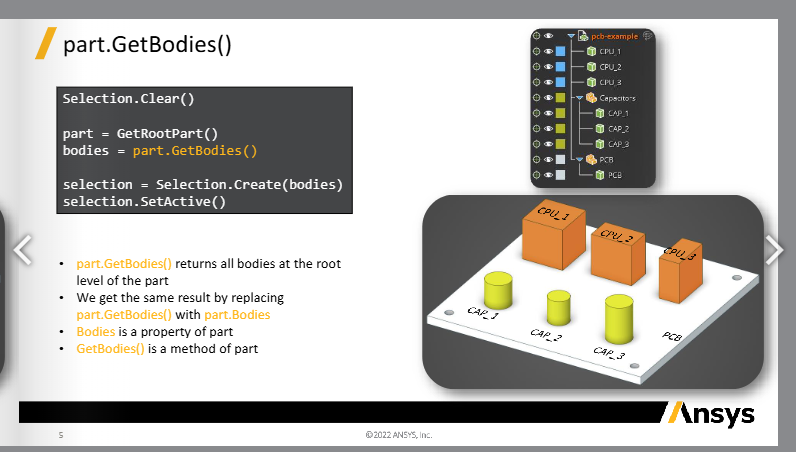
SubscriberFor example, if we look at Lesson 3 - Objects, Selections, Named Selections, we see the functions GetAllBodies/GetBodies/etc. and GetAllComponents/etc. I want to select all components containing a string and all the bodies under it to merge it.
Looking at this, let's say I have another component called Capacitors 2, with the bodies CAP_4, 5, 6. How would I call all bodies under both Capacitors groups without using GetAllBodies("CAP")?
-
September 22, 2025 at 8:19 am
NickFL
SubscriberIs there a reason why you don't want to use the answer you provided with GetAllBodies("CAP")?
This may not be the most elegant solution, but it could work for your case:
# Get the Components with name Capacitors
q = GetRootPart().GetComponents('Capacitors')
# Create Empty Selection
sel = BodySelection.Empty()# Loop through each component in q and get the bodies and add to selection
for component in q:
  newSel = BodySelection.Create(component.GetBodies())
  sel = Selection.Union(sel, newSel)-
September 22, 2025 at 6:03 pm
angmyto
SubscriberThe geometry that I am using is imported from solidworks so I have multiple parts whose bodies have the name "Sweep[Â Â ]" and I wanted to seperate it by the part names. I originally had to change the body names individually when I was using GetAllBodies. Thank you for the solution!
-
-
- You must be logged in to reply to this topic.
- Project lines/edges into a face with the direction normal to the face
- No preview in explorer with scdox file
- Add-in Error Excel
- Spaceclaim problem
- Different Body Naming and Extra Surfaces after Importing Solid Edge Part
- New Computer
- Inconsistent Script
- MISSING SIMULATION SECTION/RIBBONTAP
- Unable to attach to geometry file 2025R2
- How would I select specific components and all bodies under it?
-
4618
-
1530
-
1386
-
1210
-
1021
© 2025 Copyright ANSYS, Inc. All rights reserved.