

-
-
January 7, 2022 at 1:23 pm
l_koers
SubscriberDear all,
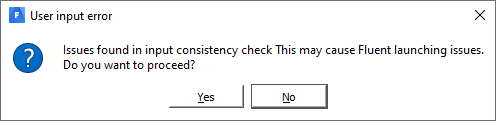
A few weeks ago, I somehow became unable to start the fluent launcher I had pinned to the windows taskbar. It started to give me the following error:
January 10, 2022 at 11:08 amRob
Forum ModeratorThe launcher is C:\Program Files\ANSYS Inc\v212\fluent\ntbin\win64\fluent.exe If you're missing dll's then it may be something else has overwritten some of the common files. This seems to be becoming a more common issue as other software providers overwrite common files rather than including their own.
January 11, 2022 at 12:26 pmSubscriberHi Rob Thank you for your reply.
It helps that the cause of the problem might be more clear, but I'm not sure how to proceed.
I forgot to mention that CFX launcher worked fine and it seems to be a Fluent-related problem. I've uninstalled everything and installed Fluent and SpaceClaim only, but the problem persists.
If I take a look at the target destination of the Fluent shortcut, the target is ""C:\Program Files\ANSYS Inc\v211\fluent\ntbin\win64\fluent.exe" -r21.1.0 -shortcut". If I remove "-shortcut" or " -r21.1.0 -shortcut" from that target destination, it launches fluent in local parallel mode.
January 11, 2022 at 5:36 pmForum ModeratorDoes that launch the launcher so you can set parallel options etc or launch the solver directly?
January 12, 2022 at 10:27 amSubscriberIt launches Fluent in meshing mode. If I switch to solutions mode its in 3d, double precision, local parallel mode.
So no Fluent launcher to adjust any settings
January 12, 2022 at 3:13 pmForum ModeratorWhat happens if you click on "Solution" in the top left? It sounds like you used Fluent Meshing and need to open the solver.
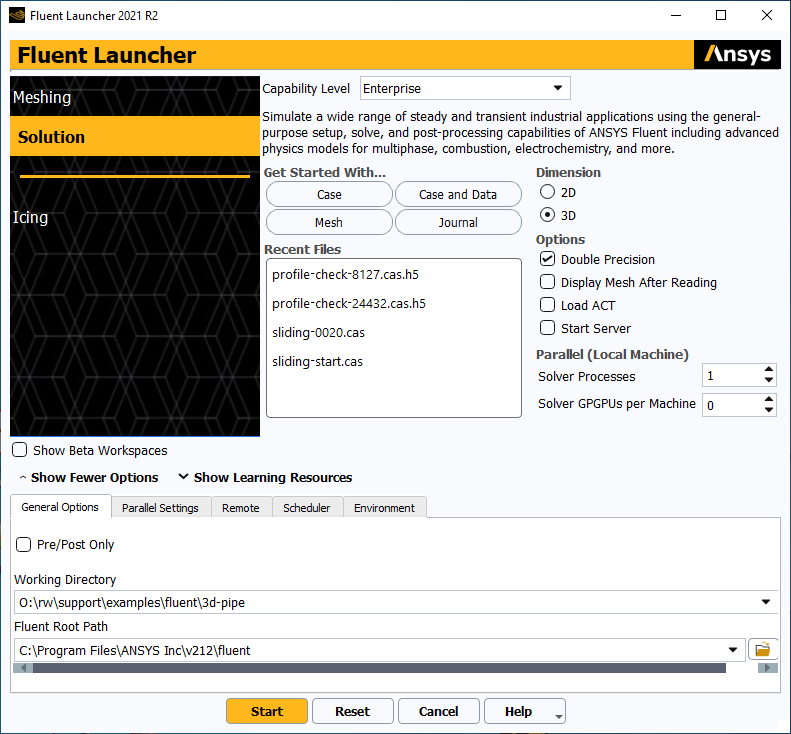
January 24, 2022 at 12:58 pmSubscriberHi Rob I got the following suggestion from the firm that sells and consults in Ansys in the Netherlands.
It took them a few weeks, but it probably had something to do with a permission issue for a folder. I was asked to run the code below in the windows command prompt:
______________________________________________
setlocal
pushd .
cd /d"%appdata%"
ifexist Launcher(
move Launcher Launcher%time::=%
)
cd /d"%localappdata%"
ifexist Launcher(
move Launcher Launcher%time::=%
)
popd
mkdir c:\zansys1
set homedrive=c:
set homepath=\zansys1
"C:\Program Files\ANSYS Inc\v211\fluent\ntbin\win64\fluent.exe" -r21.1.0 -shortcut
endlocal
___________________________
I'm don't understand the specifics but I've got access to the Fluent launcher again.
January 24, 2022 at 1:57 pmForum ModeratorThat looks like it's removing the %appdata% folder - it's a common fix when the software does something weird. Roughly the %appdata% holds the user settings and can get messed up, so removing it means the software recreates the folder without the rubbish.
January 24, 2022 at 1:59 pmSubscriberThanks for clarifying Rob!
Viewing 8 reply threads- The topic ‘Why can’t I start Fluent launcher 21r1?’ is closed to new replies.
Innovation Space Trending discussions
 Top Contributors
-
peteroznewman
 5824
5824 -
scabo
 1906
1906 -
Dennis Chen
 1420
1420 -
javat33489
 1305
1305 -
Shyam Prasad V Atri
1021
Top Rated Tags
© 2026 Copyright ANSYS, Inc. All rights reserved.
Ansys does not support the usage of unauthorized Ansys software. Please visit www.ansys.com to obtain an official distribution.
-


The Ansys Learning Forum is a public forum. You are prohibited from providing (i) information that is confidential to You, your employer, or any third party, (ii) Personal Data or individually identifiable health information, (iii) any information that is U.S. Government Classified, Controlled Unclassified Information, International Traffic in Arms Regulators (ITAR) or Export Administration Regulators (EAR) controlled or otherwise have been determined by the United States Government or by a foreign government to require protection against unauthorized disclosure for reasons of national security, or (iv) topics or information restricted by the People's Republic of China data protection and privacy laws.

 You are navigating away from the AIS Discovery experience