Ansys Assistant will be unavailable on the Learning Forum starting January 30. An upgraded version is coming soon. We apologize for any inconvenience and appreciate your patience. Stay tuned for updates.
Ansys Products

Ansys Products

Discuss installation & licensing of our Ansys Teaching and Research products.

Visual/graphic bug experiencing in Electronic Desktop 2020 R1 HFSS

    • Kelvin
      Subscriber

      I'm asking about a visual/graphic bug I'm experiencing while using HFSS 2020 R1. It happens frequently when I was dragging model around and change orientation, a lot of lags happens and suddenly all the model parts become invisible. They still exists, but can not be made visible again, and huge lagging persists when zooming in/out or changing orientation. The only solution is to restart HFSS.


      I don't think it is the problem of my desktop, since I have been using it to run HFSS 2019 R2 for two months and I never met this bug in the previous version. I'm using a desktop with Window10 system, intel i7 8700k cpu and GTX 1080Ti as gpu and my video card drive is up to date. I've tried repair the software but the bug still exists. Can someone from ANSYS or other users tell me how to deal with this bug? Thank you.


      Kelvin

    • tsiriaks
      Ansys Employee

      Hi Kelvin,


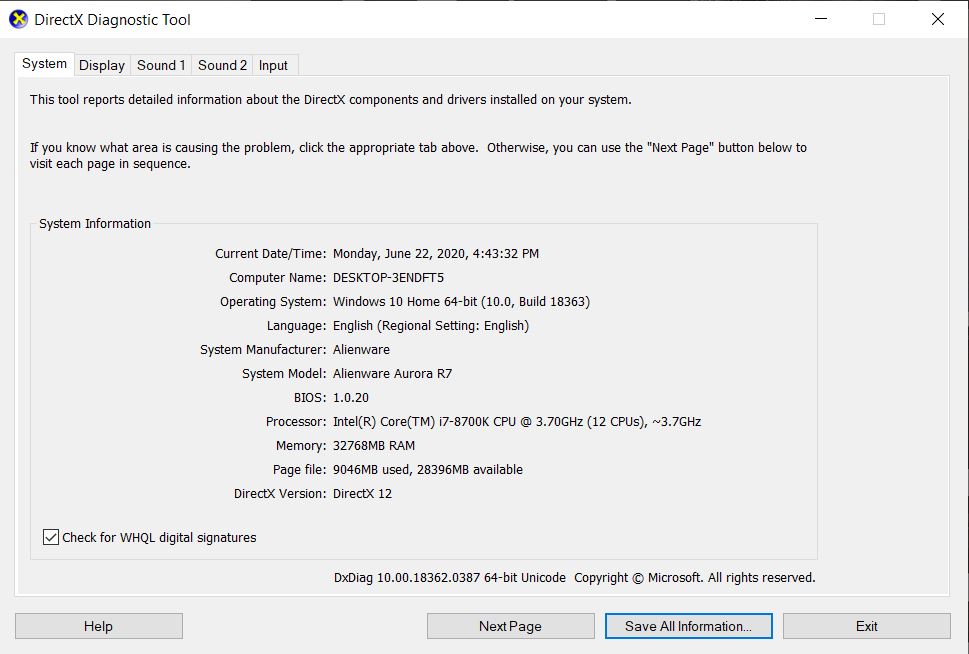
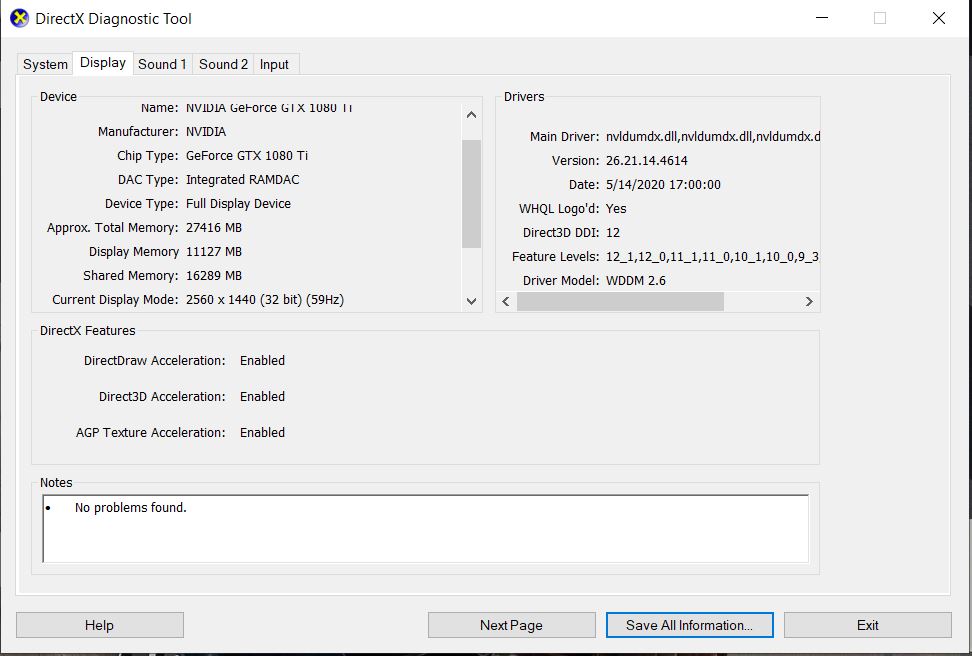
      Please include the screenshots of dxdiag main tab and display tab, inline with text.


      Thanks,


      Win

    • Kelvin
      Subscriber

      Hi tsiriaks,


      Thanks for the reply and sorry for the delay. Here are the screenshots you requested.


      Here's also an update on this bug: it can be solved by just closing and reopening the project itself, without restarting HFSS itself. Though it is easier to solve, but it is still quite bothering. Please tell me if you want any more info about my machine. Thank you for your time!


      Best Regards,


      Kelvin


    • Matt Madore
      Forum Moderator

      Hi Kelvin,


      Could you try modifying your Tools -> Options -> General Options -> General -> Desktop Performance, to uncheck the "Dynamically update" box?


      In the Nvidia Control Panel can you ensure Ansys Electronics Desktop is set to use the NVIDIA card?


      Thank you
      Matt

Viewing 3 reply threads
  • The topic ‘Visual/graphic bug experiencing in Electronic Desktop 2020 R1 HFSS’ is closed to new replies.

[bingo_chatbox]