Ansys Assistant will be unavailable on the Learning Forum starting January 30. An upgraded version is coming soon. We apologize for any inconvenience and appreciate your patience. Stay tuned for updates.
Ansys Products

Ansys Products

Discuss installation & licensing of our Ansys Teaching and Research products.

V2022, ANSYS CFX-Pre (black screen)

    • jpabraham
      Subscriber

      My university just upgraded to 2022 and when running a CFX analysis, when I open CFE-Pre the graphics screen is black.  No problems with spaceclaim, or with the mesher.  Just at CFX-Pre.  Any ideas?

      John Abraham

      University of St. Thomas

      jpabraham@stthomas.edu

    • Nikhil N
      Subscriber

      Hello, 


      Are you working on the local system or on a remote desktop? 


      In the latter case, try setting an environment variable on the remote system. 

      • Name: QT_OPENGL
      • Value: desktop 


      You will find an ocean of resources on the internet on how to set an environment variable. 


      Nikhil 

    • Ruby Noble
      Subscriber

      Hello, 

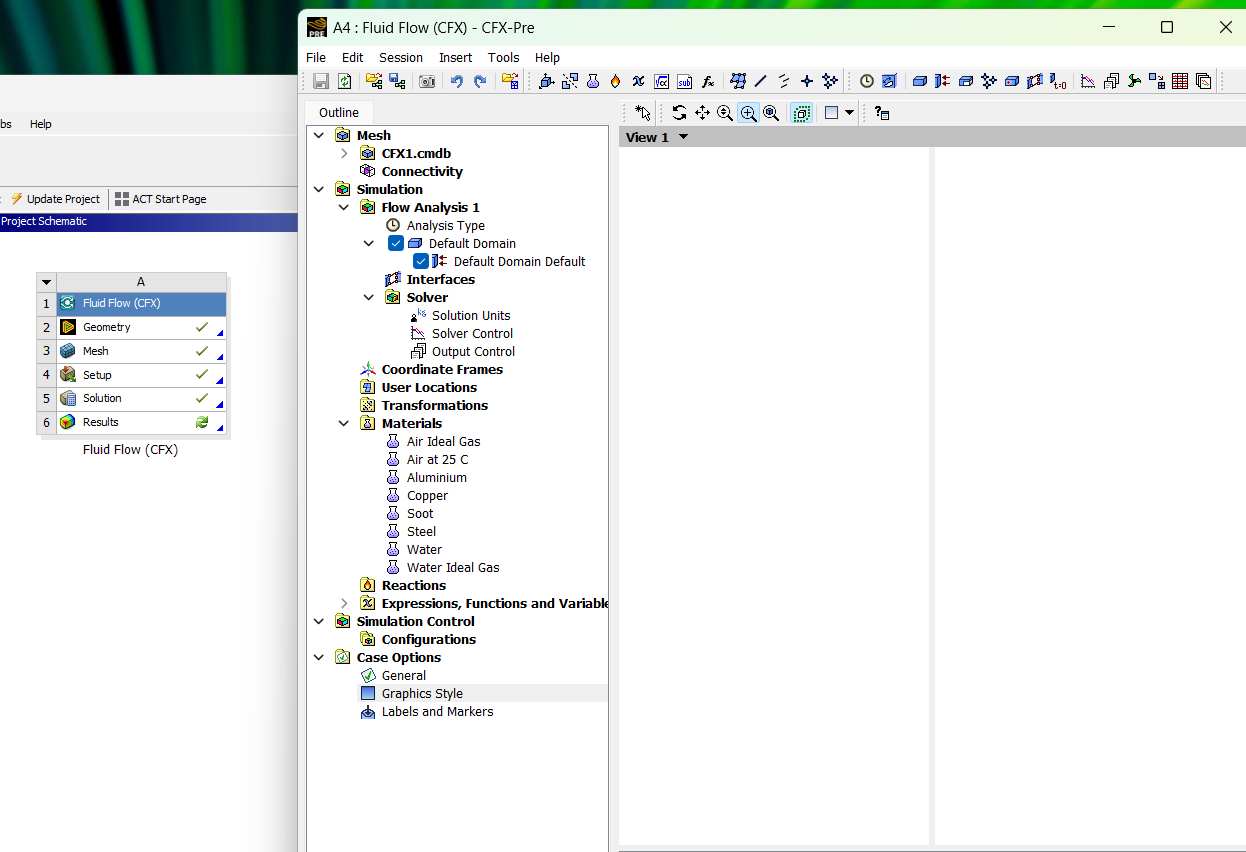
      My university had us install the 2023 version of Ansys for CFD and FEA. I am also new to the software. When running a CFX analysis and trying to make a simulation, the CFX pre just displays a half loaded white screen without the model.

      I know I have successfully defined my set up, mesh and geometry because a green tick. The solver is working perfectly as well becuase it is also inidcated by a green tick.  Why can't I see the model in the set up for CFX pre? I tried clicking on different views and reloading it and it is the same result.

      I am running it on my own computer and saving files locally and not on a cloud. 

      Hopefully the picture gives a visual aid on what my problem is.
Viewing 2 reply threads
  • The topic ‘V2022, ANSYS CFX-Pre (black screen)’ is closed to new replies.
[bingo_chatbox]









