

-
-
January 27, 2021 at 4:33 pm
dyat
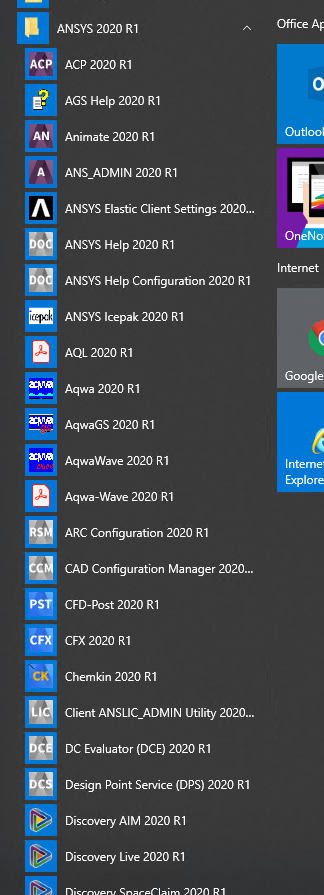
SubscriberOn the Windows OS platform, installing Ansys (from ISO images) generates dozens of start menu items for starting the different programs (see picture)
But, on Linux, I cannot find any similar desktop files with shortcuts or links to the different programs. I know that "runwb2" will start workbench. But, I find it hard to figure out how to start the different programs (like Chemkin, for example.) is there a list of commands to start all the different Ansys programs that are installed?
Thanks,
Doug
January 28, 2021 at 11:13 amRob
Forum ModeratorCheck the relevant documentation, most have a getting started section. There should be an executable for each product, assuming it's been installed. We'd typically then alias these in the .cshrc file. nViewing 1 reply thread- The topic ‘Starting Ansys on Linux’ is closed to new replies.
Innovation Space Trending discussions
 Top Contributors
-
peteroznewman
 6400
6400 -
scabo
 1906
1906 -
Dennis Chen
 1457
1457 -
javat33489
 1308
1308 -
Shyam Prasad V Atri
1022
Top Rated Tags
© 2026 Copyright ANSYS, Inc. All rights reserved.
Ansys does not support the usage of unauthorized Ansys software. Please visit www.ansys.com to obtain an official distribution.
-


The Ansys Learning Forum is a public forum. You are prohibited from providing (i) information that is confidential to You, your employer, or any third party, (ii) Personal Data or individually identifiable health information, (iii) any information that is U.S. Government Classified, Controlled Unclassified Information, International Traffic in Arms Regulators (ITAR) or Export Administration Regulators (EAR) controlled or otherwise have been determined by the United States Government or by a foreign government to require protection against unauthorized disclosure for reasons of national security, or (iv) topics or information restricted by the People's Republic of China data protection and privacy laws.

 You are navigating away from the AIS Discovery experience