Ansys Assistant will be unavailable on the Learning Forum starting January 30. An upgraded version is coming soon. We apologize for any inconvenience and appreciate your patience. Stay tuned for updates.
Ansys Products

Ansys Products

Discuss installation & licensing of our Ansys Teaching and Research products.

Geometry disappears after meshing

    • mario.toller
      Subscriber

      I'm supposed to do Moving Reference Frame and Sliding Mesh Simulations of a Wind Turbine using a model that I got from my professor, see link.

      When I imported them using DesignModeler the rotors were missing. Importing them with Discovery fixed that issue and even when I switched back to DesignModeler they were still there.

      However, when I tried the meshing step, they disappeared again. At first, I thought that was due to geometry errors, but even after fixing those, the problem persists.

      My professor thinks it could be due to conflicting element orientation, but I don't know how to see and change those. Is that possible, if so then how?

      This is how the problem looks:
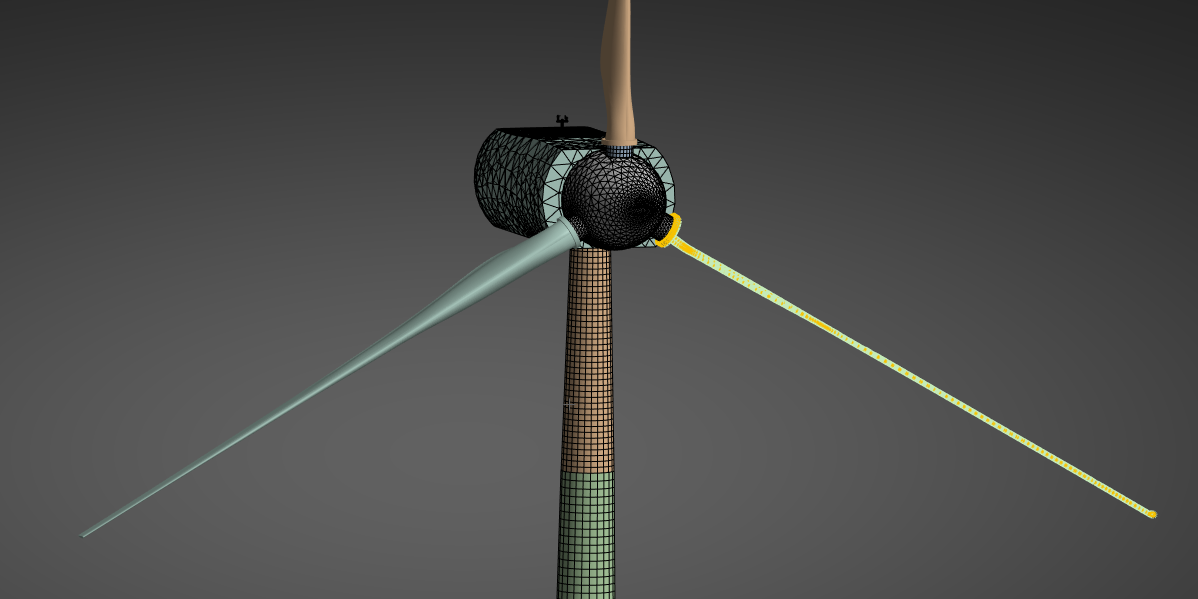
      I tried meshing it with FluentMeshing instead of Mechanical, but then I get an error that it couldn't mesh one of the rotors.

      What's a bit strange is that it seems to work in the file with the geometry errors if I keep the standard mesh size. The issue is that this is to large for some of the objects.

      Any idea what's causing this and how I can fix it?

    • Gary_S
      Ansys Employee

      This seems to be a problem with the original input geometry. 
      We are not permitted to access data files in this forum, so I am not able to determine the original source format. 
      Perhaps try a different format type. Parasolid is preferred. 


    • mario.toller
      Subscriber

      The original geometry is a .SLDPRT file which I imported as part of a .SLDASM file (SOLIDWORKS files). I also tried importing in Inventor and then importing the .iam file, however I was unsuccessful with that. I'm assuming it's due to Autodesk Inventor Professional 2026 not being compatible with Workbench 2025 R2 as I did launch CAD Configuration Manager as an administrator. Autodesk Fusion also didn't work for some reason. What program spits out Parasolid files, NX? Because I can't find that in the CAD Configuration Manager directly. 

    • Gary_S
      Ansys Employee

      Parasolid is a geometry format usually with .x_t or .x_b extension.
      Programs such as SolidWorks can export to Parasolid format, or neutral formats such as STEP or IGES. 

Viewing 3 reply threads
  • You must be logged in to reply to this topic.
[bingo_chatbox]








