-
-
May 16, 2019 at 12:44 pm
luis.lugo11
SubscriberHi,
What is the best way to create a computer cluster with 3 linux servers for ansys electronic desktop, with RSM or RSM ARC? The clients machines are Windows 10, what are the steps to send a job to this cluster from this windows machines. Thank's.
Â
-
May 16, 2019 at 1:10 pm
ANSYS_MMadore
Forum ModeratorHello,
Â
The best suggestion is to have a local admin who is familiar with Linux and job schedulers. If you were to create an LSF, PBS or UGE/SGE scheduler managed cluster, the submission from Windows machines is fairly straight forward. You would need to have a few prerequisites in place.
- Directory shared between Windows and Linux where the project will reside, and is accessible by the Windows machine as well as the Linux hosts.
- Ansoft RSM service installed and running on the Job Management Host - some settings specific to the scheduler.
- SchedulerName set to 'lsf', 'pbs' or 'sge'
- ConfigString set to directory containing scheduler commands, '/opt/pbspro/PBSPro_13.0.0/default/bin' for example
- Network access from Windows host to all Linux cluster hosts - to allow full job monitoring.
Â
If you do not have the ability to use a supported scheduler (LSF, PBS, UGE/SGE), you can do this by installing ANSYS Electronics RSM on all machines. (
/ https://www.youtube.com/embed/lSf6FEqZsws). You can then submit the job as a Remote RSM job through the Electronics Desktop -> Job Management -> Select Scheduler -> RSM -> Refresh. Then you would go to Job Management -> Submit Job and you would select the path, project path, and compute resources (remote Linux machines) as well as any other options and then submit the job.
Â
Thank you,
Matt -
May 16, 2019 at 11:54 pm
luis.lugo11
SubscriberHi,
I followed the RSM installation instructions and submit a job test, but have the following error.
Failed to check out license 'hfsshpc_pack''
License server does not support this license (FLEXlm Error - 18) -- Simulating on machine
Thank you.
Â
Â
Â
Â
-
May 17, 2019 at 10:40 am
ANSYS_MMadore
Forum ModeratorWhat is the process you are using for job submission? Are you using the Submit Job interface, or are you using an interactive solve with just setting HPC and Analysis Options and then clicking the Analyze All button? Also, what type of HPC licenses do you currently have available? It will be one of these, and specifying the proper license to use depends on the license available and the job submission steps you're using.
Â
Thank you,
Matt
-
May 17, 2019 at 4:56 pm
luis.lugo11
SubscriberHi,
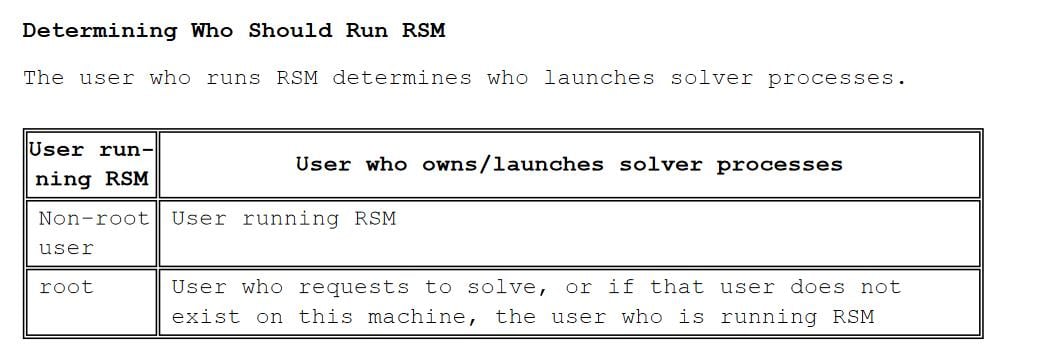
I changed the HPC License from Pack to Pool in the HPC and Analysis Options and the problem was resolved. I have one more question. I have some other users that need to use the linux servers to submit jobs, but when they try the job status is unknown and only submit jobs with the account that I start the RSM service.
Â
-
May 17, 2019 at 5:25 pm
-
- The topic ‘Ansys Electronic RSM’ is closed to new replies.
-
5849
-
1906
-
1420
-
1305
-
1021
© 2026 Copyright ANSYS, Inc. All rights reserved.