-
-
June 25, 2021 at 3:39 pm
glipkowitz
SubscriberWhen I try to install ANSYS Discovery on my Windows 10 desktop, I’ve repeatedly gotten the following error message:
“The application failed to initialize this may be caused by an issue with your installation.”
Hardware, graphics card are definitely supported. Reinstall doesn't solve. Any ideas why this (unfortunately not very informative) error is occurring?
June 25, 2021 at 4:05 pmANSYS_MMadore
Forum ModeratorPlease share the text of your C:\Program Files\Ansys Inc\install.log and install.err files. If this is the STUDENT install they will be under C:\Program Files\Ansys Inc\Ansys Student\.
Please also open a command prompt and run the command "dxdiag" without quotes and send screenshots of the output, pasted in your response as we cannot download attachments. Finally, please also run the command "set" from the command prompt and send that full output.
June 25, 2021 at 4:31 pmglipkowitz
SubscriberI cannot find the install.log and install.err files; instead, I see install and install.licconfig text files. These are very long.
Output of dxdiag:
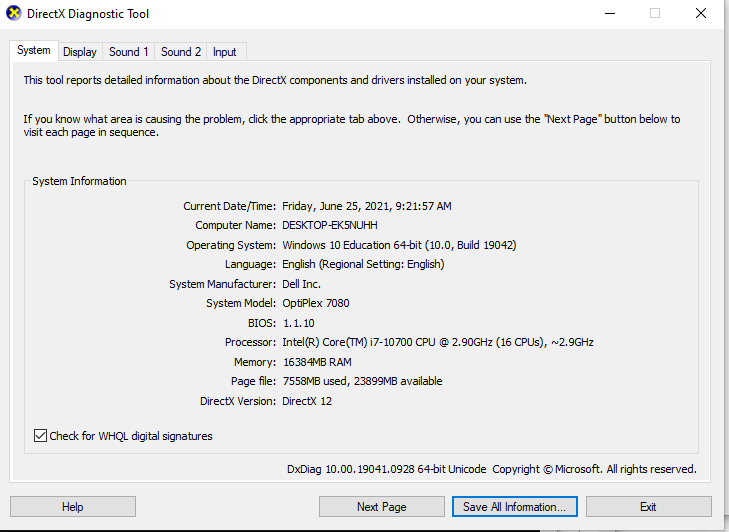
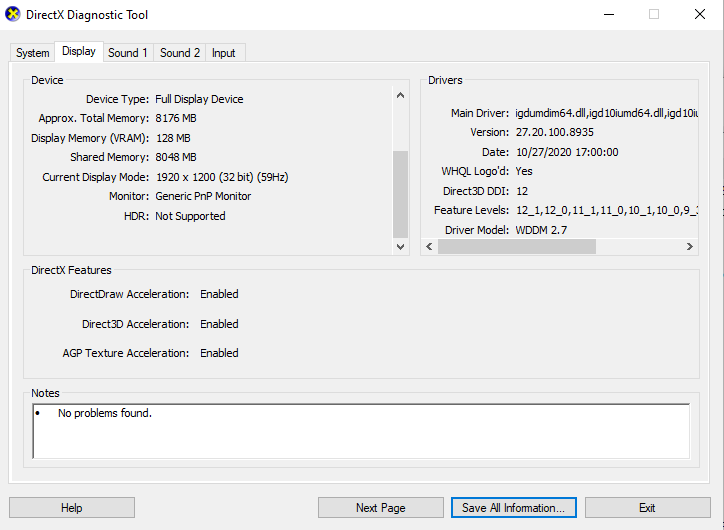
One thing I notice on the Display is that it is only detecting one graphics card. Perhaps ANSYS is not able to find the other? Even though I have manually told it to use the NVIDIA card (GeFORCE Super).
Output of set command:
C:\Users\DeSimoneLab>set
ALLUSERSPROFILE=C:\ProgramData
ANSYS201_DIR=C:\Users\DeSimoneLab\Downloads\ANSYS Inc\ANSYS Student\v201\ANSYS
ANSYS202_DIR=C:\Program Files\ANSYS Inc\ANSYS Student\v202\ANSYS
ANSYS211_DIR=C:\Program Files\ANSYS Inc\ANSYS Student\v211\ANSYS
ANSYS_SYSDIR=winx64
ANS_OLD_ATTACH=1
APPDATA=C:\Users\DeSimoneLab\AppData\Roaming
AWP_LOCALE202=en-us
AWP_LOCALE211=en-us
AWP_ROOT201=C:\Users\DeSimoneLab\Downloads\ANSYS Inc\ANSYS Student\v201
AWP_ROOT202=C:\Program Files\ANSYS Inc\ANSYS Student\v202
AWP_ROOT211=C:\Program Files\ANSYS Inc\ANSYS Student\v211
CADOE_LIBDIR201=C:\Users\DeSimoneLab\Downloads\ANSYS Inc\ANSYS Student\v201\CommonFiles\Language\en-us
CADOE_LIBDIR202=C:\Program Files\ANSYS Inc\ANSYS Student\v202\CommonFiles\Language\en-us
CADOE_LIBDIR211=C:\Program Files\ANSYS Inc\ANSYS Student\v211\CommonFiles\Language\en-us
CommonProgramFiles=C:\Program Files\Common Files
CommonProgramFiles(x86)=C:\Program Files (x86)\Common Files
CommonProgramW6432=C:\Program Files\Common Files
COMPUTERNAME=DESKTOP-EK5NUHH
ComSpec=C:\WINDOWS\system32\cmd.exe
DriverData=C:\Windows\System32\Drivers\DriverData
FLEXLM_TIMEOUT=1500000
HOMEDRIVE=C:
HOMEPATH=\Users\DeSimoneLab
LOCALAPPDATA=C:\Users\DeSimoneLab\AppData\Local
LOGONSERVER=\\DESKTOP-EK5NUHH
LSTC_LICENSE=ANSYS
NUMBER_OF_PROCESSORS=16
OneDrive=C:\Users\DeSimoneLab\OneDrive
OS=Windows_NT
Path=C:\Program Files (x86)\NVIDIA Corporation\PhysX\Common;C:\WINDOWS\system32;C:\WINDOWS;C:\WINDOWS\System32\Wbem;C:\WINDOWS\System32\WindowsPowerShell\v1.0\;C:\WINDOWS\System32\OpenSSH\;C:\Program Files\Microsoft SQL Server\Client SDK\ODBC\110\Tools\Binn\;C:\Program Files (x86)\Microsoft SQL Server\120\Tools\Binn\;C:\Program Files\Microsoft SQL Server\120\Tools\Binn\;C:\Program Files\Microsoft SQL Server\120\DTS\Binn\;C:\Program Files (x86)\Windows Kits\8.1\Windows Performance Toolkit\;C:\Program Files\Common Files\Autodesk Shared\;C:\Program Files\nTopology\nTopology\;C:\Program Files\NVIDIA Corporation\NVIDIA NvDLISR;C:\WINDOWS\system32;C:\WINDOWS;C:\WINDOWS\System32\Wbem;C:\WINDOWS\System32\WindowsPowerShell\v1.0\;C:\WINDOWS\System32\OpenSSH\;C:\Users\DeSimoneLab\AppData\Local\Microsoft\WindowsApps;C:\Users\DeSimoneLab\AppData\Local\Box\Box Edit\;
PATHEXT=.COM;.EXE;.BAT;.CMD;.VBS;.VBE;.JS;.JSE;.WSF;.WSH;.MSC
PROCESSOR_ARCHITECTURE=AMD64
PROCESSOR_IDENTIFIER=Intel64 Family 6 Model 165 Stepping 5, GenuineIntel
PROCESSOR_LEVEL=6
PROCESSOR_REVISION=a505
ProgramData=C:\ProgramData
ProgramFiles=C:\Program Files
ProgramFiles(x86)=C:\Program Files (x86)
ProgramW6432=C:\Program Files
PROMPT=$P$G
PSModulePath=C:\Program Files\WindowsPowerShell\Modules;C:\WINDOWS\system32\WindowsPowerShell\v1.0\Modules;C:\Program Files (x86)\Microsoft SQL Server\120\Tools\PowerShell\Modules\
PUBLIC=C:\Users\Public
P_SCHEMA=C:\Users\DeSimoneLab\Downloads\ANSYS Inc\ANSYS Student\v201\AISOL\CADIntegration\Parasolid\PSchema
SESSIONNAME=Console
SW_SIM_HYDRA=C:\Program Files\Common Files\SolidWorks Shared\Simulation Worker Agent\
SW_SIM_MPIT=INTELMPI
SW_SIM_TEMP=C:\ProgramData\SOLIDWORKS\SW_net_sim_temp\
SystemDrive=C:
SystemRoot=C:\WINDOWS
TEMP=C:\Users\DESIMO~1\AppData\Local\Temp
TMP=C:\Users\DESIMO~1\AppData\Local\Temp
USERDOMAIN=DESKTOP-EK5NUHH
USERDOMAIN_ROAMINGPROFILE=DESKTOP-EK5NUHH
USERNAME=DeSimoneLab
USERPROFILE=C:\Users\DeSimoneLab
windir=C:\WINDOWS
ZES_ENABLE_SYSMAN=1

June 25, 2021 at 4:35 pmglipkowitz
SubscriberI did, however, find this log in "C:\Program Files\ANSYS Inc\ANSYS Student\v211\CADConfigLogs\Latest\CADConfigurationMgr.log"
Previous configuration log backed up to: C:\Program Files\ANSYS Inc\ANSYS Student\v211\CADConfigLogs\Latest\..\20210625\CADConfigurationMgr_091751.log
___________________________________________________________________________
______________________________________________________________________
Execution Time:6/25/2021 9:17:51 AM
Local OS Version:Microsoft Windows NT 6.2.9200.0
Network Installation:False
Machine Name:DESKTOP-EK5NUHH
Current User:DESKTOP-EK5NUHH\DeSimoneLab
Role:Administrator
Mode:Configure,Admin Install
Installing User:DESKTOP-EK5NUHH\DeSimoneLab
Working Directory:C:\Program Files\ANSYS Inc\ANSYS Student\Shared Files\Licensing
Process Directory:C:\Program Files\ANSYS Inc\ANSYS Student\v211\commonfiles\CAD\bin\winx64
AWP_ROOT211:C:\Program Files\ANSYS Inc\ANSYS Student\v211
System Directory:winx64
LOCALE:en-us
SILENT:False
______________________________________________________________________
Reading uninstallFile from:C:\Users\DeSimoneLab\AppData\Roaming\\Ansys\v211\ProdConfig\uninst_data.dat
C:\Users\DeSimoneLab\AppData\Roaming\\Ansys\v211\ProdConfig\uninst_data.dat is present
ReadPackageInstallData succeeded.
______________________________________________________________________
<>
File:C:\Program Files\ANSYS Inc\ANSYS Student\v211\aisol\bin\winx64\AnsCoreObjects.tlb
Mode:Configure
Result:Success
______________________________________________________________________
<>
File:C:\Program Files\ANSYS Inc\ANSYS Student\v211\aisol\bin\winx64\DSPartMgr.tlb
Mode:Configure
Result:Success
----------------------------------------------------------------------
<>
File:C:\Program Files\ANSYS Inc\ANSYS Student\v211\aisol\bin\winx64\ReaderHostU.dll
Mode:Configure
Exit Code: 0-- expecting 0
Result:Success
______________________________________________________________________
<>
Successful update of CAD Controller
SCWorkbenchPlugIn ..... Configure Success
______________________________________________________________________
SpaceClaimEngineeringConfiguration Not Detected
Saving to C:\Program Files\ANSYS Inc\ANSYS Student\v211\commonfiles\CAD\CADConfigurationInfo.XML
Writing to C:\Program Files\ANSYS Inc\ANSYS Student\v211\commonfiles\CAD\CADConfigurationInfo.XML
WriteUpdateConfigurationStatusFile Update Success
June 25, 2021 at 4:39 pmANSYS_MMadore
Forum Moderatorthis is an issue with your graphics card, it isn't recognizing your Nvidia. Please ensure you have downloaded and installed the latest graphics drivers from the Nvidia website.
Viewing 4 reply threads- The topic ‘ANSYS Discovery 2021 initialization error’ is closed to new replies.
Innovation SpaceTrending discussionsTop Contributors-
5884
-
1906
-
1420
-
1306
-
1021
Top Rated Tags© 2026 Copyright ANSYS, Inc. All rights reserved.
Ansys does not support the usage of unauthorized Ansys software. Please visit www.ansys.com to obtain an official distribution.
-
Ansys Assistant will be unavailable on the Learning Forum starting January 30. An upgraded version is coming soon. We apologize for any inconvenience and appreciate your patience. Stay tuned for updates.








