Ansys Assistant will be unavailable on the Learning Forum starting January 30. An upgraded version is coming soon. We apologize for any inconvenience and appreciate your patience. Stay tuned for updates.
Ansys Products

Ansys Products

Discuss installation & licensing of our Ansys Teaching and Research products.

Wall temperature on the fluid wall

TAGGED: , , ,

    • sarathaj
      Subscriber

      I am simulating a geometry inside a air domain( air), it is a natural convection. I applied pressure outlet on the surface boudnary of the air-domian. I am wondering can i apply fixed temperature ( ambient temp) on the outer boundary surface of the air domain?

      I tried, but when I switch the air domain outer surface from pressure outlet to wall and edit, it shows the solid material not air(fluid). But air domain cell zone condition is in fluid 

      How can I resolve it?

    • Hemant Gurav
      Bbp_moderator


      If you are using enclosure the its okay to have solid matrial for farside walls.Other wise you may edit the material. Additionaly In Ansys Fluent, you can use the boundary condition panel to apply the necessary settings. For instance, you can set the gauge pressure, total temperature, and internal emissivity for an inlet, and apply a quick boundary condition for an outlet. For walls, you can treat them as adiabatic with an internal emissivity set. This setup can help in correctly defining the material properties and ensuring that the air domain is recognized as fluid , please check the following course / Lesson How to Define Materials in Ansys Fluent | Ansys Innovation Courses


    • sarathaj
      Subscriber

      I meant, Initially I set outer boundary of the sphere air domain (Fluid) as pressure Outlet, then I changes to wall. 
      when I edit the wall sphere outer boundary, in the material section, I can see only the list of solid material not air. 

      • Hemant Gurav
        Bbp_moderator

        Try following steps, also check the above course

        1.Change the boundary into a wall, which will create a coupled wall (wall/wall-shadow).
        2. Use the TUI command: mesh/modify-zones/slit-face-zone to uncouple the walls.
        3. Choose the appropriate external boundary for each wall

      • Hemant Gurav
        Bbp_moderator
        • Ensure that air is the only material required in the simulation, as it is available by default in Fluent. 
        • Check the boundary conditions to ensure they are set correctly for the fluid domain. 
          • Ensure the cell zone is set to fluid and the working fluid is air. 
          • Check that the volume is correctly brought in as a fluid. 
          • Switch to boundary conditions and ensure they are applied based on specific name selections.
        • sarathaj
          Subscriber

          My geometry has both solid and fluid. Fluid as Enclosure  

    • sarathaj
      Subscriber

      A quick question, If I am simulating a natural convection using the sphere air domain. setiing a adiabatic on the outer boundary surface is right ? or pressure outlet or fixed ambient temperature on the wall? 

      • Hemant Gurav
        Bbp_moderator


        Yes you are right, for natural convection simulations with a sphere air domain, an adiabatic outer boundary simplifies the model by assuming no heat transfer. For more accuracy, consider a fixed ambient temperature or a pressure outlet on the wall.


        • sarathaj
          Subscriber

          Thank you 

        • sarathaj
          Subscriber

          I Simulated using the adiabatic condition(wall) but the tempearture rises gradually without stopping or stabilising 

    • sarathaj
      Subscriber

      HI Hemant
          I simulated my geometry using pressure outlet as outer air domain boundary. turns out to be the temperature what simulation acheived( 75 degC) is half of the test data (150 degC).


    • Hemant Gurav
      Bbp_moderator

      Please check your boundary condition and other constraints,  you may have overlooked something 

    • Hemant Gurav
      Bbp_moderator

      I would suggest you to change boundary conditions by using parametric settings and compare the result,  this might help you to get the proper settings.

    • sarathaj
      Subscriber

      few questions
      does the pressure outlet extract/remove lof of heat from the geometry ?
      could you please direct me how to set parametric settings? 

      • Hemant Gurav
        Bbp_moderator


        That depends on your geomtry and boundary conditions. 

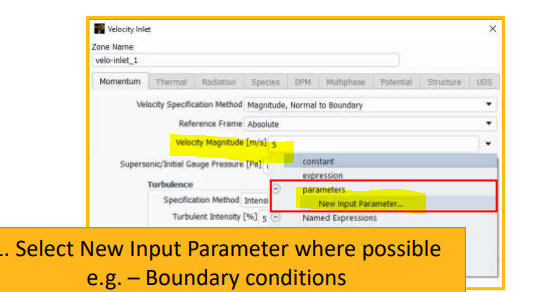
        Parametetric Analysis you can check: Performing Parametric Analyses Using Ansys Fluent

        Another method is use Parametric Settings using Ansys Workbench, but if you dont know how to use it please follow the provided link or change the boundary conditions manually and study your output with respect to input. You need to run the case multiple times . Chapter 2: Parametric Analysis in Ansys Workbench Using Ansys Fluent.

        PS : You can add paramters where you provide boundary conditions , I am attaching SS here . Also check your theortical calculations, material properties, assumptions etc.


    • sarathaj
      Subscriber

      Thank you, Hemant 

Viewing 8 reply threads
  • You must be logged in to reply to this topic.
[bingo_chatbox]