-
-
April 9, 2025 at 8:24 am
d.galvin
SubscriberHello
One of our users of Ansys 2024 R1 has recently been migrated to a new VPN, but is now experiencing a delay when opening an Ansys application when remote.Ansys displays status of ‘Checking Licenses..’  for approximately 5 minutes before it finally opens. When it does open it works without issue. Ping response to licensing server is approx 45ms and test connection to server does get green tick.Â
Has anyone experienced a similar issue, and were you able to resolve?
Thanks
Â
-
April 10, 2025 at 6:09 am
Rajeshwari Jadhav
Forum ModeratorHi Galvin,
Please try the below steps: (take help from your IT if you don’t have admin access)
Close all the Ansys applications before trying the below suggestion step by step. Can you please try adding the below timeout features in the ansyslmd.ini file –
Â- Go to C:\Program Files\ANSYS Inc\Shared Files\Licensing directory, copy the ansyslmd.ini file to the desktop location.
Open the ansyslmd.ini file using Notepad and add the following lines –
Â
ANSYSLI_FNP_IP_ENV=1
ANSYSLI_TIMEOUT_FLEXLM=20
ANSYSLI_FLEXLM_TIMEOUT_ENV=20000000
ANSYSCL_TIMEOUT_CONNECT=60
ANSYSCL_TIMEOUT_RESPONSE=300
Â
Once you add the lines, click Save As > ensure that the save as file type is ‘all files’.
Once the file is saved, please replace the old ansyslmd.ini file using the newly created one.
Â
- Also set the following Environment Variable –
Go to START > ‘Edit the System Environment Variables’ > click Environment Variables.
Under the System Variables, please click NEW and create a new variable.
Â
Variable Name – FLEXLM_TIMEOUT
Variable Value – 50000000
Â
Save it.
Â
Config File Reset - Â
Now open a file explorer and type %appdata% in the address bar.
Locate the Ansys folder and rename it to Ansys.old.Relaunch the application.
- Go to C:\Program Files\ANSYS Inc\Shared Files\Licensing directory, copy the ansyslmd.ini file to the desktop location.
-
April 10, 2025 at 3:06 pm
d.galvin
SubscriberHi RajeshwariÂ
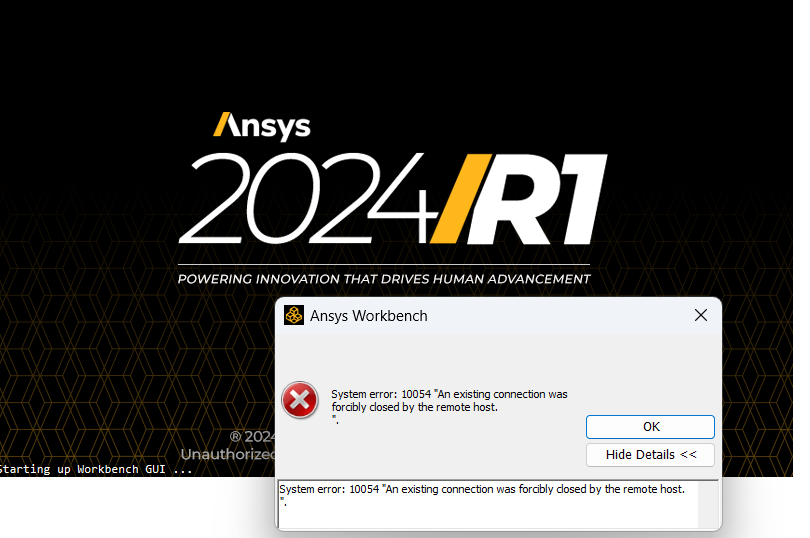
We applied the settings you suggested, but it didn't work and now we have an error that we didn't have before. (10054 "An existing connection was forcibly closed by the remote host)
We reverted the changes but the application won't open now at all. Any idea on how we should proceed from here?
-
April 10, 2025 at 3:09 pm
Rajeshwari Jadhav
Forum ModeratorHi,
Rename the Ansys folder one more time to Ansys.old2 %appdata%
-
April 10, 2025 at 3:11 pm
Rajeshwari Jadhav
Forum ModeratorAlso, check if the Ansys Client Licensing log files in %temp%\.ansys. Show errors which match the pattern:
HANDSHAKE_ERRORÂ Â Â Â Â Â Â Â Â Â Â Â Â Â Â Â Â Â Â Â Â Â Â Â Â Â Â Â Â Â Â Â Â Â Â Â Â Â Â Â Â Â Â Â Â Â Â Â Â Â Â Â Â Â Â Â Â Â Â Â Â Â Â Â Â Â Â Â Â Â Â Â Â Â Â Â Â Â Â Â Â Â Â Â Â Â Â Â Â Â Â Â Â Â Â Â Â Â Â Â Â Â Â Â Â Â Â Â Â Â Â Â Â Â Â Â Â Â Â Â Â Â Â Â Â Â Â Â Â Â Â Â Â Â Â Â Â Â Â Â Â Could not make an SSL handshake with client 7604:127.0.0.1System error: 10054 "An existing connection was forcibly closed by the remote host." -
April 14, 2025 at 2:34 pm
d.galvin
SubscriberHi Rejeshwari,
We tried renaming Ansys folder again, but it's now displaying a different error:
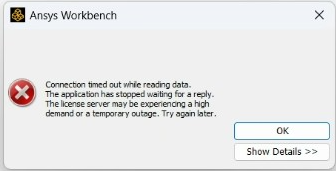
The handshake error in the licensing log files: HANDSHAKE_ERROR Â Â Â Â Â Â Â Â Â Â Â Â Â Â Â Â Â Â Â Â Â Â Â Â Â Â Â Â Â Â Â Â Â Â Â Â Â Â 35368:GRANTA_SIM_MAT_DATA:e16010557@8FM4HX3:winx64Â Â Â Â Â
    Could not make an SSL handshake with server *****@127.0.0.1.Â
    Connection timed out while handshaking with the server.This is no longer a remote issue, as it's now not opening when onsite. We are contemplating a reinstall of the software.
Thanks
David

-
June 13, 2025 at 5:34 pm
Rajeshwari Jadhav
Forum ModeratorHi David,
If you launch the Ansys Licensing Settings> under features in use tab all increments are visible?
-
- You must be logged in to reply to this topic.
-
5899
-
1906
-
1420
-
1306
-
1021
© 2026 Copyright ANSYS, Inc. All rights reserved.