Ansys Assistant will be unavailable on the Learning Forum starting January 30. An upgraded version is coming soon. We apologize for any inconvenience and appreciate your patience. Stay tuned for updates.
Ansys Products

Ansys Products

Discuss installation & licensing of our Ansys Teaching and Research products.

Ansys DPF Stress Linearization

    • Matthew Little
      Subscriber

      I am trying to automate stress linearization using Ansys DPF (in Mechanical 2024 R1).  I figured out how to do this in DPF (discritize the path, get those coordinates, get the stress along those points, and linearize).  When I compare the results of Mechanical (Linearized Stress object for the Path) to what I calculate with DPF, I am getting slightly different results.  It seems that the discritized stress along the path (say Sxx in this case) is different than what Mechanical is giving.

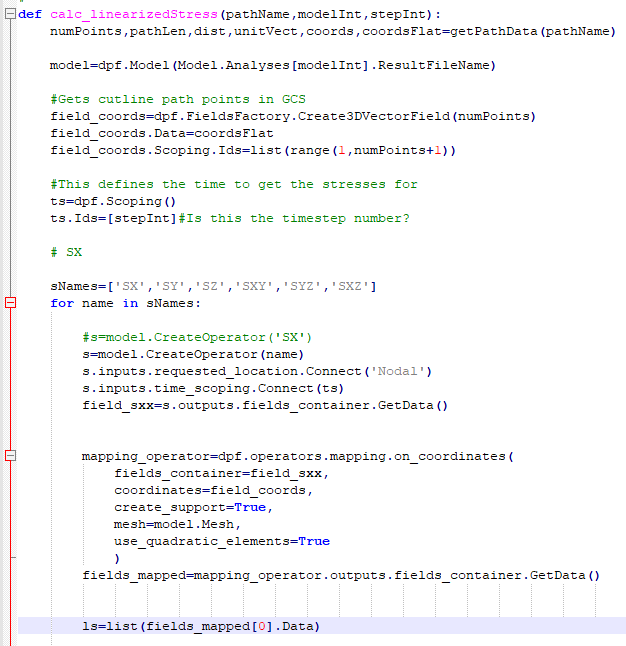
      I know when you plot a normal stress in Mechanical (not linearized), you can choose different types of averaging of the results.  I don't see that option for the linearized object.  So my question is: what is the difference between what DPF is doing versus what mechanical is doing to obtain the stress along the path at the discritized locations?  Below is a snapshot of the DPF portion of the script for reference.

    • Matthew Little
      Subscriber

      Followup... My model geomery was split and then Shared in Spaceclaim (so i can fine tune the mesh as well as have continuous elements across the geometry borders).

      As it turns out, the above script works when the Path is fully within one single body.  It does not work when the Path is defined along an edge where two bodies come together.

      So, now my question is... Does Mechanical do some type of nodal averaging behind the scenes when doing this operation?  And if so, this does not seem to be captured in the DPF script as-is, so how would this be able to be incorporated so the results in Mechanical and DPF match?

    • Rohith Patchigolla
      Ansys Employee

      Hello Matthew, 

      Your analysis is right. If the path is fully within one single body, DPF (or APDL) results and Mechanical Path result will match. 

      However, if the Path is defined on an edge (for example) which is shared between two bodies, the Path results are considered from the nodes of one of the body, which has higher geometry ID (internal ID which can be displayed when selecting a geometry and clicking on Selection Information) as shown below. The example here shows that I selected two bodies and I can see from the selection information that the IDs are 16 and 30. Hence, if a path is scoping one of the edges shared between these two blocks, the results are taken from Body with id 30. However, DPF or APDL will get averaged result. You can verify this by scoping only the body with highest id when scripting with DPF to match the results between DPF and Mechanical. 
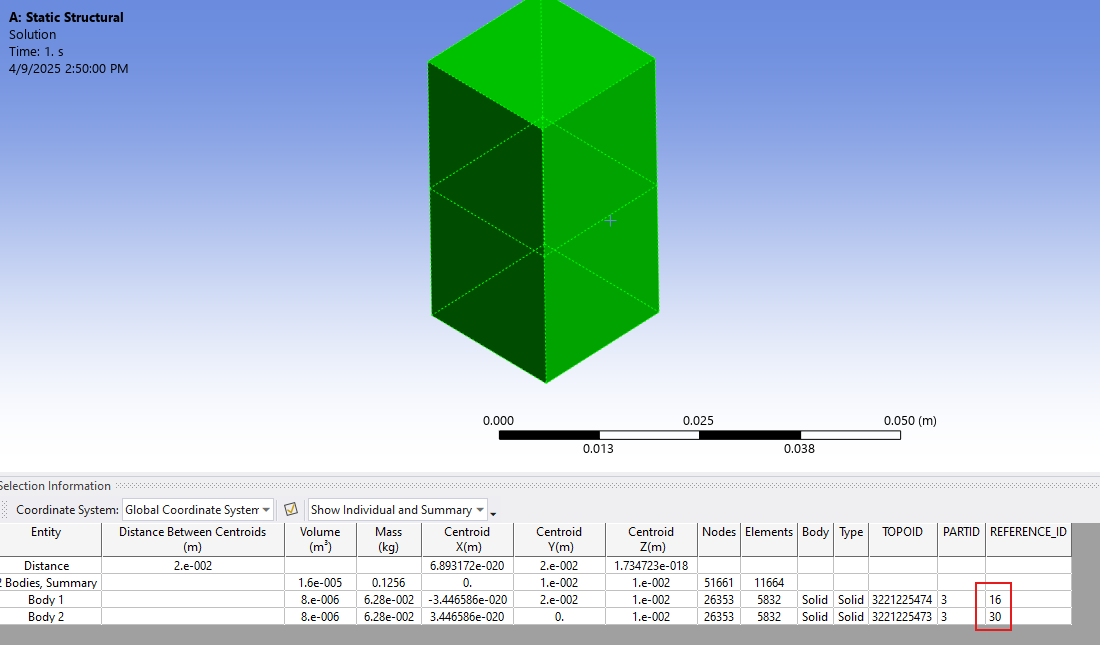
      This has also been documented in help as shown below. 

      https://ansyshelp.ansys.com/account/secured?returnurl=/Views/Secured/corp/v231/en/wb_sim/ds_path_results.html

      If a Path traverses multiple surface or solid bodies and if a Path point lies on the interface between the distinct bodies, the application only displays the body used to create the result. For example, as illustrated here, a Path is defined by the edge between two surface bodies. Note that both bodies are scoped. However, the result contours on the Path are only based on body A.

      In the first two images, a body (A and B) is specified in the Geometry property for the result. Only one body is displayed in the Geometry window. And, note that the stresses for Body A and Body B differ. In the third image, the result is scoped to both bodies. The stresses displayed for this third image match those of Body A because it has the highest identifier and therefore selected by the application by default.

      Hope this helps. 

      Best regards,
      Rohith

Viewing 2 reply threads
  • You must be logged in to reply to this topic.
[bingo_chatbox]