Ansys Assistant will be unavailable on the Learning Forum starting January 30. An upgraded version is coming soon. We apologize for any inconvenience and appreciate your patience. Stay tuned for updates.
Ansys Products

Ansys Products

Discuss installation & licensing of our Ansys Teaching and Research products.

The selected file is of an unsupported or unconfigured Geometry type.

    • cpepperkorn02
      Subscriber

      I'm trying to import a .catPart into the workbench, which ive done on my school computers multiple times, but i just downloaded ansys onto my home computer to continue working on it, but i keep getting the "The selected file is of an unsupported or unconfigured Geometry type." error when im trying to import the geometry, im using the exact same file that ive used on my school computer so i dont know why it wont just import.

    • Deepak
      Ansys Employee

      This issue may be due to the Catia V5 Plugin Error with the workbench. Please follow the below steps to configure the Catia V5 Plugin.
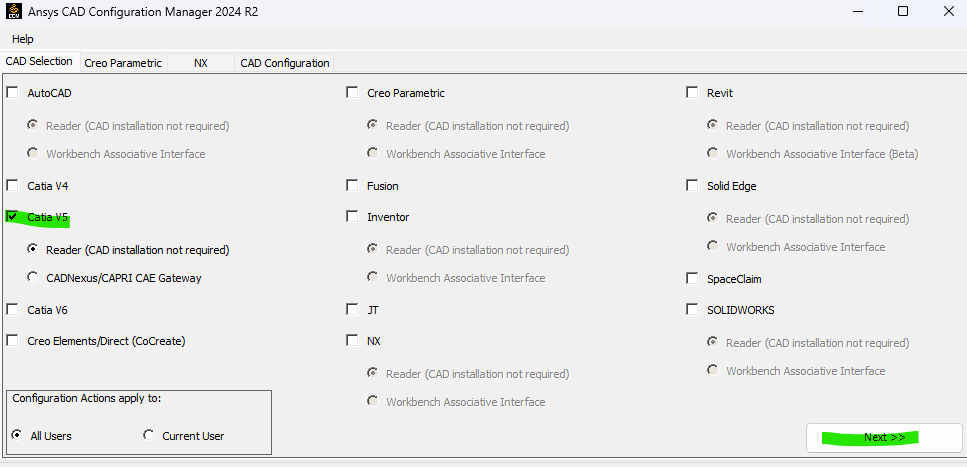
      1. Open the CAD Configuration Manager (From Windows, right-click the Start > CAD Configuration Manager 2024 R2), and select  Catia V5. Then Click Next.
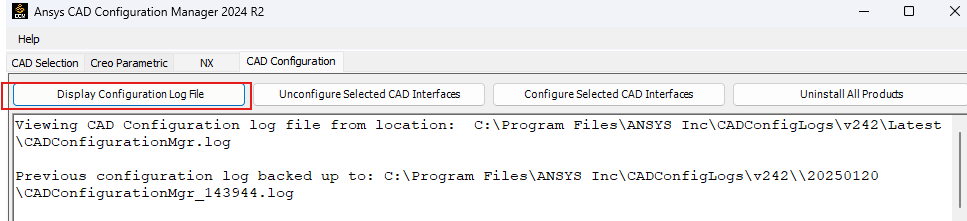
      2. Press the "Display Configuration Log File" button.
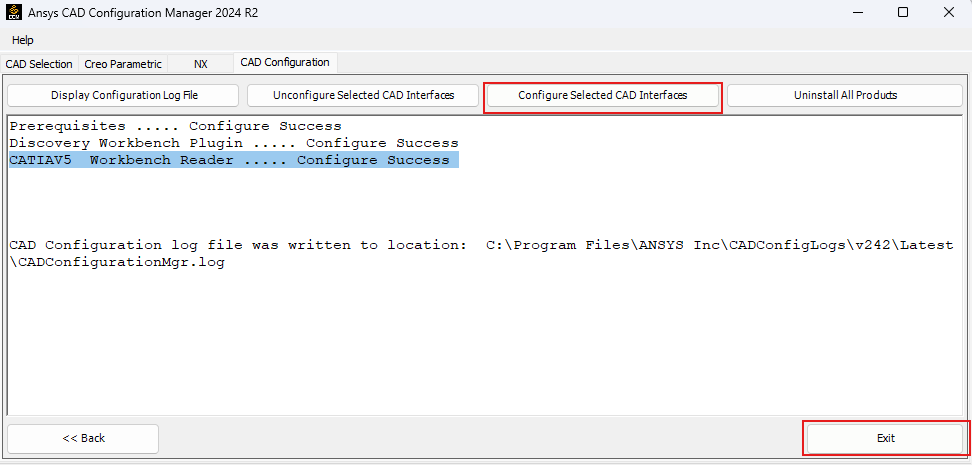
      3. Press the "Configure Selected CAD Interfaces" and "Exit".
      Let me know if this helps

      Thanks,

      Deepak

Viewing 1 reply thread
  • You must be logged in to reply to this topic.
[bingo_chatbox]








