Ansys Assistant will be unavailable on the Learning Forum starting January 30. An upgraded version is coming soon. We apologize for any inconvenience and appreciate your patience. Stay tuned for updates.
Ansys Products

Ansys Products

Discuss installation & licensing of our Ansys Teaching and Research products.

ANSYS Additive Command line execution

    • cnadkins
      Subscriber

      Is it possible to run the ANSYS Additive module through command prompt or batch scripts? I am attempting to run with command prompt using the script below, the additive program GUI opens (which I don't think it should when running in batch mode), but nothing else happens.


      "C:\Program Files\ANSYS Inc\v231\AddPrint\Additive 23.1.exe" -b -i "C:\Users\cnadkins\Desktop\Batch Test\simulation_196_export.aasp" -o "C:\Users\cnadkins\Desktop\Batch Test"

    • John Doyle
      Ansys Employee

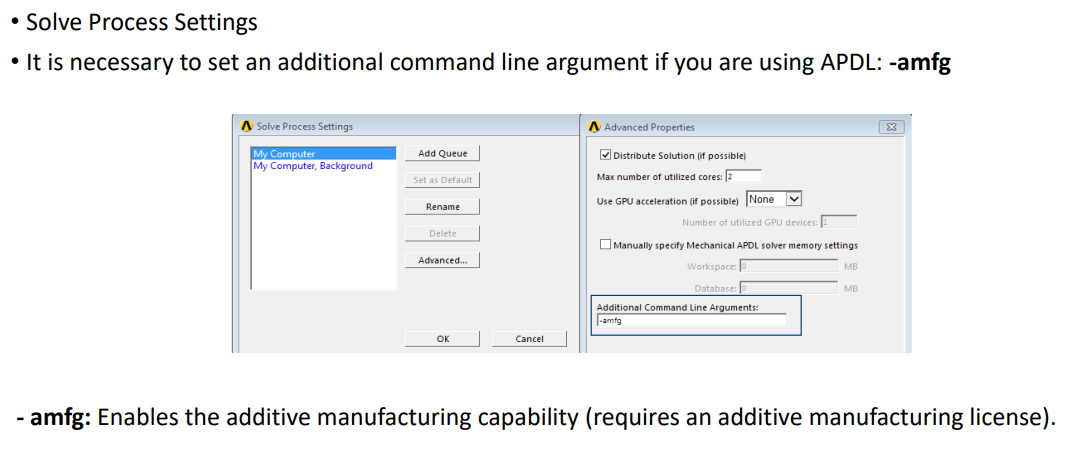
      It should work, but be sure to also specific -amfg when you launch APDL in batch.  See below.

      • cnadkins
        Subscriber

        Hello John, sorry for the delay but I am revisiting this topic.

        Just to clarify, I am attempting to run the "ANSYS Additive Print and Science" module through a batch script. This module is its own application with a GUI that is seperate from the mechanical workbench. Here is a page of documentation on this module:

        Additive Print and Science User's Guide

        Using the module, I can export a .aasp file that contains the simulation parameters, but as of yet I have been unsucessful in importint this file to APDL, either using batch or with the GUI.
        Is running this simulation through APDL in batch possible? If so what steps should I take?
        Thanks again for your assistance, it is greatly appreciated.

Viewing 1 reply thread
  • You must be logged in to reply to this topic.
[bingo_chatbox]