Ansys Assistant will be unavailable on the Learning Forum starting January 30. An upgraded version is coming soon. We apologize for any inconvenience and appreciate your patience. Stay tuned for updates.
Ansys Products

Ansys Products

Discuss installation & licensing of our Ansys Teaching and Research products.

client PC can not run ANSYS but host PC can run ANSYS

    • Gu Xuan
      Subscriber

      Why the host PC can run software? The client PC can not.

      My professor PC installed licence. And the PC can run the software.

      I am a student. My PC can not run this software.

      The error is 

      Failover feature ' Ansys spaceclaim Direct Modeler is not avaliable. FLEXIM server is not responding. Resource temporarily not available.

      ANSYSLI_SERVERS: 2325@goto333

      FLEXIm servers: 1055@goto333

      the reporting of Flexnet publisher license status is that

      1055@goto333
      ------------------------------------------
      
      lmutil - Copyright (c) 1989-2019 Flexera. All Rights Reserved.
      Flexible License Manager status on Mon 2/27/2023 18:35
      
      [Detecting lmgrd processes...]
      License server status: 1055@goto333
          License file(s) on goto333: C:\Program Files\ANSYS Inc\Shared Files\Licensing\license_files\ansyslmd.lic:
      
         goto333: license server UP (MASTER) v11.17.2
      
      Vendor daemon status (on goto333):
      
        ansyslmd: Cannot connect to license server system. (-15,10032)


      goto333 is my professor PC name.
      Can you solve this problem?
      Thank you very much!!!!!!!!!!!


    • ANSYS_MMadore
      Forum Moderator

      Please make sure the port for the ansyslmd daemon is open on the license server firewall. The error seems to indicate a problem with communicating with ansyslmd.

      You can set ansyslmd to a static port by adding it in the license file on the VENDOR line. Then restart the license manager and ensure the firewalls are updated to allow the port.

      For example:

      VENDOR ansyslmd PORT=1056

      If running only the Windows firewall on the server/host machine, please review this video for how to add exceptions for the executable files.

      https://www.youtube.com/watch?v=XIh47MZG__A&list=PL0lZXwHtV6OkRCk-_jQqtA0sTNgTWYB-i&index=14

    • Gu Xuan
      Subscriber
    • Gu Xuan
      Subscriber

      Thank you for your reply.

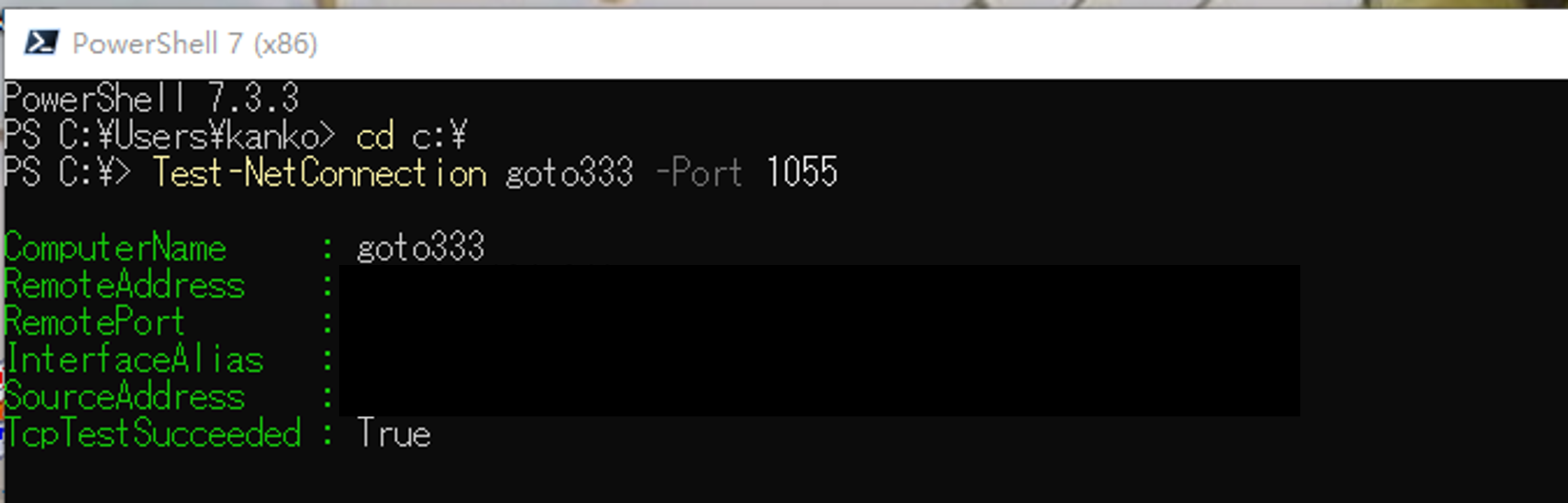
      Maybe the port is not the problem. Because the student' PC connected professor' PC with a port. And I tested it. It is OK. Please see the attached photo 1.

      And the student's PC can run the software before. But suddenly the PC can not run the software. It is so strange.

      I show more information about this problem.

      Looking forward to your advice.

      Thank you very much!!!

      
      C:\Program Files\ANSYS Inc\v212\licensingclient\winx64\lmutil.exe lmstat -a -i -c 1055@goto333
      lmutil - Copyright (c) 1989-2019 Flexera. All Rights Reserved.
      Flexible License Manager status on Thu 3/30/2023 22:28
      
      [Detecting lmgrd processes...]
      License server status: 1055@goto333
          License file(s) on goto333: C:\Program Files\ANSYS Inc\Shared Files\Licensing\license_files\ansyslmd.lic:
      
         goto333: license server UP (MASTER) v11.17.2
      
      Vendor daemon status (on goto333):
      
        ansyslmd: Cannot connect to license server system. (-15,10032)
      
      
      NOTE: lmstat -i does not give information from the server,
            but only reads the license file.  For this reason, 
            lmstat -a is recommended instead.

      Feature                         Version     #licenses    Vendor        Expires
      _______                         _________   _________    ______        ________


      1055@goto333
       is up.


      Checking FNO server...
      ----------------------


      ping ansys-fno.flexnetoperations.com
      WARNING: ansys-fno.flexnetoperations.com is not reachable.


      Checking LAAS server...
      -----------------------


      curl -v https://laas.fnocc.com -o C:\Users\kanko\AppData\Local\Temp\.ansys\laas_output.log


        % Total    % Received % Xferd  Average Speed   Time    Time     Time  Current
                                       Dload  Upload   Total   Spent    Left  Speed


        0     0    0     0    0     0      0      0 --:--:-- --:--:-- --:--:--     0*   Trying 52.89.236.90:443...
      * Connected to laas.fnocc.com (52.89.236.90) port 443 (#0)
      * schannel: disabled automatic use of client certificate
      * ALPN: offers http/1.1


        0     0    0     0    0     0      0      0 --:--:-- --:--:-- --:--:--     0* ALPN: server accepted http/1.1
      > GET / HTTP/1.1


      > Host: laas.fnocc.com


      > User-Agent: curl/7.83.1


      > Accept: */*


      > 


      * Mark bundle as not supporting multiuse
      < HTTP/1.1 302 


      < Date: Thu, 30 Mar 2023 04:37:41 GMT


      < Content-Length: 0


      < Connection: keep-alive


      < Set-Cookie: laas-cookie=485a1a348026bb23ad2ec185c2e1abfb|1169eb77ada69db09cacdf5b49a61b8d; Expires=Thu, 30-Mar-23 05:37:41 GMT; Max-Age=3600; Path=/; Secure; HttpOnly


      < Set-Cookie: JSESSIONID=73FB7E93F26CEADBCBCA31FEC46FF300; Path=/; Secure; HttpOnly


      < X-Content-Type-Options: nosniff


      < X-XSS-Protection: 1; mode=block


      < Cache-Control: no-cache, no-store, max-age=0, must-revalidate


      < Pragma: no-cache


      < Expires: 0


      < Strict-Transport-Security: max-age=15724800; includeSubDomains


      < X-Frame-Options: DENY


      < Location: https://laas.fnocc.com/login


      < Content-Language: en-US


      < X-Forwarded-For: 133.82.251.156


      < 


        0     0    0     0    0     0      0      0 --:--:--  0:00:01 --:--:--     0
      * Connection #0 to host laas.fnocc.com left intact


      Checking proxy settings...
      --------------------------


      Error: Command failed: cscript.exe //Nologo C:\Program Files\ANSYS Inc\v212\licensingclient\winx64\ClientSettings\resources\app.asar\node_modules\regedit\vbs\regList.wsf A HKCU\Software\Microsoft\Windows\CurrentVersion\Internet Settings


      Checking network interfaces...
      ------------------------------



      test port
    • ANSYS_MMadore
      Forum Moderator

      This does appear to be a Vendor Port issue or firewall issue. The message here tells us that it cannot connect to the ansyslmd process.

          License file(s) on goto333: C:\Program Files\ANSYS Inc\Shared Files\Licensing\license_files\ansyslmd.lic:

         goto333: license server UP (MASTER) v11.17.2

      Vendor daemon status (on goto333):

        ansyslmd: Cannot connect to license server system. (-15,10032)

    • Gu Xuan
      Subscriber

      Thank you very much for your immediate reply.

      So in your opinion, the problem is the host computer (PC: goto333) not the student PC.

      But why the host computer (PC: goto333) can run the software.

      Looking forward to your advice.


    • ANSYS_MMadore
      Forum Moderator

      Correct. The host computer is able to run as it is likely allowing local communications, whereas the student pc relies on external communications through the firewalls.

    • Gu Xuan
      Subscriber

      Thank you very much for your reply.

      However, my Professor has checked the firewall. There is no problem.

      Because there are 3 PC with Ansys software. The host PC and two client PC. The student PC is one of the client PC.

      Now, the host PC and another client PC can run the software. The student PC can not.

      Could you give me other pieces of advice?

      I am so worried about this problem. 

      Looking forward to your reply.

    • ANSYS_MMadore
      Forum Moderator

      The issue is still with your connection to the "host" on the ansyslmd port. Please check the port that this process is running on on the host machine, then try testing your connectivity to it directly. Run this command from a Windows Powershell window on your client pc, replacing the xxxx with the port the ansyslmd process is running on on the host machine.

      Test-NetConnection goto333 -Port xxxx

    • Gu Xuan
      Subscriber

      Thank you for your reply.

      Yes, I already checked it. Please see the photo.

      There is no problem.


    • ANSYS_MMadore
      Forum Moderator

      1055 is the port for "lmgrd", I need you to test the port being used for "ansyslmd".  By default the port is dynamic and changes with each restart. You will need to ask the person running the host machine to check which port is being used, then test that port.

    • Gu Xuan
      Subscriber

      Thank you for your reply.

      How to check the ansysImd port on the host PC.

      Could you please teach me?

    • ANSYS_MMadore
      Forum Moderator

      You will need access to the host pc. In the C:\Program Files\ANSYS Inc\Shared Files\Licensing\license.log file look for the text "ansyslmd using TCP-port". That will tell you the port ansyslmd is using.

Viewing 12 reply threads
  • The topic ‘client PC can not run ANSYS but host PC can run ANSYS’ is closed to new replies.
[bingo_chatbox]