Ansys Assistant will be unavailable on the Learning Forum starting January 30. An upgraded version is coming soon. We apologize for any inconvenience and appreciate your patience. Stay tuned for updates.
Since I upgraded Ansys From 2019R2 to 2021R1, I can't open the mechanical windows in workbench.
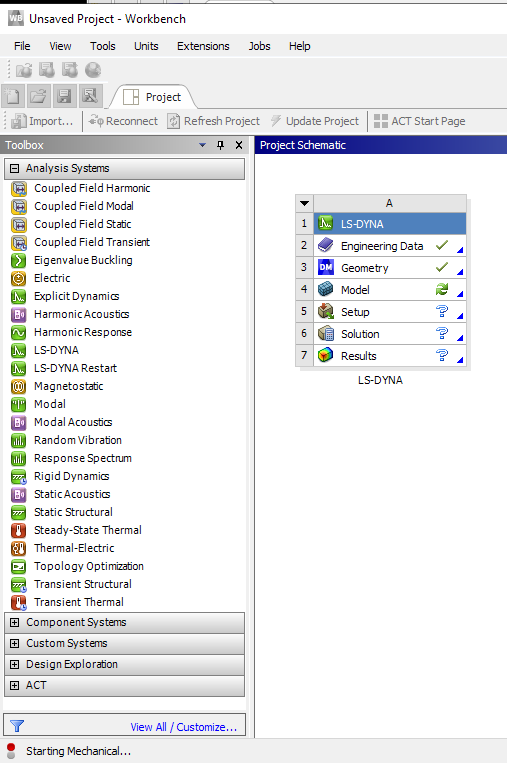
There is no error messages, only a message "starting mechanical...". Workbench is loading until I stop it in the task manager...
I let it run for more than one hour now, and there is still no messages or mechanical window.
Did somebody already faced this issue ?
Thanks !
November 5, 2021 at 12:18 pm
Karthik Remella
Administrator
Hello
Is this the case with any project? Or is it only this specific project file? Are you able to create a new project and launch WB?
Also, could you please share a screenshot of the issue?
Karthik
November 5, 2021 at 12:23 pm
MangeshANSYS
Ansys Employee
Hi
click on windows start button and type "msinfo32.exe" and click "System Information" in results.
Expand Software Environment and Navigate to Environment variables in the left pane, then click in the right pane of system information, press Ctrl + A to select All and Ctrl+C to copy the listed environment variables
Paste the contents in a response here
Hi
Yes this is the case for all projects:
Workbench is blocked, and do not send any error message.
Thank you
Matthieu
June 21, 2023 at 5:29 am
b.wu
Subscriber
Hi, dose this problem solved?
I encoutered the same prolblem when I upgraded Ansys from 2019R2 to 2021R2 or 2022R1. Even I uninstall all ANSYS products and re-install Ansys 2021R2, there is the same problem.
Does anyone know the reason and solution? Thanks in advance.
Bi
Viewing 5 reply threads
The topic ‘Workbench Model Opening Issue’ is closed to new replies.
The Ansys Learning Forum is a public forum. You are prohibited from providing (i) information that is confidential to You, your employer, or any third party, (ii) Personal Data or individually identifiable health information, (iii) any information that is U.S. Government Classified, Controlled Unclassified Information, International Traffic in Arms Regulators (ITAR) or Export Administration Regulators (EAR) controlled or otherwise have been determined by the United States Government or by a foreign government to require protection against unauthorized disclosure for reasons of national security, or (iv) topics or information restricted by the People's Republic of China data protection and privacy laws.
Please Login to Report Topic
Please Login to Share Feed
Edit Discussion
You are navigating away from the AIS Discovery experience
The Ansys Learning Forum is a public forum. You are prohibited from providing (i) information that is confidential to You, your employer, or any third party, (ii) Personal Data or individually identifiable health information, (iii) any information that is U.S. Government Classified, Controlled Unclassified Information, International Traffic in Arms Regulators (ITAR) or Export Administration Regulators (EAR) controlled or otherwise have been determined by the United States Government or by a foreign government to require protection against unauthorized disclosure for reasons of national security, or (iv) topics or information restricted by the People's Republic of China data protection and privacy laws.



















 You are navigating away from the AIS Discovery experience