
Modern avionics applications increasingly rely on gesture‑based interactions: zooming into a map, rotating a tactical display, or adjusting range rings with intuitive two‑finger motions. To support these HMI paradigms, Ansys SCADE supports gesture-based controls. We illustrate these in our scade-example-multi-touch-cockpit model.
The application supports advanced multi-touch gestures for intuitive interaction:
- Swipe: Navigate between pages with a swipe gesture.
- Pinch-to-Zoom: Adjust the zoom level of the map using pinch gestures.
- Rotate: Rotate the map for customized views.
All gesture logic is implemented in deterministic state machines and mathematical operators inside Ansys SCADE Suite.
In this article, we’ll dive into it and explain how the logic for various gestures is implemented in the public example model.
But first, let’s look at all three gestures in action:
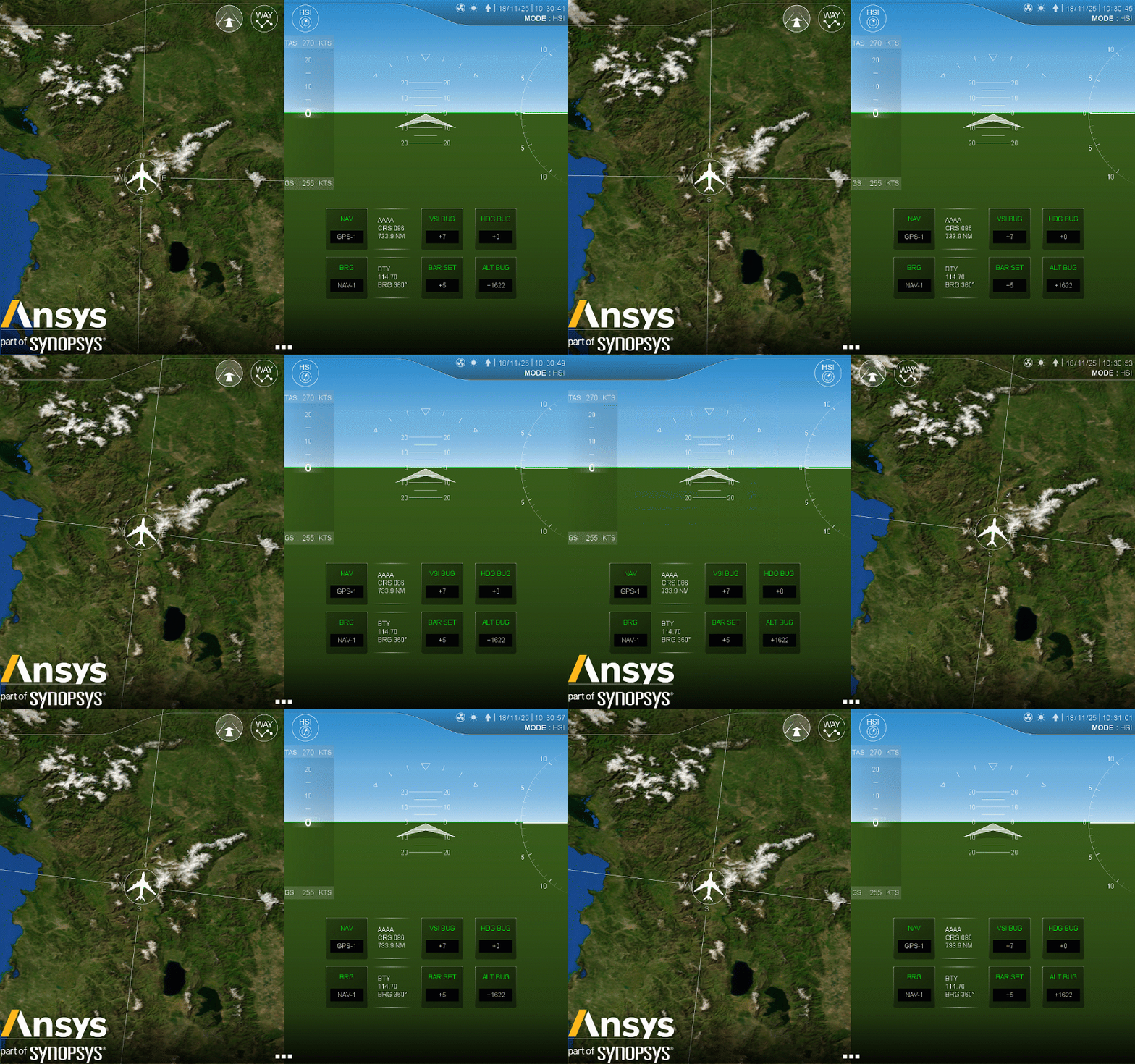
Overall gesture architecture
The gesture system is decomposed into three dedicated SCADE components:
|
Gesture
|
SCADE Node
|
Purpose
|
|
Swipe Navigation
|
hmiManagement (posXManagement/ mouseManagement)
|
Slide between pages
|
|
Pinch-to-Zoom
|
zoomAndRotate
|
Map scaling
|
|
Rotation
|
zoomAndRotate
|
Map rotation in degrees
|
Swipe gesture: navigating between pages
The Swipe gesture is implemented in diagrams of the hmiManagement operator:
mouseManagement detects touch, click, long press, and the beginning of a swipeposXManagement manages the horizontal sliding animation
Let’s start by detecting the swipe. A swipe gesture begins when:
- a finger is pressed inside a valid area
- finger press time exceeds a certain duration
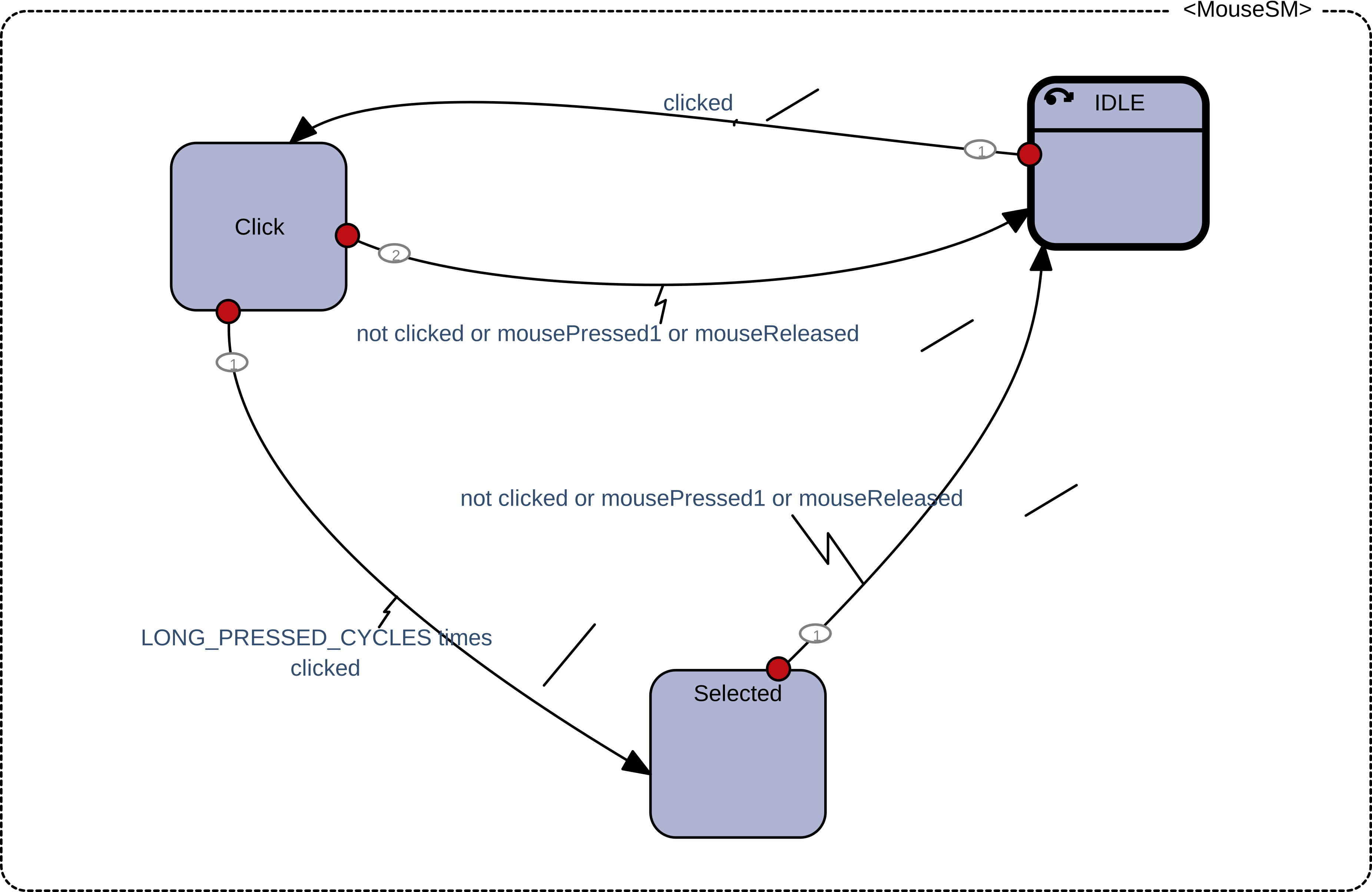
When this state machine moves to state Selected, and we detect a movement delta, a swipe begins and the left (or right) panel starts sliding horizontally.
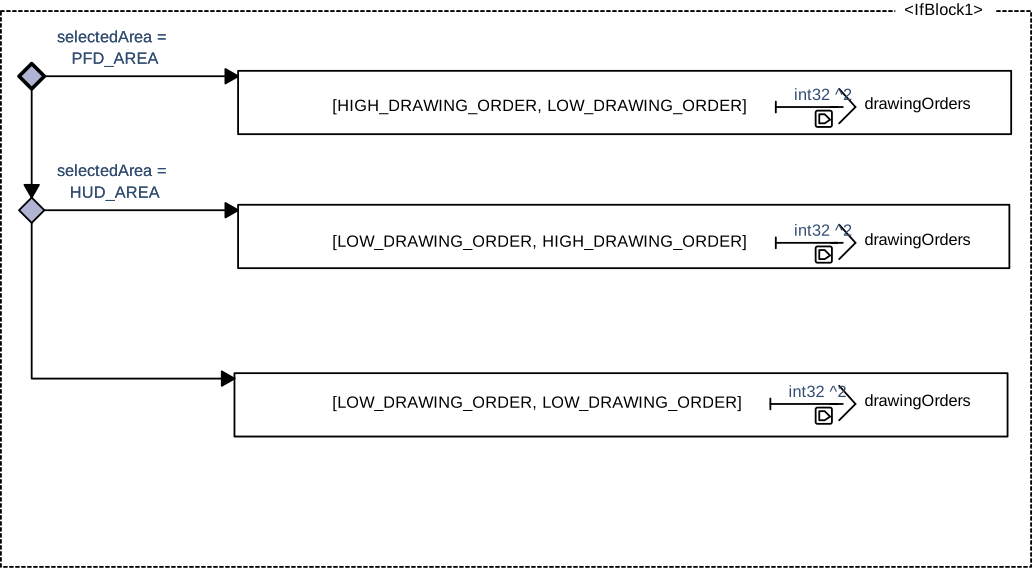
To provide a legible user experience, the interface must also ensure that the selected area (PFD or HUD) appears in front of the other during the swipe. This is achieved by dynamically computing a drawing order that is transmitted to SCADE Display.
In SCADE Display, every graphical layer or group (e.g., PFD area, HUD area, menus) has an integer Drawing Order. Layers with a higher value are drawn on top of layers with a lower value.
In our model, when we detect a swipe, we detect which of the two halves of the screen is active (PFD_AREA or HUD_AREA). We then dynamically produce a drawingOrders[] output, sent to SCADE Display, which updates the Z-ordering of the graphics.
Pinch-to-zoom gesture
Pinch-to-zoom is implemented in the zoomAndRotate operator. As the name suggests, it also handles rotation, as both gestures require two active fingers:
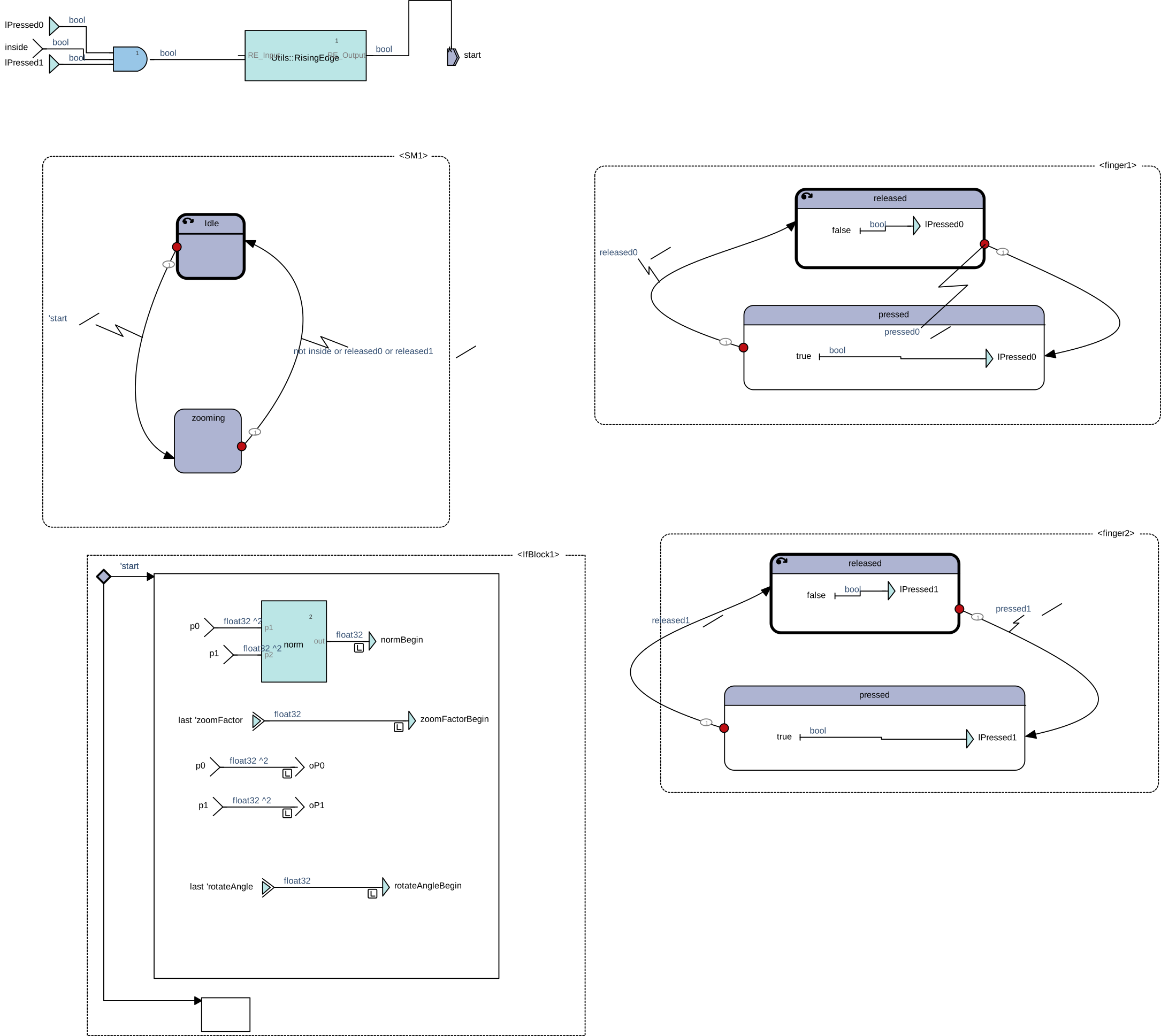
Once both fingers are down, the SM1 state machine transitions to zooming. Initial values are captured on the raising edge when both fingers are pressed, ensuring deterministic behavior.
To compute the distance between the two fingers for pinch-to-zoom, we use the classic Pythagorean theorem ($c^2=a^2+b^2$).
Let’s define:
- $p_0 = (x_0, y_0)$ : position of the first finger
- $p_1 = (x_1, y_1)$ : position of the second finger
In our formula, we simply replace $a$ with $x_1−x_0$, $b$ with $y_1−y_0$, and replace the hypotenuse $c$ with $D^2$. We then apply the square root to both sides of the equation to isolate distance $D$:
$D=\sqrt{(x_1-x_0)^2+(y_1-y_0)^2}$
Or, as a SCADE diagram:
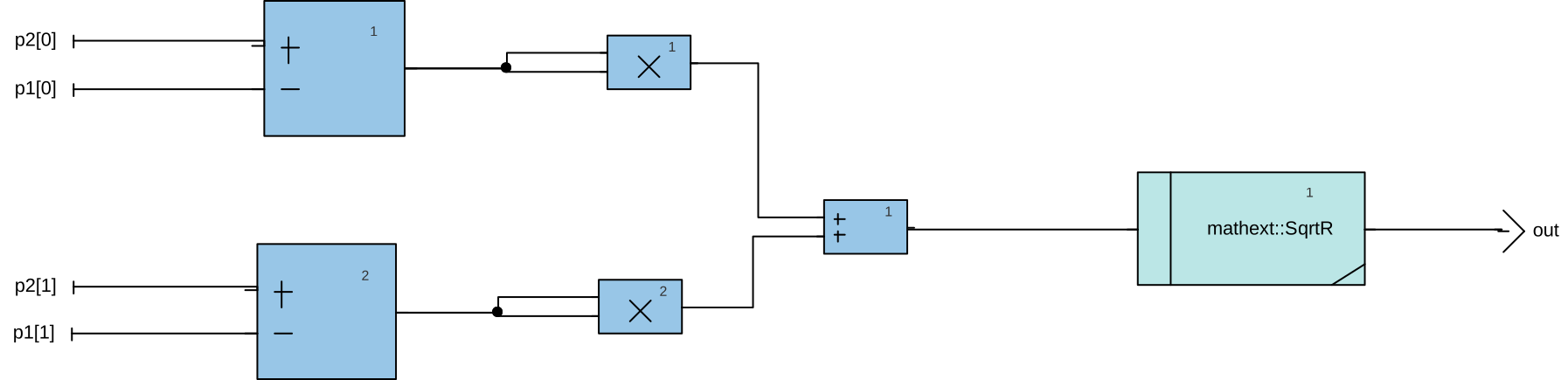
After years of being told “You’ll use this in real life someday!” during math class, we can finally confirm: Pythagoras genuinely helps… manage zoom on a certifiable avionics cockpit map. Who knew the old Greek mathematician would become such a reliable co-pilot?
When two fingers become active simultaneously, SCADE captures:
- the initial distance
- the initial zoom factor
- the initial finger positions
$$D_{begin}=\sqrt{(x_{1,begin}-x_{0,begin})^2+(y_{1,begin}-y_{0,begin})^2}$$
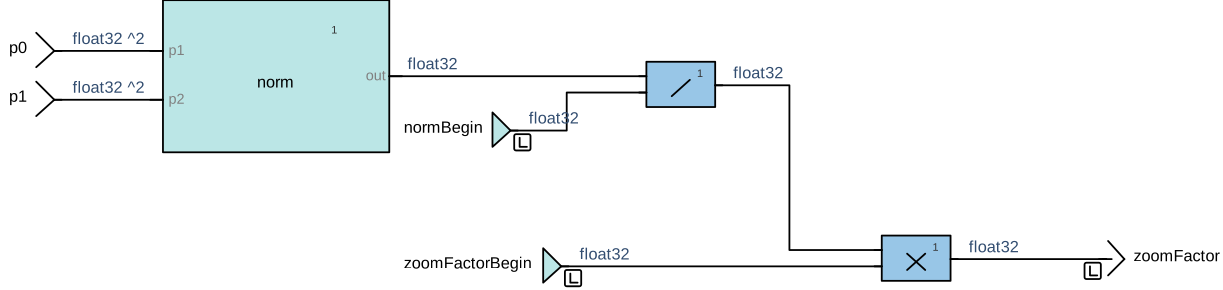
At every cycle during the gesture, we compute the current finger distance:
$$D_{current}=\sqrt{(x_1-x_0)^2+(y_1-y_0)^2}$$
This formulation naturally handles all scenarios:
- If $D_{current}>D_{begin}$, the user is pinching out and the map zooms in.
- If $D_{current}=D_{begin}$, the user is not pinching and zoom factor stays the same.
- Otherwise, the user is pinching in and the map zooms out.
As a SCADE diagram, this yields:
Two-finger rotation gesture
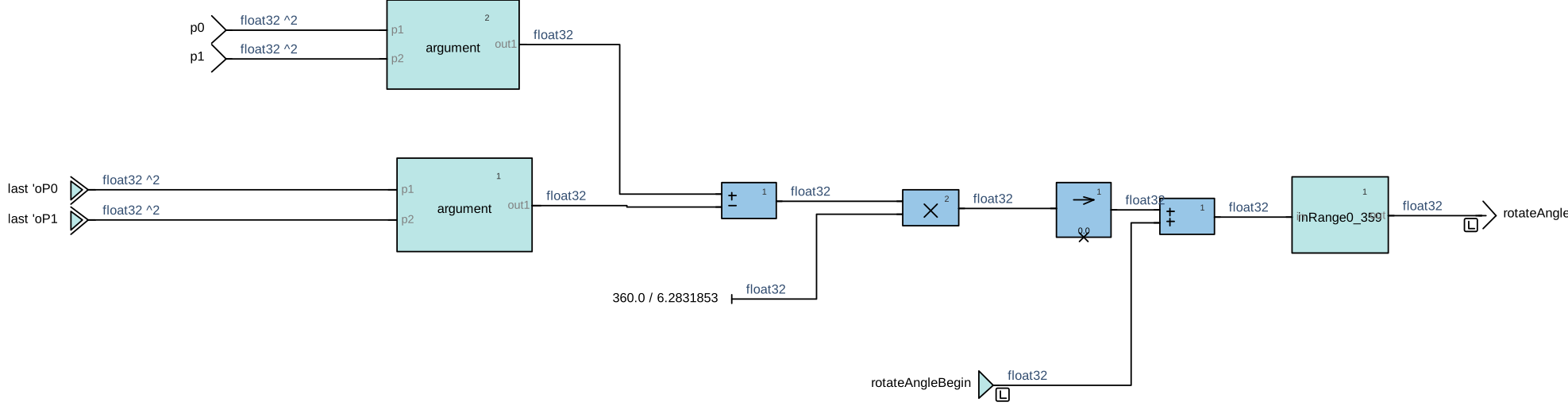
Rotation uses the orientation of the segment defined by the two fingers. At each cycle, we compute the angle of this segment using the atan2 function, compare it to the initial angle, and compute the difference.
Again, let’s define:
- $p_0 = (x_0, y_0)$ : position of the first finger
- $p_1 = (x_1, y_1)$ : position of the second finger
We first build the vector from finger 0 to finger 1:
$$\vec{v}=(dx,dy)=(x_1-x_0, y_1-y_0)$$
The orientation of this vector is:
$$\theta=atan2(dy,dx)$$
$atan2$ returns the angle in radians, in the range $(-\pi, \pi]$, taking into account the signs of both $dx$ and $dy$. Unlike a simple arctangent, $atan2$ correctly distinguishes all four quadrants, which is essential for a robust rotation gesture.
- $\theta_{current}$: angle at the current frame
- $\theta_{init}$: angle at the init frame (built from
oP0, oP1)
The incremental change is:
$$\Delta\theta=\theta_{current}-\theta_{init}$$
The SCADE model then converts this delta from radians to degrees and adds it to the starting angle of the gesture:
$$\Delta\theta_{deg}=\Delta\theta\times\frac{360}{2\pi}$$
Or, as a SCADE diagram:
Conclusion
In this article, we explored implementation of swipe navigation, pinch-to-zoom, and rotation gestures in SCADE. We showed how complex multi-touch behavior can be modeled with graphical state machines, computed using mathematical operators, translated into deterministic C code, and deployed in avionics-grade HMIs. This approach provides a reusable foundation for touchscreen interactions on MFDs, HUDs, map displays, and tactical interfaces.
If you’d like to explore the model used in this article, you can find it here on the Ansys GitHub (link to docs).
About the author
|

|
Ludovic Oddos (LinkedIn) is a Lead Product Specialist at Ansys. He has been supporting SCADE field engagements, in many industries, for more than 15 years. He has deep expertise in embedded software and its integration into various target environments.
|








 You are navigating away from the AIS Discovery experience