This article is part of a series:
- Part 1 (this article): Control software for a rice cooker with Scade One
- Part 2: FMU: a step-by-step guide for Scade One
A rice cooker is a familiar appliance, but it hides a neat control problem. When free water remains, the pot stays near 100°C; once the water is gone, the temperature rises sharply, providing a natural signal that cooking is complete.
That makes it an excellent home-appliance example for Scade One. The behavior maps naturally to state machines, while dataflow (the graphical wiring to compute values at every cycle) handles the numerical and timing logic: this keeps the overall design structured and easy to understand. At the same time, Scade One brings the industrial-grade rigor inherited from safety-critical applications in SCADE, helping raise model quality from the start.
In this post, we build a rice cooker controller, connect it to a simplified plant model, and simulate the closed-loop behavior with graphical panels. The goal is not to create a perfect kitchen-ready model, but rather a first prototype within a few hours to show how Scade One helps organize the logic, validate behavior early, and make the design easy to explore. By the end, we will see how Scade One gets a controller from concept to interactive simulation in a single environment.
Let’s get started.
🍚 What makes a rice cooker interesting to model?
At first glance, a rice cooker looks like a very basic appliance. However, it highlights several useful engineering ideas in a single model:
- clear operating modes such as idle, delayed start, cooking, and keep-warm
- a physical process with a visible phase change around boiling that acts as a signal to stop cooking
- user inputs and safety conditions, such as opening the lid or cancelling the program
- temperature regulation for soaking and keep-warm phases
To stop cooking, a mechanical rice cooker uses Curie‘s law: a metal piece loses its ability to be magnetized above 100°C, releasing a spring that cuts the power. Modern rice cookers use sensors (temperature, steam, etc.) and a digital controller to regulate power for optimal cooking.
🎮 The controller model in Scade One
The controller reads the pot temperature (via a sensor), button inputs, and a lid-open sensor. It then computes three main outputs:
- heater power, as a percentage of the cooker nominal power
- text to display on a small screen
- LED color to indicate the current mode
This logic fits Scade One well because the high-level behavior is best expressed as a state machine (capturing discrete operating modes and the transitions between them), while the numerical parts are naturally expressed with dataflow.
At the top level, the controller is organized into five states:
Idle: wait for inputSetDelay: let the user configure the delayed startDelayedCooking: count down to the start timeCooking: handle the actual cooking sequenceKeepWarm: maintain the serving temperature after cooking completion
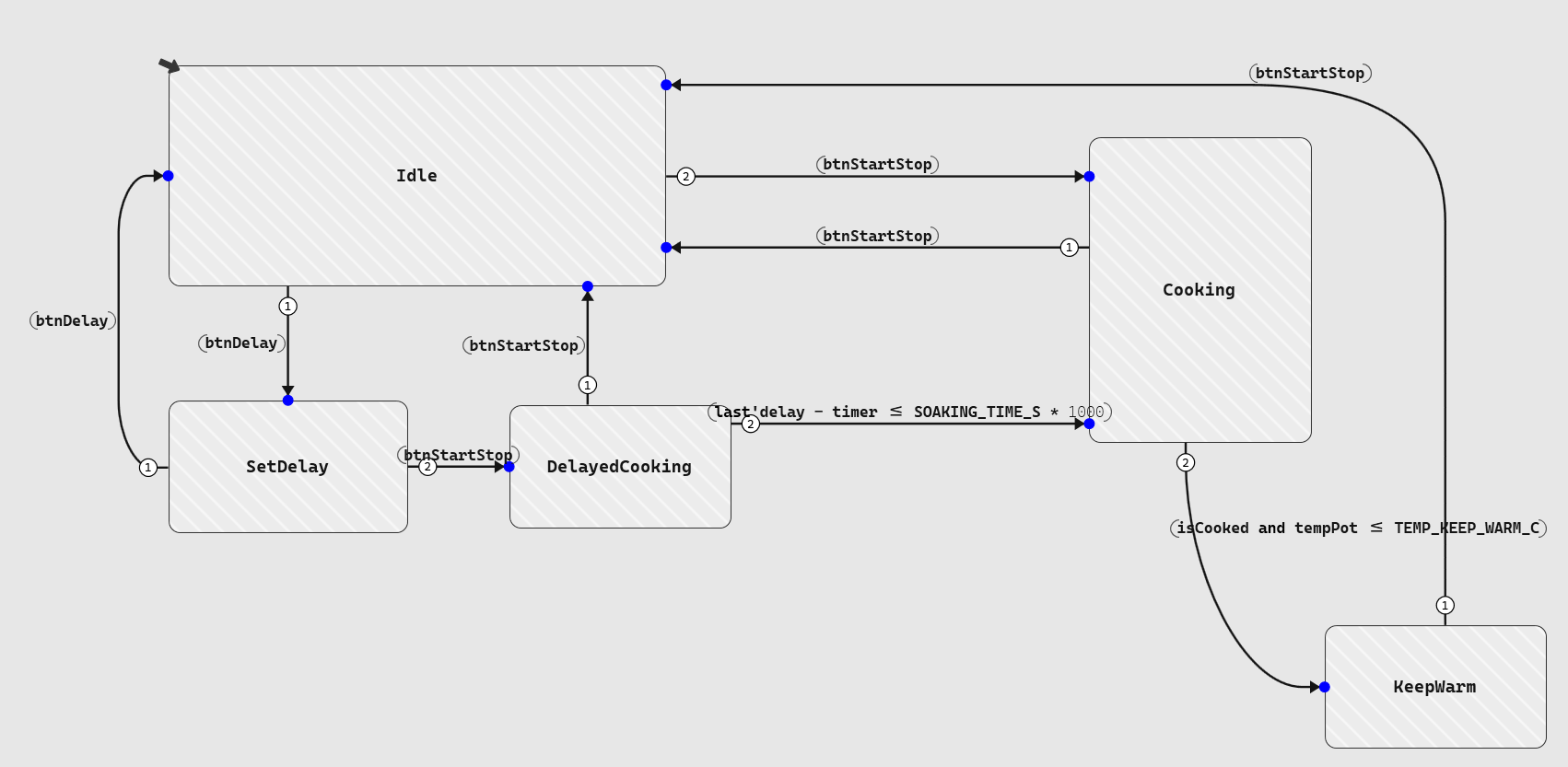
Figure 1: High-Level controller states
This highlights one practical strength of Scade One and model-based software development in general: instead of having a long sequence of conditional blocks, the operating modes are very explicit and easy to check in simulation.
🧑🍳 Going into the cooking mode
The Cooking mode is the most interesting part of the model. It is itself split into several phases that match different steps for improving the taste of the cooked rice:
WaterAbsorption: keeping the rice warm for some time to hydrate each grain of rice, resulting in fluffy and tender ricePreCooking: heating up to reach the next phaseEnzymaticActivation: slowing cooking between 60°C and 80°C to enhance nutrition, texture, and flavor by activating dormant enzymesReachingBoiling: reaching 100°C as fast as possibleSimmering: slow boiling until all water has evaporatedResting: letting the steam finish cooking the rice slowly and evaporating remaining moisture
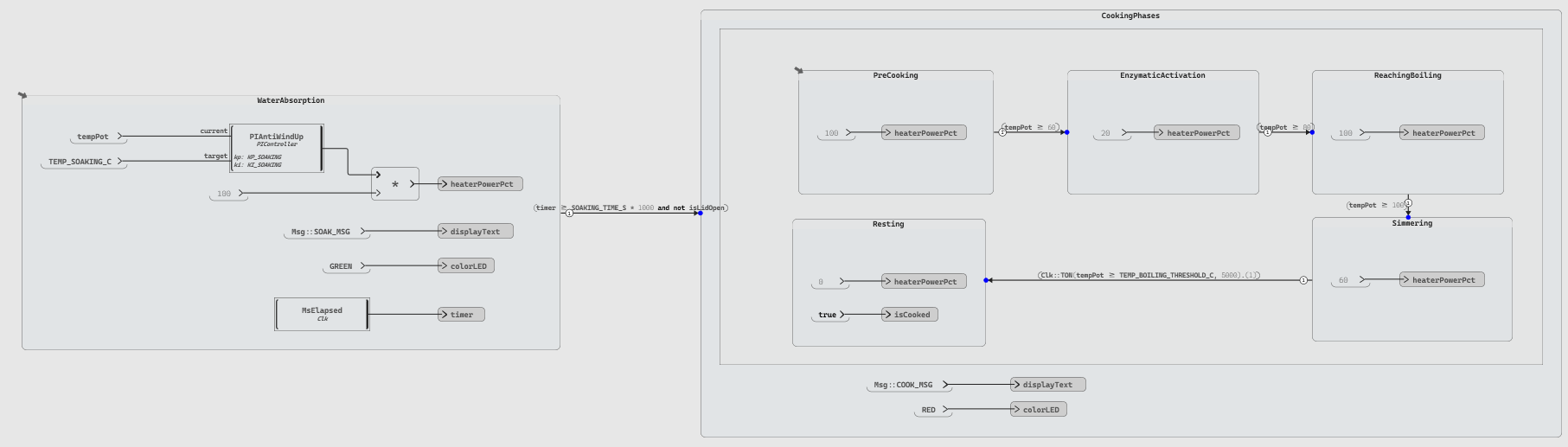
Figure 2: Cooking phases inside the main cooking state
This state machine shows where Scade One becomes particularly useful: state machines capture the sequencing while data flow logic computes timers, thresholds, and power commands within each phase. On top of that, nested state machines with the possibility to hide state content (i.e. detached diagrams) give the possibility to have a clear hierarchy of the sequencing.
Moreover, we can easily implement the closed-loop temperature control for the two phases requiring it:
WaterAbsorption, which keeps the temperature at 45°C for a configured soaking timeKeepWarm (the next top-level state), which regulates the pot around 65°C to avoid bacteria multiplication (under 60°C) or drying out (above 80°C)
For both, a PI controller (Proportional Integral) with anti-windup is sufficient. The implementation reuses an example provided in the Scade One installation. A full PID controller would have been possible but is not needed here: the temperature changes slowly, the control objective is moderate, and the simpler design is easier to tune and explain.
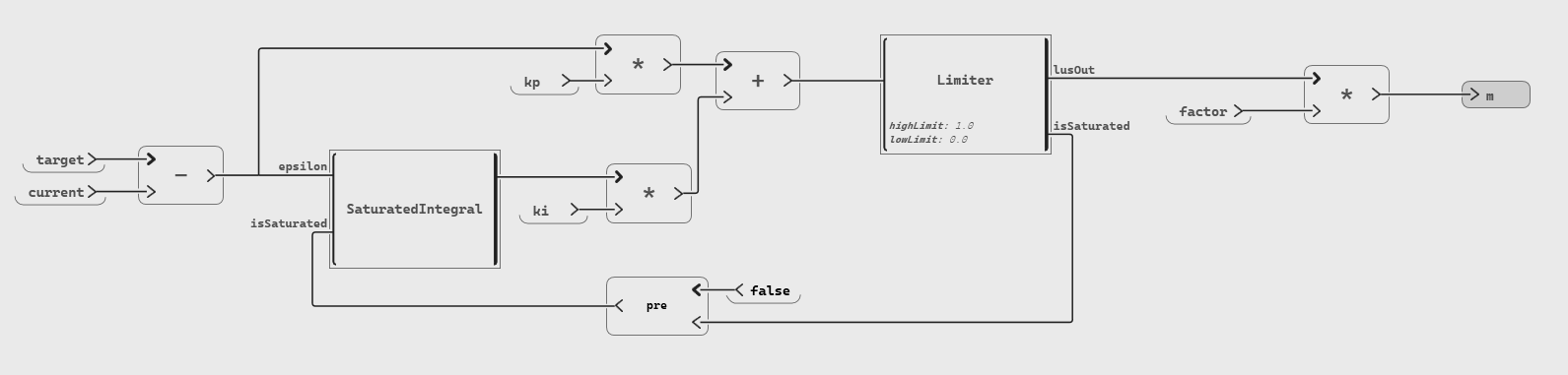
Figure 3: Implementation of PI controller with anti-windup
🛠️ Utility operators to make life easier
A small set of reusable operators keeps the controller model easy to understand:
- Time measurement: computes elapsed milliseconds and cycle-to-cycle delta time, easily adaptable to different hardware by adjusting the millisecond source
- Timer-on delay (TON): as specified in IEC 61131-3 for PLCs, validates a condition only after it remains true long enough, preventing the model from reacting to transient noise or measurement glitches
- Message formatting: helps build strings for the rice cooker screen
These utilities are the core building blocks of the application. The TON operator is especially important for the cooking-completion logic: instead of switching phases on a single temperature sample above threshold, the model waits until the condition persists long enough to be meaningful.
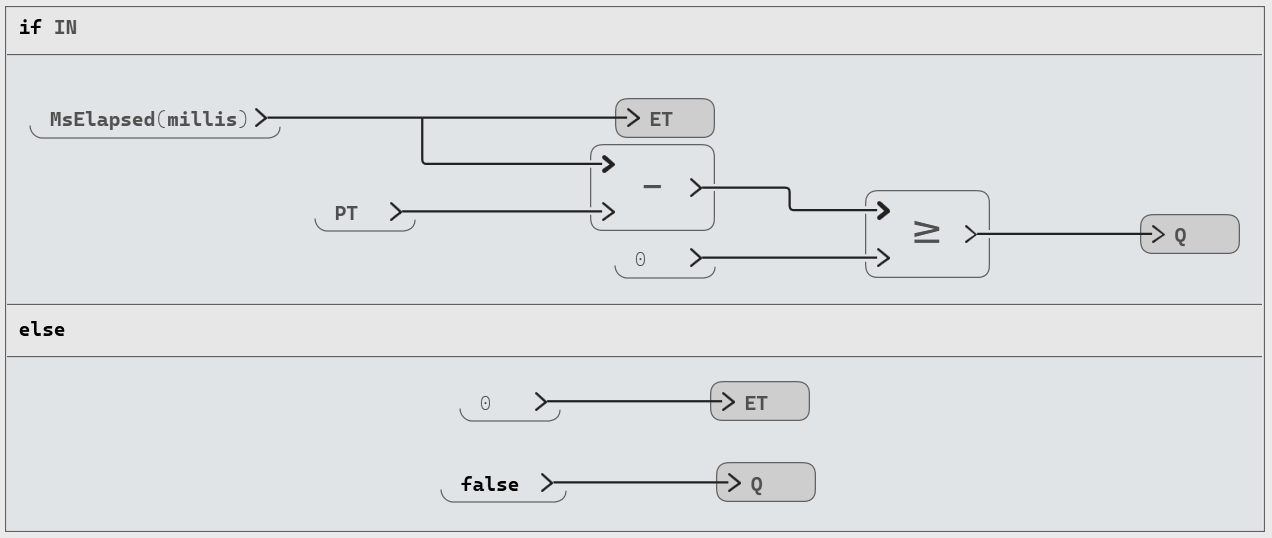
Figure 4: TON Operator where Q becomes true if IN stays true for PT milliseconds
🏭 A simple plant model to test the logic
To validate the controller, particularly the change of temperature based on given input power, we need a plant model that represents the physics of the rice cooker.
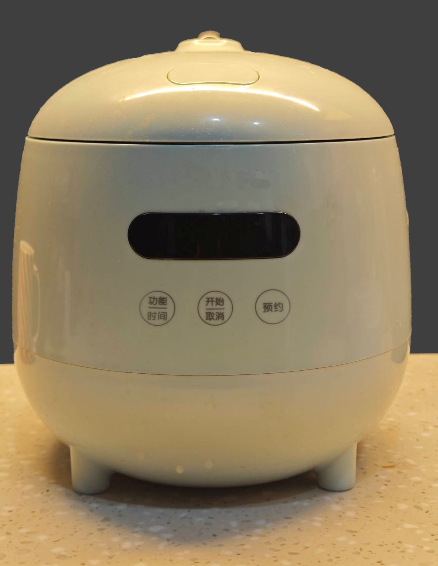
Figure 5: the mini rice cooker used as our plant model
While plant modelling is usually done with dedicated tools, the physics here can be reduced to a set of equations simple enough to implement directly using Scade One.
For a plant model with better fidelity, we can connect the controller to an FMU package of the plant model: this is usually done by building a FMU of the controller and connecting the two FMUs using a third-party tool (TwinBuilder, Dymola, etc.).
Our physical representation includes the following elements:
- Aluminum bowl
- Rice and water mass
- Heat losses to the environment
- Water absorption by the rice
- Evaporation when boiling begins
The key to this simplified plant model is not to be realistic but rather to reproduce the key physical behaviors:
- Before boiling, the temperature rises
- When some water remains, the temperature stays at boiling point
- Once the water is gone, temperature goes above the boiling point
- When no power is provided, the temperature decreases
⚛️ Curious about the physics behind our plant model?
For our simplified physical model, we make the following assumptions:
- A standard boiling point of water: $T_{boiling}=100°C$ (i.e. sea level and standard pressure)
- An instantaneous thermal equilibrium: the bowl and water are at the same temperature $T$
- A linear heat transfer law: the power loss is $P_{loss}=h\ A\ (T-T_{ext})$, where $T_{ext}$ is the ambient temperature and $h\ A=0.5\ W/K$.
- A linear water absorption by rice with saturation constraint: $\Delta m_{w,absorbed}=0.0001 \frac{T}{T_{boiling}} \Delta t$ with $m_{w,absorbed} \le m_{rice,init}$.
During the boiling, the mass of water that evaporates across a time $\Delta t$ due to a given input power is expressed by the energy-mass relation , $\Delta m_{w}=\frac{(P_{in}-P_{loss}) \Delta t}{L}$ with $L$ being the latent heat of vaporization for water.
During other phases, the change of temperature across time is using a linear energy balance equation depending on the total heat capacity of the system (with being given constants):
$$\Delta T = \frac{(P_{in}-P_{loss}) \Delta t}{m_{al} C_{p,al} + m_{rice,init} C_{p,rice} + m_{w,total} C_{p,w}}$$
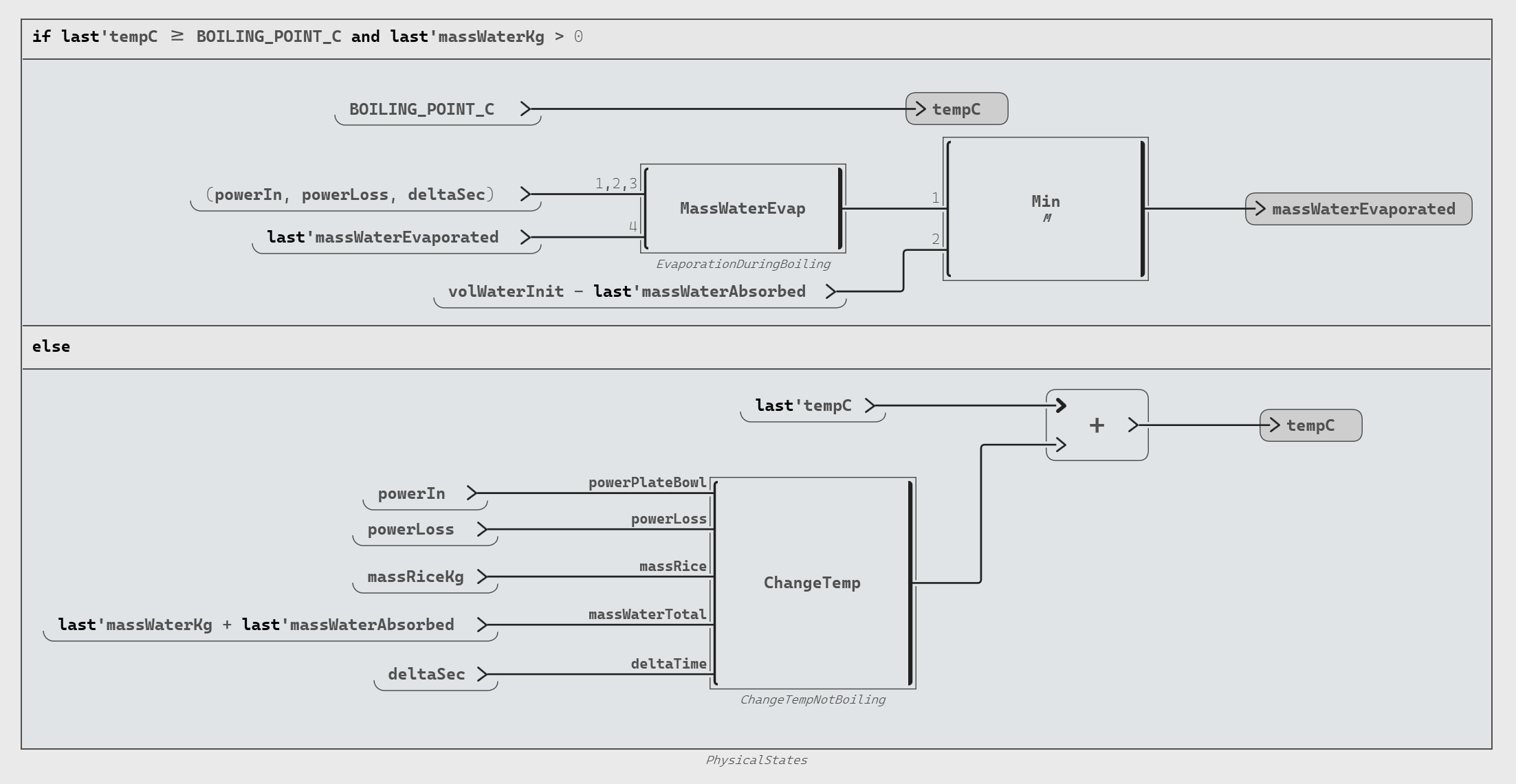
Figure 6: The plant model distinguishes boiling and non-boiling behavior
💡 TIP: Computation of the different physical characteristics (mass, volume, power, etc.) can be made clearer by using dedicated operator or being grouped with diagrams (used as named zones).
This model is enough to validate our controller, so let’s do check how good we are doing.
🏃 Running the closed-loop simulation
Once the controller and plant model are available, they can be connected in a test harness. The controller sends heater power to the plant model. The plant model returns the pot temperature and water-related values. Those signals then drive the next controller cycle.
We will stop the simulation 30 minutes after the rice has been cooked.
💡 TIP: The temperature of the pot and the lid sensor shall be connected to "Set Sensor" blocks (a Scade One test harness mechanism that injects values into sensor inputs).
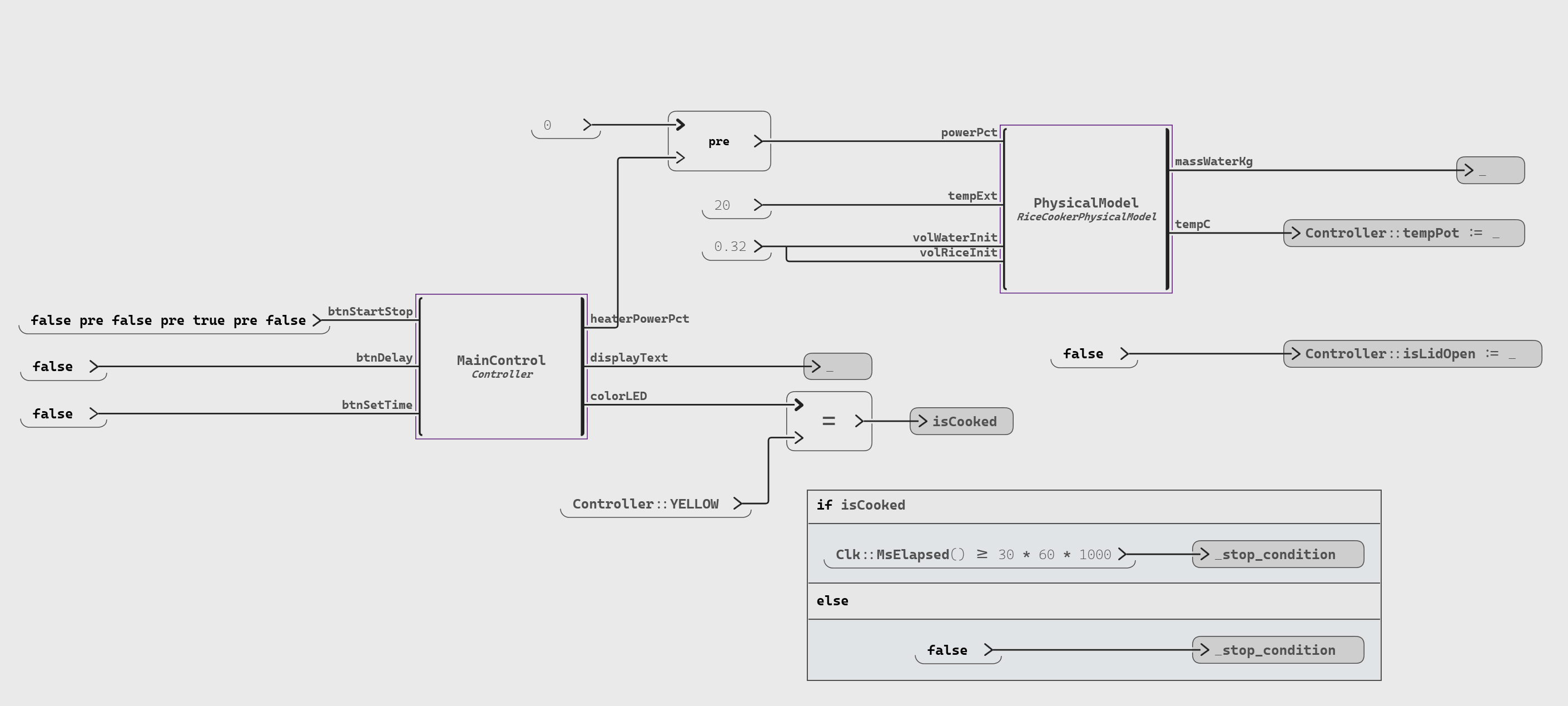
Figure 7: Controller and Plant Model connected in a test harness
This closed-loop simulation really pays off as we can observe the whole cooking sequence and easily verify the behavior:
- Temperature ramps up in multiple phases during the heating until reaching boiling point
- At boiling point, the water decreases drastically
- Once the water is depleted, the temperature spikes
- The controller detects that spike and stops cooking
- The keep-warm PI controller stabilizes the temperature around the target
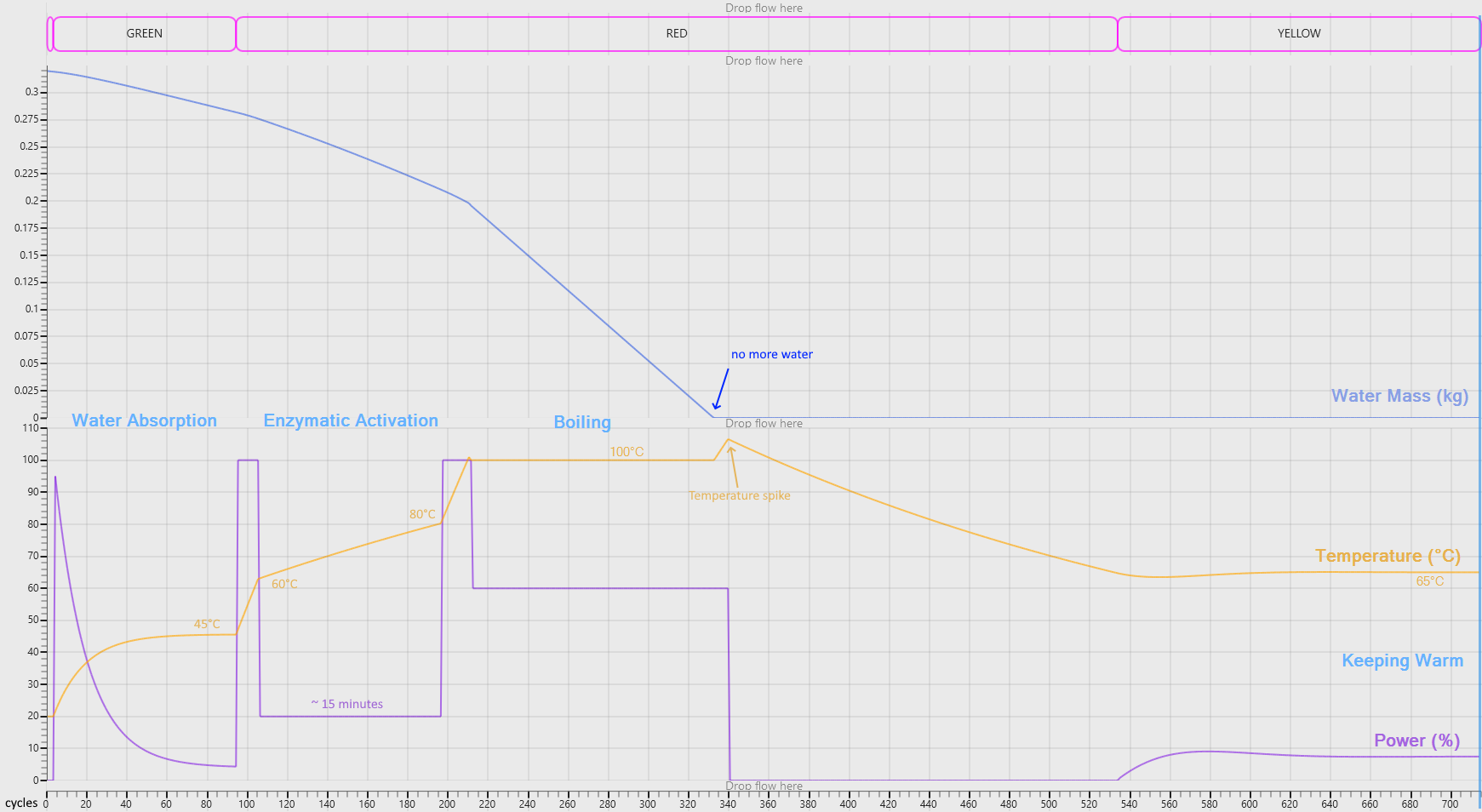
Figure 8: Simulation traces for water, temperature, and heater power
That temperature spike is the key moment in the whole example. It shows that the controller logic is not switching phases on an arbitrary timeout alone. It reacts to a physical signature produced by the plant model.
This is exactly the sort of early validation Scade One is good at. Before deploying any embedded code, we can already check whether the control strategy makes sense, whether the thresholds are plausible, and whether the overall behavior is correct.
📲 Making the model interactive with graphical panels
To validate the model from a user’s perspective, we can use graphical panels created with SCADE Rapid Prototyper, a companion tool to quickly build graphical front-ends connected to Scade One:
- a front panel representing the rice cooker itself, with buttons, display, and status LED
- a monitoring panel showing values such as temperature, power, water level, and rice volume
You can find more information on building a graphical panel and integrating it with Scade One in this blog post on Ansys Innovation Space.
💡 TIP: For creating our graphical panel based on the real rice cooker, we can import the SVG file in Rapid Prototyper, potentially using GenAI tools to create that SVG.
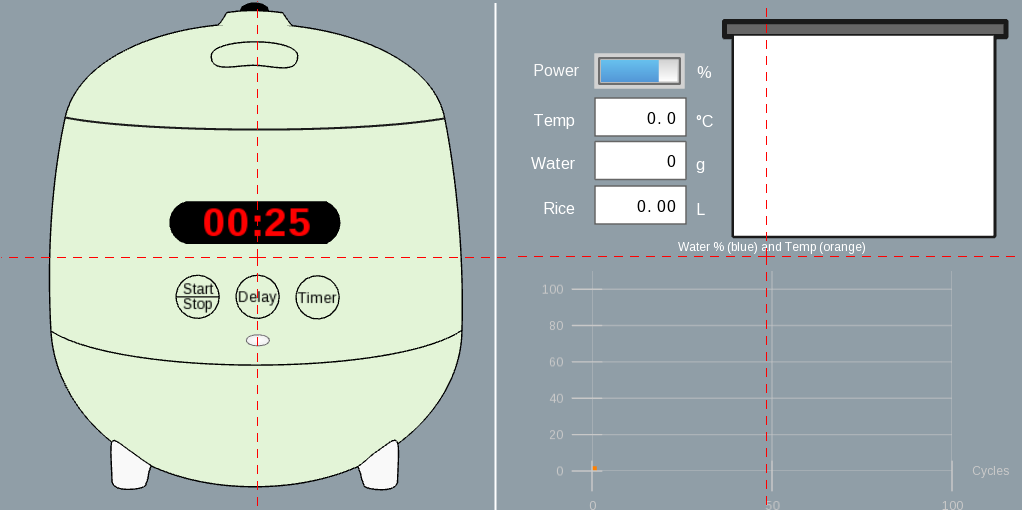
Figure 9: Two graphical panels for user interaction and signal monitoring
These two panels are more than a visual bonus: they allow us to interact in the way a user would. We can select a delay, press Start/Stop, watch the cooker moving through the phases, and even interrupt at any time we want. The second panel also shows us the engineering view to understand the physical behavior.
That combination is powerful. It lets one model serve two audiences at once:
- a system designer who wants to inspect states and physical variables
- a stakeholder who wants to see realistic appliance behavior without reading model internals
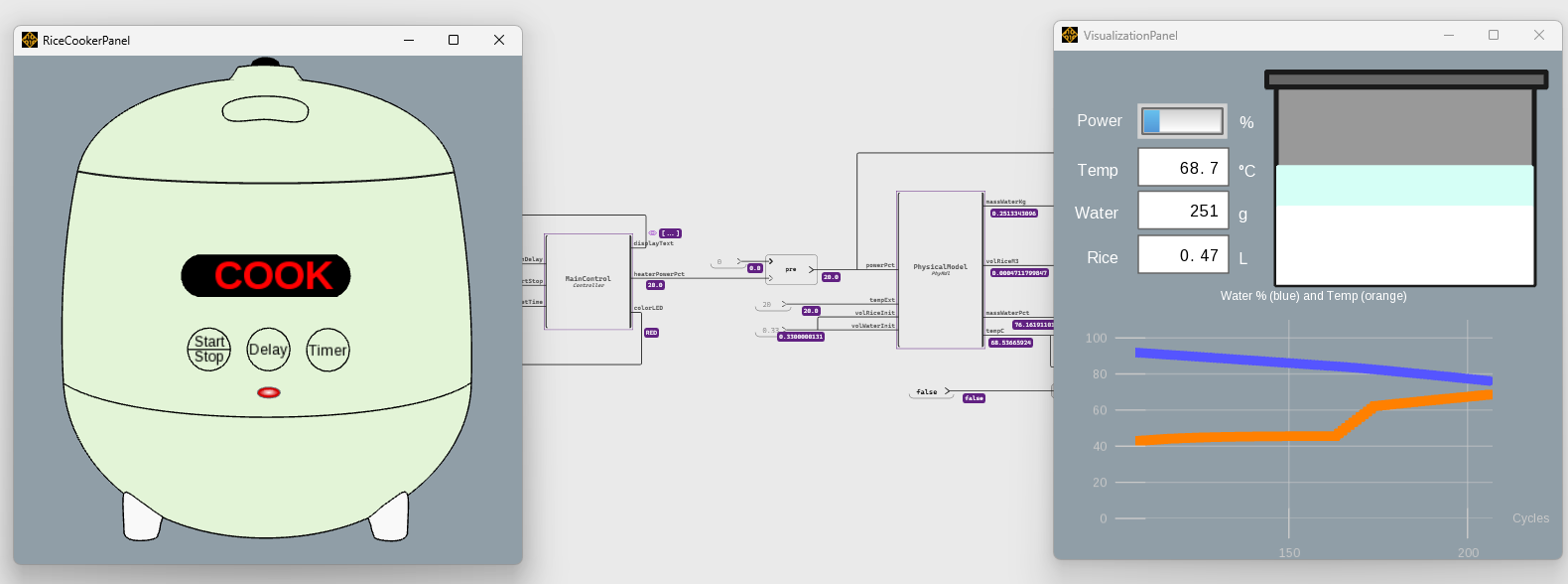
Figure 10: Interactive debug session with the two graphical panels
🦢 What this example shows about Scade One
This project is a small example, but it highlights a powerful workflow:
-
Design operating modes with state machines: The top-level states and cooking sub-phases are immediately readable, making the logic easy to review and maintain.
-
Add numerical logic with dataflow: PI controllers, timers, and message builders are wired as reusable operators alongside the state machine
-
Connect the controller to a plant model: Even a simplified physical model is enough to produce the temperature-spike signal on which the controller depends
-
Run a simulation and inspect traces: The closed-loop test harness validates the complete cooking behavior before any hardware integration
-
Add graphical panels for interactive review: Rapid Prototyper panels let both engineers and non-technical stakeholders explore the model in real time.
Compared to hand-coded C or general-purpose simulation tools, Scade One offers a model-based approach with a deterministic behavior by construction where the state machines logic and the numerical computation live in the same environment.
With this approach, we have built in a few hours a model that is clear, testable, and interactive. And because the simulation is also powered by the Swan Code Generator, the user can use the same design that works in simulation and debug to produce production-quality C code for the target hardware.
🌍 Explore further
In this blog post, we explored how to create a rice cooker controller, simulate it using a plant model, and run an interactive debug session with graphical panels. You can download the examples here and experiment with extending the model (e.g. adding more cooking modes, detecting errors, or supporting more sensors / heaters).
In the next post of this series, we will generate an FMU from this model using PyScadeOne and connect it to an external, more accurate, plant model to perform co-simulation.
If you would like to learn more about Ansys Scade One, we’d love to hear from you! Try this model in the free Scade One Student or get in touch on our product page.
Next in this series is Part 2.
About the author
 |
Jean-François Thuong (LinkedIn) is a Software Validation Manager at Synopsys. He excels in software development, testing, and team management. His areas of expertise include the SCADE product, with a particular focus on Scade One. He is fluent in French, English and Chinese. |








 You are navigating away from the AIS Discovery experience