Hi,
I need to do a coupled simulation using Ansys Workbench (as shown in the figure below). First I need to do an electromagnetic simulation using HFSS and then do a transient thermal simulation using Mechanical (by importing the geometry & volumetric heat absorption from HFSS solution).
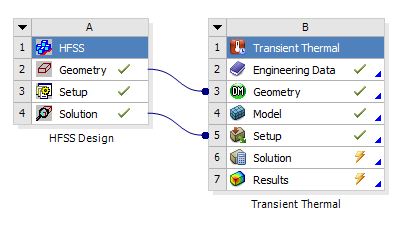
I would like to automate the process by writing the scripts. I am using academic license (Workbench 17.1). I recorded the workbench journal and have the following question: (while running the recorded journal using command prompt)
1) The first simulation HFSS works fine but it is taking lot of time. It is taking 75 min to complete the first part. (It is a simple simulation and it takes very less time doing manually) For example it takes 3 min for creating second box in the geometry after creating the first one. I am unable to understand why it is taking so much time. Since I need a coupled simulation, I am recording the script using workbench. Else by writing a script in HFSS, it takes just 2 min for doing the simulation. Any help on this would be appreciated. Is there an option to call the HFSS script in workbench journal?
Thank you very much

















 You are navigating away from the AIS Discovery experience