Ansys Assistant will be unavailable on the Learning Forum starting January 30. An upgraded version is coming soon. We apologize for any inconvenience and appreciate your patience. Stay tuned for updates.
Ansys Products

Ansys Products

Discuss installation & licensing of our Ansys Teaching and Research products.

Workbench Errors

    • Jdrs132
      Subscriber

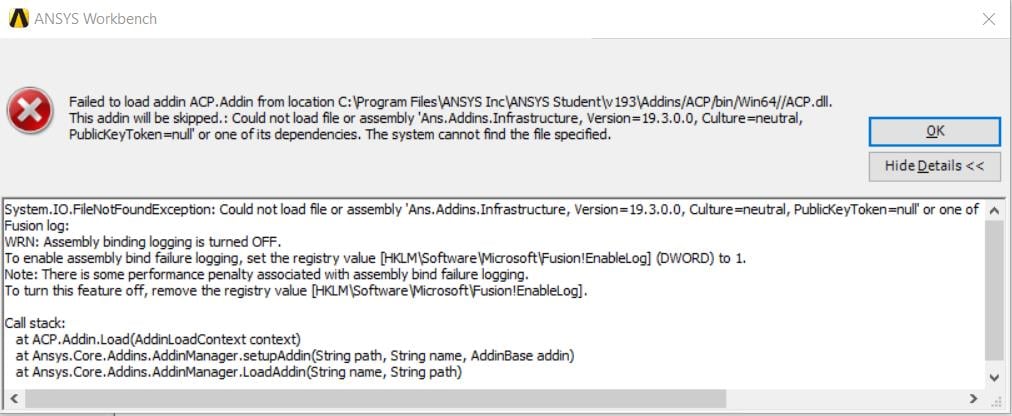
      I keep getting MANY errors saying I am missing files when I open Workbench. Workbench opens and is stable, but no tools show up. 


      Copyable Error Text from first error:


      System.IO.FileNotFoundException: Could not load file or assembly 'Ans.Addins.Infrastructure, Version=19.3.0.0, Culture=neutral, PublicKeyToken=null' or one of its dependencies. The system cannot find the file specified.


      Fusion log:


      WRN: Assembly binding logging is turned OFF.


      To enable assembly bind failure logging, set the registry value [HKLMSoftwareMicrosoftFusion!EnableLog] (DWORD) to 1.


      Note: There is some performance penalty associated with assembly bind failure logging.


      To turn this feature off, remove the registry value [HKLMSoftwareMicrosoftFusion!EnableLog].


      Call stack:


         at ACP.Addin.Load(AddinLoadContext context)


         at Ansys.Core.Addins.AddinManager.setupAddin(String path, String name, AddinBase addin)


         at Ansys.Core.Addins.AddinManager.LoadAddin(String name, String path)


      I have tried uninstalling and reinstalling many times.  I even extracted the installation folder into the ANSYS Inc folder and then installed by "Run as Administrator". So far nothing has worked. 

    • George Karnos
      Ansys Employee

      Hello Jdrs132,


      What package did you download and what is the size of it?


      In the Ansys Inc folder, there should be a install.log file. Viewing this with notepad, are there any other errors listed?


      Thank You,


      Geo

    • Jdrs132
      Subscriber

      Hello Geo,


      I downloaded the R1 package listed under "ANSYS Student" on this page https://www.ansys.com/academic/free-student-products


      The compressed file was 4,593,833,344 bytes.


      No noticeable errors in the install log, no errors that are similar to workbench error I am receiving 


      Thank you,


      Jake

    • tsiriaks
      Ansys Employee

      Hi Jake,


      Can you post the screenshot of the entire error message ?


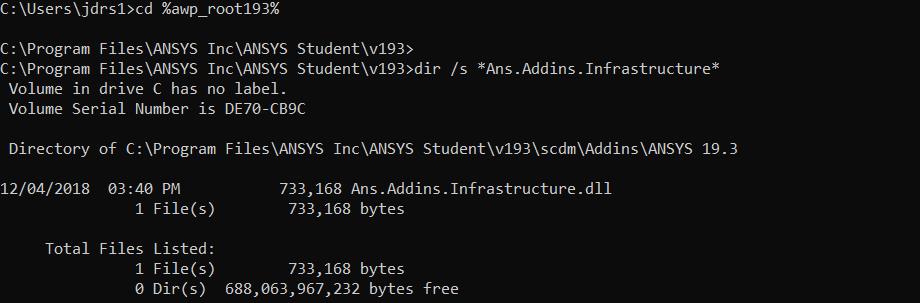
      Also post the screenshots of the output of the following commands from CMD Prompt


      1.


      cd %awp_root193%


      dir /s *Ans.Addins.Infrastructure*


      2.


      set


      3.


      "%awp_root193%commonfilesIronPythonipy.exe"


      Thanks,


      Win

    • Jdrs132
      Subscriber

    • Jdrs132
      Subscriber

    • JakeC
      Ansys Employee

      Hi Jdrs132,


      at the command prompt please try the following and post a screenshot.  Please follow each step:


      cd %awp_root193%


      dir /s ACP.dll


      Then at that prompt type the "set" command:


      set


      And post a screenshot of that complete output.


      Lastly from that same command prompt, please paste this in:


      "%awp_root193%commonfilesIronPythonipy.exe"


      And post a screenshot of the output.


      Thank you,


      Jake


    • fluffy592fury
      Subscriber

      Hi,


      If the problem still persists try disabling your antivirus, then installing ANSYS. 


      Had the same issue, later found out that my anti-virus was isolating the addin files, disabling it


      seem to have fixed the problem.


      Thanks,


      Abhi

    • tsiriaks
      Ansys Employee

      Thank you for sharing your resolution Abhi.


      Win

Viewing 8 reply threads
  • The topic ‘Workbench Errors’ is closed to new replies.
[bingo_chatbox]