Ansys Products

Ansys Products

Discuss installation & licensing of our Ansys Teaching and Research products.

Workbench Errors

    • Jdrs132
      Subscriber

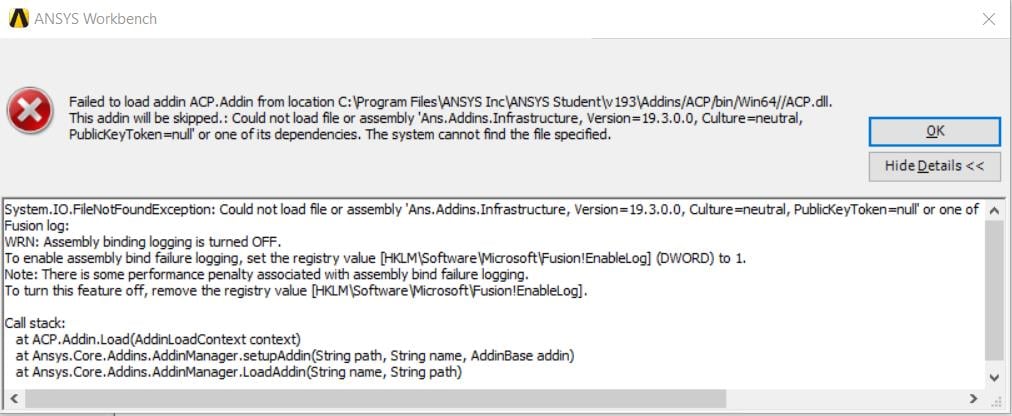
      I keep getting MANY errors saying I am missing files when I open Workbench. Workbench opens and is stable, but no tools show up. 


      Copyable Error Text from first error:


      System.IO.FileNotFoundException: Could not load file or assembly 'Ans.Addins.Infrastructure, Version=19.3.0.0, Culture=neutral, PublicKeyToken=null' or one of its dependencies. The system cannot find the file specified.


      Fusion log:


      WRN: Assembly binding logging is turned OFF.


      To enable assembly bind failure logging, set the registry value [HKLMSoftwareMicrosoftFusion!EnableLog] (DWORD) to 1.


      Note: There is some performance penalty associated with assembly bind failure logging.


      To turn this feature off, remove the registry value [HKLMSoftwareMicrosoftFusion!EnableLog].


      Call stack:


         at ACP.Addin.Load(AddinLoadContext context)


         at Ansys.Core.Addins.AddinManager.setupAddin(String path, String name, AddinBase addin)


         at Ansys.Core.Addins.AddinManager.LoadAddin(String name, String path)


      I have tried uninstalling and reinstalling many times.  I even extracted the installation folder into the ANSYS Inc folder and then installed by "Run as Administrator". So far nothing has worked. 

    • George Karnos
      Ansys Employee

      Hello Jdrs132,


      What package did you download and what is the size of it?


      In the Ansys Inc folder, there should be a install.log file. Viewing this with notepad, are there any other errors listed?


      Thank You,


      Geo

    • Jdrs132
      Subscriber

      Hello Geo,


      I downloaded the R1 package listed under "ANSYS Student" on this page https://www.ansys.com/academic/free-student-products


      The compressed file was 4,593,833,344 bytes.


      No noticeable errors in the install log, no errors that are similar to workbench error I am receiving 


      Thank you,


      Jake

    • tsiriaks
      Ansys Employee

      Hi Jake,


      Can you post the screenshot of the entire error message ?


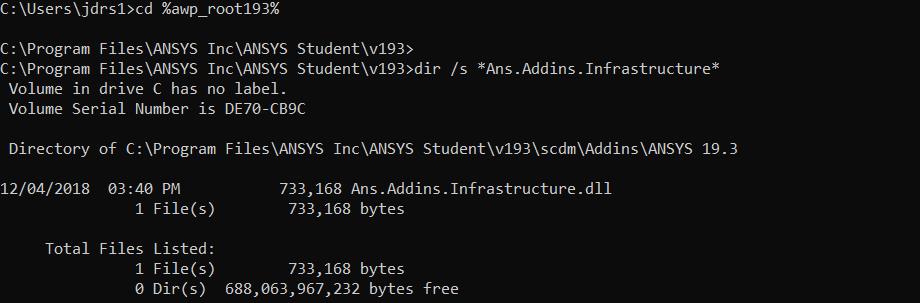
      Also post the screenshots of the output of the following commands from CMD Prompt


      1.


      cd %awp_root193%


      dir /s *Ans.Addins.Infrastructure*


      2.


      set


      3.


      "%awp_root193%commonfilesIronPythonipy.exe"


      Thanks,


      Win

    • Jdrs132
      Subscriber

    • Jdrs132
      Subscriber

    • JakeC
      Ansys Employee

      Hi Jdrs132,


      at the command prompt please try the following and post a screenshot.  Please follow each step:


      cd %awp_root193%


      dir /s ACP.dll


      Then at that prompt type the "set" command:


      set


      And post a screenshot of that complete output.


      Lastly from that same command prompt, please paste this in:


      "%awp_root193%commonfilesIronPythonipy.exe"


      And post a screenshot of the output.


      Thank you,


      Jake


    • fluffy592fury
      Subscriber

      Hi,


      If the problem still persists try disabling your antivirus, then installing ANSYS. 


      Had the same issue, later found out that my anti-virus was isolating the addin files, disabling it


      seem to have fixed the problem.


      Thanks,


      Abhi

    • tsiriaks
      Ansys Employee

      Thank you for sharing your resolution Abhi.


      Win

Viewing 8 reply threads
  • The topic ‘Workbench Errors’ is closed to new replies.