TAGGED: display-problem
-
-
December 15, 2023 at 2:24 pm
Weronika Nowak
SubscriberI have a sequence in Plugs in Scade Display that change the color of the rectangle under condition A<30, but I want it to be more elaborated. How to write this sequence correctly to make it change the color only when there are two conditions achieved in the same time? For example when A<30 and in the same time A
-
December 23, 2023 at 5:24 am
Jair Gonzalez
Ansys Employee
Hello,
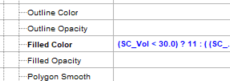
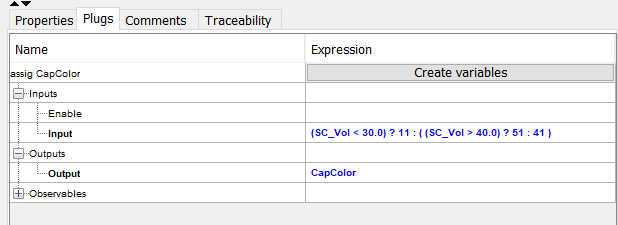
SCADE Display allows for complex expressions on Plugs, in your example, you are using a conditional expression plugged to the Filled Color property. You can write a more complex expression like the following
(SC_Vol < 30.0) ? 11 : ( (SC_Vol > 40.0) ? 51 : 41 )
Testing first if SC_Vol is smaller that 30.0, in which case the assigned value will be 11, else there is a second test SC_Vol > 40.0, in which case the assigned value will be 51, else 41. For this kind of complexity in the expression, you can use “Assignment” from the “References” Tab in the object palette. When using “Assignment, a local variable shall be created of the type of the plug that you want to control, also connected to the output of the assignment. The input of the assignment will be the expression as described above.
For more complex behaviour, you should use a “Behaviour” from the “References” Tab in the Objects Palette. Which is a reference to a SCADE Suite operator from a SCADE Suite project associated to the SCADE Display project.
-
Viewing 1 reply thread
- The topic ‘Scade Display – plugs and variables’ is closed to new replies.

Innovation Space
Trending discussions
Top Contributors
-
5834
-
1906
-
1420
-
1305
-
1021
Top Rated Tags
© 2026 Copyright ANSYS, Inc. All rights reserved.
Ansys does not support the usage of unauthorized Ansys software. Please visit www.ansys.com to obtain an official distribution.