Ansys Assistant will be unavailable on the Learning Forum starting January 30. An upgraded version is coming soon. We apologize for any inconvenience and appreciate your patience. Stay tuned for updates.
Ansys Products

Ansys Products

Discuss installation & licensing of our Ansys Teaching and Research products.

Rocky installation under the SYSTEM account fails

    • J.J.M.Brockhoff
      Subscriber

      SCCM (MECM) uses the local SYSTEM account to install applications.

      ansys-rockybundle-bin-22.2.0-win64.exe wont install correctly using the switches /SUPPRESSMSXBOXES /SILENT /NOCANCEL /NORESTART

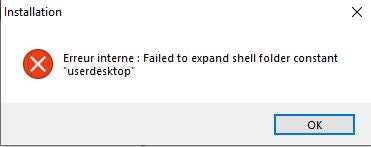
      We get 3 of these:

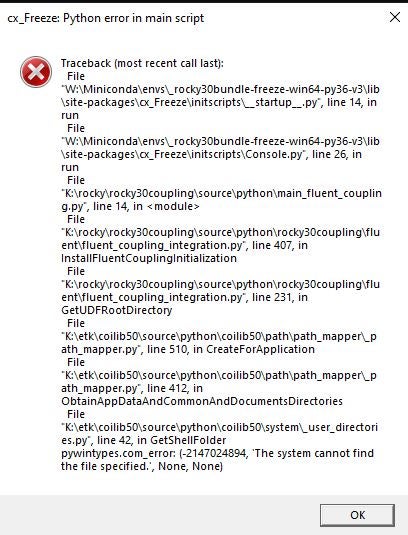
      And this one:


      This last one is cause by an action of the Rocky installer:

      "C:\Program Files\ANSYS Inc\v222\Rocky\bin\fluent_coupling.exe"

      This action is the last action of the Rocky installer (innosetup) and will fail under the system account.

      To reproduce, use sysinternals psexec.exe

      psexec.exe -s -i cmd

      to enter a Command Pompt under the local SYSTEM account.


    • George Karnos
      Ansys Employee
      At this time we only accept the /SILENT option.
       
      Command for installation on windows via silent mode.
      ansys-rockybundle-bin-22.2.X-win64.exe /SILENT /DIR=C:\Program Files\ANSYS Inc\v222\Rocky
    • p.guerrisi
      Subscriber

      hi @JM Derksen Did you ever resolve this?

      I am getting the exact same issue and error as you. I have even tried just running /SILENT without any additional switches as the above Ansys Employee stated but still getting this issue

    • MangeshANSYS
      Ansys Employee

      similar thread

      /forum/forums/topic/unable-to-install-ansys-rocky-through-sccm-mecm/

Viewing 3 reply threads
  • The topic ‘Rocky installation under the SYSTEM account fails’ is closed to new replies.

[bingo_chatbox]