Ansys Assistant will be unavailable on the Learning Forum starting January 30. An upgraded version is coming soon. We apologize for any inconvenience and appreciate your patience. Stay tuned for updates.
Electronics

Electronics

Topics related to HFSS, Maxwell, SIwave, Icepak, Electronics Enterprise and more.

Non-Functional Pads Not Displayed

    • Joseph Spada
      Subscriber

      In Electronics Desktop 2022 R2...

      Non-functional pads in a padstack are not displayed.  Editing the padstack correctly reveals the non-functional pads on desired layers.

      A previous post suggested making a change in the options:

      Tools >> Options >> Layout Editor >> Object >> "Suppress non-functional internal pads"

      This check box is not selected.


    • Mrinmoy Bharadwaj
      Ansys Employee

      Kindly let us know what is your query here?

    • Joseph Spada
      Subscriber

      I am unable to see non-functional pads in a padstack after I made the above changes in the options.  

    • Mrinmoy Bharadwaj
      Ansys Employee

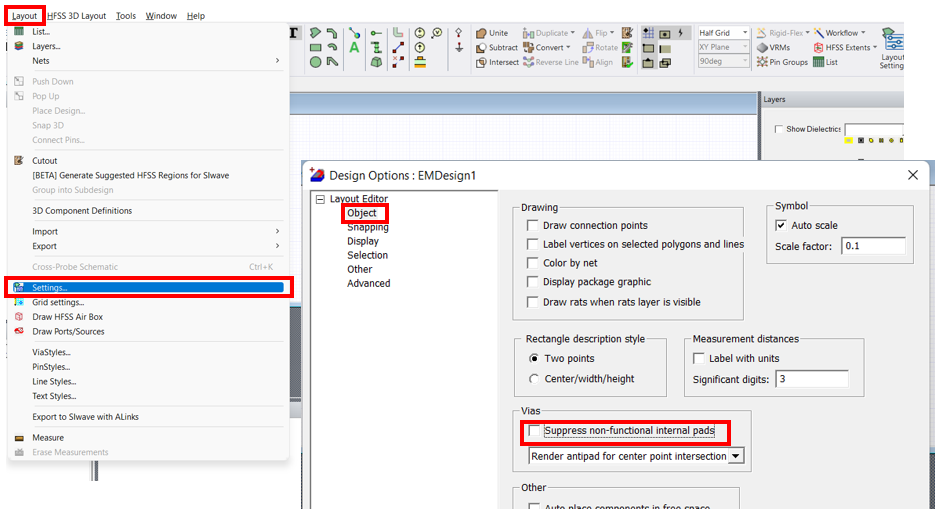
      To enable view of non-functional pads, you would need to turn ON or Uncheck the "Suppress non-functional internal pads" option under Layout>Settings>Objects>Vias as shown below:

      I hope this answers your query.

    • Joseph Spada
      Subscriber

      Thank you, that fixed it for me.  It looks like..

      Layout >> Settings >> Object >> works

      But...

      Tools >> Options>> Layout Object >> does not?

Viewing 4 reply threads
  • The topic ‘Non-Functional Pads Not Displayed’ is closed to new replies.
[bingo_chatbox]