Fluids

Fluids

Topics related to Fluent, CFX, Turbogrid and more.

Mesh incompatible error when changing geometry parameter in Fluent

    • lzhang
      Subscriber

      Hi,

      I'm trying to do a parametric study using Fluent. I imported my Solidworks model to Spaceclaim and used the pull function to set up some geometry parameters. My original model works fine and has reasonable results. However, when I try to change the geometry parameters in the parameter set and update the design point, it has an error of 'Model information is incompatible with incoming mesh. Fluent failed to apply some mesh operations'. I noticed that in Fluent whenever there is a change in Mesh, it's pretty easy to get this warning. Is there a way to change geometry parameters without facing this kind of error?

      Thanks for your help!

    • Rob
      Forum Moderator
      It means a surface ID has changed. If the mesh is conformal it's fairly uncommon. If the mesh has interface zones the automatic wall creation can return different IDs each time.
    • lzhang
      Subscriber
      Thanks for your help, Rob. Yes, I'm getting different IDs for the walls. For example, previously I have wall-17, wall-18, for the new model I have wall-12 and wall-13. Is there a way to solve this issue?
    • Rob
      Forum Moderator
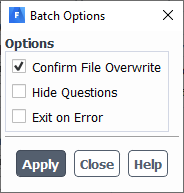
      It shouldn't matter as there are no settings assigned to those walls. Using a conformal mesh will remove the problem. In the current set up try File - Batch Options
      And "Hide Questions". I've not used that option recently but it may bypass the check to some extent.
    • lzhang
      Subscriber
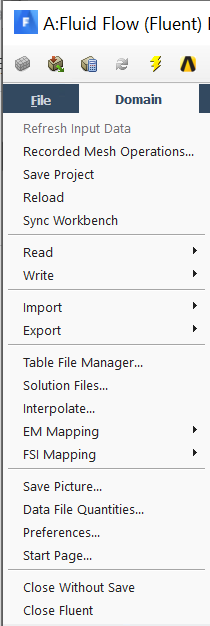
      I'm not able to find Batch Options in my file menu, I've attached a screenshot below.

    • Rob
      Forum Moderator
      In that case Workbench must take care of that.
Viewing 5 reply threads
  • The topic ‘Mesh incompatible error when changing geometry parameter in Fluent’ is closed to new replies.