-
-
December 11, 2018 at 8:50 pm
daniela
SubscriberHey everyone,Â
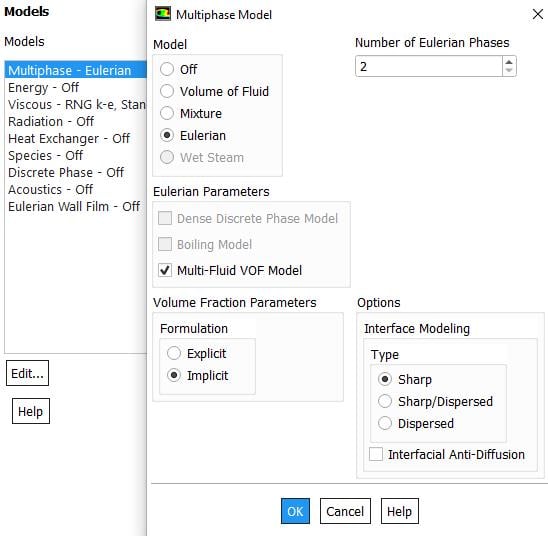
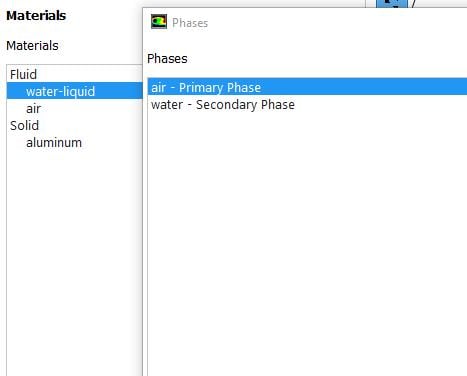
I'm right now trying to simulate the inflow in a rainwater channel. Therefore I've chosen the Eulerian Multi Fluid model, with air as phase 1, water as phase 2.Â
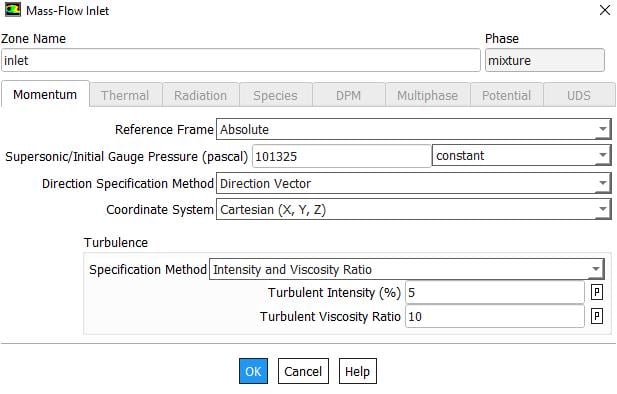
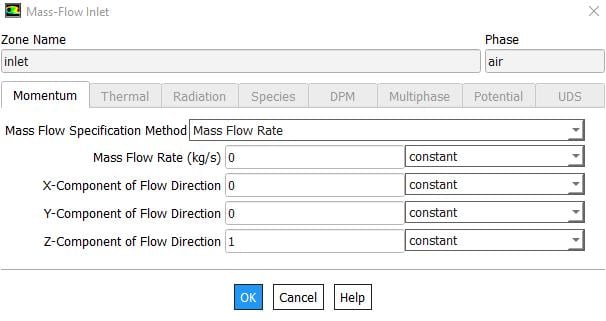
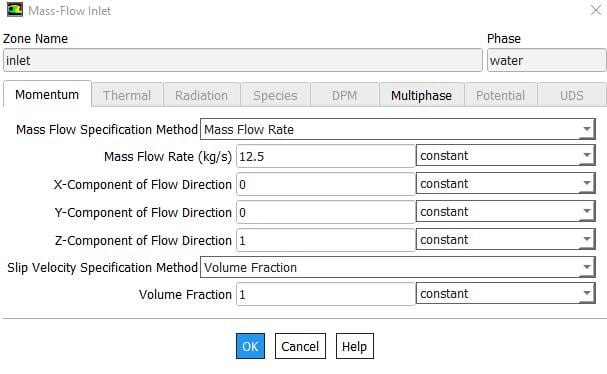
As my boundary condition for the inlet I've chosen a mass flow inlet. I've set 0 kg/s for air and 12.5 kg/s for water with a volume fraction of 1.Â
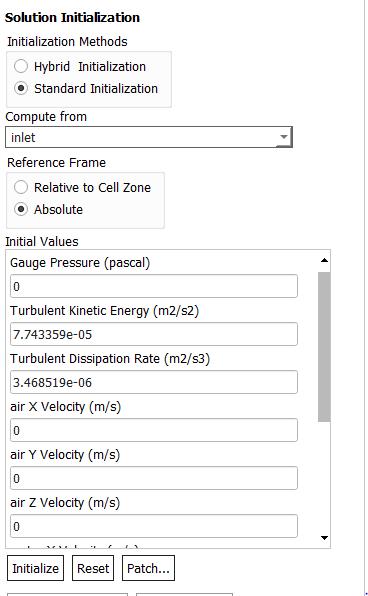
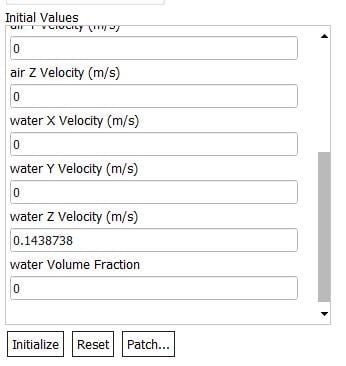
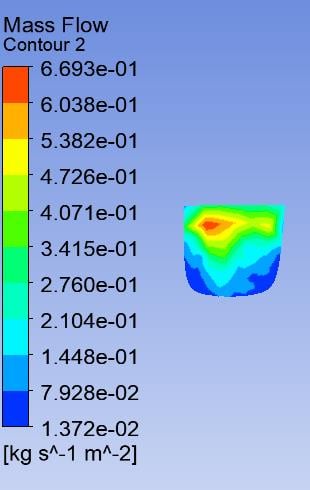
I've done a initialization from the inlet and the velocity is generated correctly. After the calculation the post-processing shows a mass flow of max 6e-1 kg/s/m2 at the inlet instead of the set 12.5 kg/s (the area is about 0.088 m2, so it should be aroung 143 kg/s/m2).Â
Can anyone tell me how this is possible? Is it not possible to choose a mass flow inlet in a VOF model? Or could there be another reason?Â
Thanks in advance,Â
Â
Regards.Â
Daniela
-
December 11, 2018 at 9:50 pm
Amine Ben Hadj Ali
Ansys Employee1/Is it 2D or 3D?
2/How are you doing the post-processing?
3/Can you confirm that you are using the Eulerian Model?
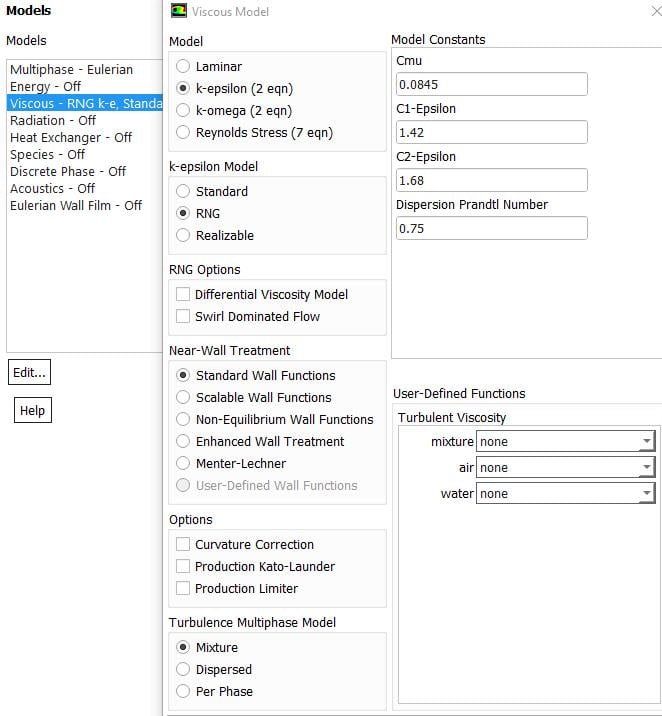
Share screenshots of the models and of the boundary (bulk and phase) and post-processing.
-
December 12, 2018 at 4:15 am
Keyur Kanade
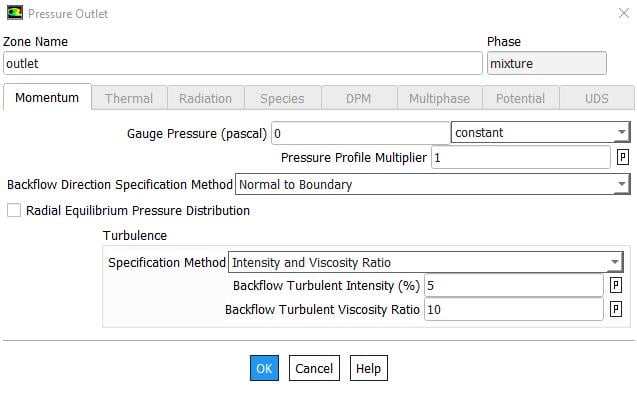
Ansys Employeealso please share screen shots of outlet boundary conditions, models used, other set up etc.Â
-
December 12, 2018 at 6:36 pm
-
December 12, 2018 at 6:52 pm
Amine Ben Hadj Ali
Ansys EmployeeWhat you are now post-processing is just the mass-flux applied at the boundary. You can imagine that Fluent will scale your input of mass-flow at with facets at your inlet so you will see that variation: Fluent divide your 12 kg/s by the water density and total area of inlet to get the normal velocity. What you are now showing is this normal velocity times density divided by the facet area. More important to verify under Report that the mass flow rate for the mixture and water-phase is what you provided as a boundary condition.Â
-
December 12, 2018 at 7:15 pm
daniela
SubscriberThanks for the quick response!Â
I think I got the calculation of the flux and flow. But as my area of the inlet is only 0.088 m2, I was thinking of a flux of about 143 kg/s/m2.Â
I've attached the report in the bottom, but I didn't see any specifications on the mass flow there.Â
Â
Thanks in advance,Â
best regards,Â
Daniela
Fluent
Version: 3d, pbns, eulerian, rngke, transient (3d, pressure-based, Eulerian, RNG k-epsilon, transient)
Release: 19.2.0
Title:Â
Â
Â
Models
Â
  Model               Settings            Â
 Â
  Space               3D               Â
  Time                Unsteady, 1st-Order Implicit  Â
  Viscous              RNG k-epsilon turbulence model Â
  Wall Treatment           Standard Wall Functions     Â
  RNG Differential Viscosity Model  Disabled            Â
  RNG Swirl Dominated Flow Option  Disabled            Â
  Multiphase k-epsilon Models    Mixture k-epsilon        Â
  Heat Transfer           Disabled            Â
  Solidification and Melting     Disabled            Â
  Species              Disabled            Â
  Coupled Dispersed Phase      Disabled            Â
  NOx Pollutants           Disabled            Â
  SOx Pollutants           Disabled            Â
  Soot                Disabled            Â
  Mercury Pollutants         Disabled            Â
Â
Â
Material Properties
Â
  Material: water-liquid (fluid)
Â
   Property            Units   Method   Value(s) Â
  Â
   Density             kg/m3   constant  998.2   Â
   Cp (Specific Heat)       j/kg-k  constant  4182   Â
   Thermal Conductivity      w/m-k   constant  0.6    Â
   Viscosity            kg/m-s  constant  0.001003 Â
   Molecular Weight        kg/kmol  constant  18.0152  Â
   Thermal Expansion Coefficient  1/k    constant  0     Â
   Speed of Sound         m/s    none    #f    Â
Â
  Material: air (fluid)
Â
   Property            Units   Method   Value(s)  Â
  Â
   Density             kg/m3   constant  1.225    Â
   Cp (Specific Heat)       j/kg-k  constant  1006.43   Â
   Thermal Conductivity      w/m-k   constant  0.0242   Â
   Viscosity            kg/m-s  constant  1.7894e-05 Â
   Molecular Weight        kg/kmol  constant  28.966   Â
   Thermal Expansion Coefficient  1/k    constant  0      Â
   Speed of Sound         m/s    none    #f     Â
Â
  Material: aluminum (solid)
Â
   Property        Units  Method   Value(s) Â
  Â
   Density        kg/m3  constant  2719   Â
   Cp (Specific Heat)   j/kg-k  constant  871    Â
   Thermal Conductivity  w/m-k  constant  202.4   Â
Â
Â
Cell Zone Conditions
Â
  Zones
Â
   name          id  type  Â
  Â
   negativgro--freeparts  3  fluid Â
Â
  Setup Conditions
Â
   negativgro--freeparts
Â
     Condition    Value Â
    Â
     Frame Motion?  no   Â
     Mesh Motion?  no   Â
Â
Â
Boundary Conditions
Â
  Zones
Â
   name             id  type       Â
  Â
   inlet            6  mass-flow-inlet Â
   wall-negativgro--freeparts  1  wall       Â
   outlet            7  pressure-outlet Â
   wall1            8  wall       Â
   wall2            9  wall       Â
   wall3            10  wall       Â
   wall4            11  wall       Â
   wall5            12  wall       Â
   wall6            13  wall       Â
Â
  Setup Conditions
Â
   inlet
Â
     Condition  Value Â
    Â
Â
   wall-negativgro--freeparts
Â
     Condition   Value Â
    Â
     Wall Motion  0   Â
Â
   outlet
Â
     Condition  Value Â
    Â
Â
   wall1
Â
     Condition   Value Â
    Â
     Wall Motion  0   Â
Â
   wall2
Â
     Condition   Value Â
    Â
     Wall Motion  0   Â
Â
   wall3
Â
     Condition   Value Â
    Â
     Wall Motion  0   Â
Â
   wall4
Â
     Condition   Value Â
    Â
     Wall Motion  0   Â
Â
   wall5
Â
     Condition   Value Â
    Â
     Wall Motion  0   Â
Â
   wall6
Â
     Condition   Value Â
    Â
     Wall Motion  0   Â
Â
Â
Solver Settings
Â
  Equations
Â
   Equation     Solved Â
  Â
   Flow       yes   Â
   Volume Fraction  yes   Â
   Turbulence    yes   Â
Â
  Numerics
Â
   Numeric             Enabled Â
  Â
   Absolute Velocity Formulation  yes   Â
Â
  Unsteady Calculation Parameters
Â
                     Â
  Â
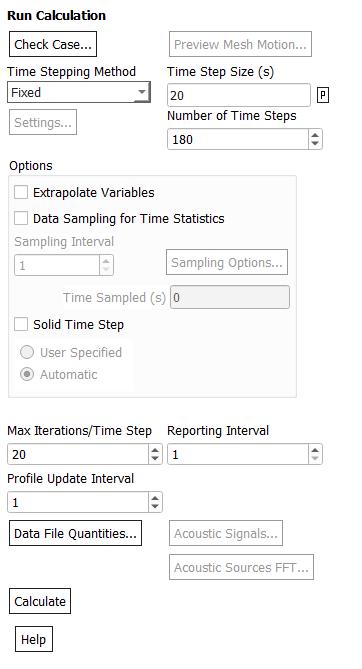
   Time Step (s)          10 Â
   Max. Iterations Per Time Step  5  Â
Â
  Relaxation
Â
   Variable           Relaxation Factor Â
  Â
   Pressure           0.3        Â
   Density           1         Â
   Body Forces         1         Â
   Momentum           0.7        Â
   Volume Fraction       0.5        Â
   Turbulent Kinetic Energy   0.8        Â
   Turbulent Dissipation Rate  0.8        Â
   Turbulent Viscosity     1         Â
Â
  Linear Solver
Â
                  Solver   Termination  Residual Reduction Â
   Variable           Type    Criterion   Tolerance      Â
  Â
   Pressure           V-Cycle  0.1                Â
   X-Momentum          Flexible  0.1      0.7         Â
   Y-Momentum          Flexible  0.1      0.7         Â
   Z-Momentum          Flexible  0.1      0.7         Â
   Volume Fraction       Flexible  0.1      0.7         Â
   Turbulent Kinetic Energy   Flexible  0.1      0.7         Â
   Turbulent Dissipation Rate  Flexible  0.1      0.7         Â
Â
  Pressure-Velocity Coupling
Â
   Parameter  Value         Â
  Â
   Type    Phase Coupled SIMPLE Â
Â
  Discretization Scheme
Â
   Variable           Scheme       Â
  Â
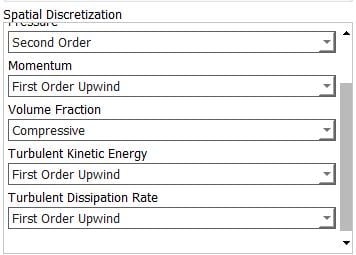
   Pressure           Second Order    Â
   Momentum           First Order Upwind Â
   Volume Fraction       Compressive     Â
   Turbulent Kinetic Energy   First Order Upwind Â
   Turbulent Dissipation Rate  First Order Upwind Â
Â
  Solution Limits
Â
   Quantity             Limit  Â
  Â
   Minimum Absolute Pressure    1    Â
   Maximum Absolute Pressure    5e+10  Â
   Minimum Temperature       1    Â
   Maximum Temperature       5000  Â
   Minimum Turb. Kinetic Energy   1e-14  Â
   Minimum Turb. Dissipation Rate  1e-20  Â
   Maximum Turb. Viscosity Ratio  100000 Â
Â
Â
Â
Â
-
December 12, 2018 at 7:25 pm
Amine Ben Hadj Ali
Ansys Employee -
December 13, 2018 at 10:46 am
daniela
Subscriber"mfr_air_inlet-rfile"
"Time Step" "mfr_air_inlet etc.."
("Time Step" "mfr_air_inlet" "flow-time")
0 0 0
1 0 10
2 0 20
3 0 30
4 0 40
5 0 50
6 0 60
7 0 70
8 0 80
9 0 90
10 0 100

11 0 110

12 0 120
13 0 130
14 0 140
15 0 150
16 0 160
17 0 170
18 0 180
19 0 190
20 0 200
Â
Â
"mfr_mixture_inlet-rfile"
"Time Step" "mfr_mixture_inlet etc.."
("Time Step" "mfr_mixture_inlet" "flow-time")
0 12.49999999999998 0
1 12.49999999999998 10
2 12.49999999999998 20
3 12.49999999999998 30
4 12.49999999999998 40
5 12.49999999999998 50
6 12.49999999999998 60
7 12.49999999999998 70
8 12.49999999999998 80
9 12.49999999999998 90
10 12.49999999999998 100
11 12.49999999999998 110
12 12.49999999999998 120
13 12.49999999999998 130
14 12.49999999999998 140
15 12.49999999999998 150
16 12.49999999999998 160
17 12.49999999999998 170
18 12.49999999999998 180
19 12.49999999999998 190
20 12.49999999999998 200
Â
Â
"mfr_water_inlet-rfile"
"Time Step" "mfr_water_inlet etc.."
("Time Step" "mfr_water_inlet" "flow-time")
0 12.49999999999998 0
1 12.49999999999998 10
2 12.49999999999998 20
3 12.49999999999998 30
4 12.49999999999998 40
5 12.49999999999998 50
6 12.49999999999998 60
7 12.49999999999998 70
8 12.49999999999998 80
9 12.49999999999998 90
10 12.49999999999998 100
11 12.49999999999998 110
12 12.49999999999998 120
13 12.49999999999998 130
14 12.49999999999998 140
15 12.49999999999998 150
16 12.49999999999998 160
17 12.49999999999998 170
18 12.49999999999998 180
19 12.49999999999998 190
20 12.49999999999998 200
Â
Â
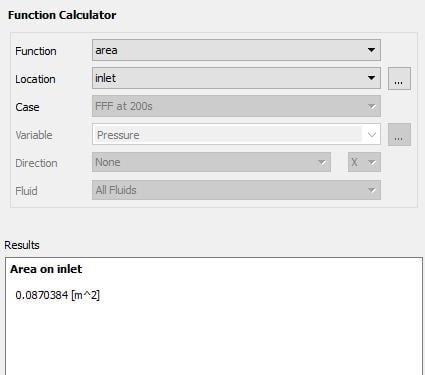
The flow rates seem to be correct (I've chosen different time steps now). But the CFD Post is still showing the same for the flux. Is there any possibility to check the surface area in fluent? If I check it in DM it says 0.088 m2. And if I divide 12.5 kg/s by 0.088 m2, it should be 142 kg/s/m2, right?Â
Could be that I got this wrong somehow.Â
Best regards,Â
Daniela -
December 13, 2018 at 12:17 pm
Rob
Forum ModeratorIn Fluent go to the Surface Integrals (Post Processing and/or Reports), one of those gives area.Â
-
December 13, 2018 at 12:20 pm
Amine Ben Hadj Ali
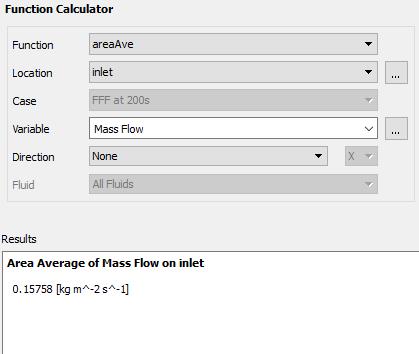
Ansys Employee1/Is the contour plot from CFD-Post? Then please go to Calculators and make an area average of it at your Inlet
2/Area inf Fluent: Reports>Surface Integral>Choose Area and then your boundary
-
December 13, 2018 at 1:35 pm
-
December 13, 2018 at 1:57 pm
Amine Ben Hadj Ali
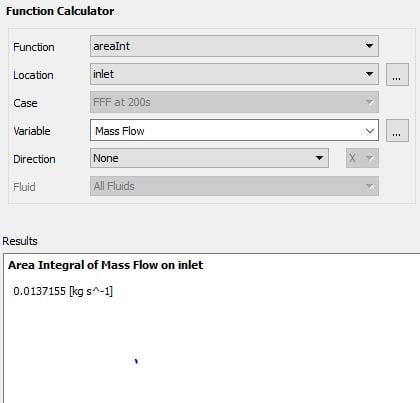
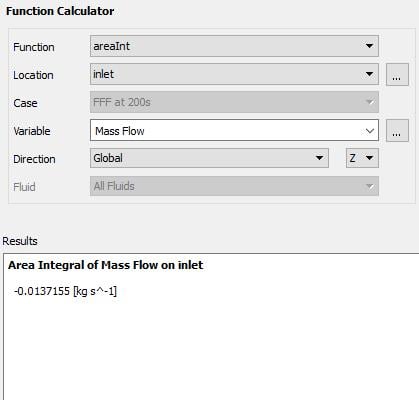
Ansys EmployeeIn CFD-Post make Area Integral of Mass Flow at the inlet. Does it fit your 12 kg/s?
-
December 13, 2018 at 2:04 pm
-
December 13, 2018 at 2:08 pm
Amine Ben Hadj Ali
Ansys EmployeeCan you please go back to Fluent and check there 2. In Fluent I am not aware about such a variable called mass flow but with dimension of flux.
Â
Are you working with *.dat file in CFD-Post or with *.cdat file? Which version are you using?
-
December 13, 2018 at 2:21 pm
daniela
SubscriberIn Fluent I can't find the variable mass flow.Â
I'm using version 19.2, and for CFD-Post it's *.cdat.Â
Best regards,Â
Daniela
-
December 13, 2018 at 2:26 pm
Amine Ben Hadj Ali
Ansys EmployeeHi,
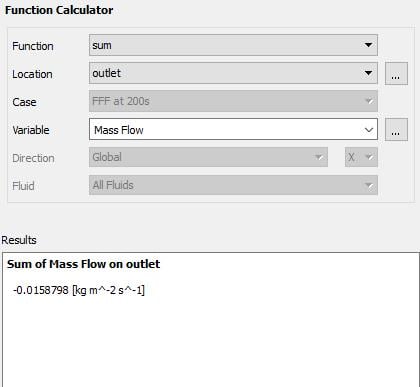
That is what I've actually said: there is no variable called mass flow in Fluent. That is only what CFD-Post does understand when it comes into calculating mass flow based on mass flow variable. In multi-phase runs CFD-Post will try to calculate the integrated mass-flow (your input) based on that variable (which is kg/m^2s). Please build the sum of the variable "mass flow" in CFD-Post. I would say it would match the 12 kg/s.
-
December 13, 2018 at 2:33 pm
Amine Ben Hadj Ali
Ansys EmployeeThere is no benefit for me to post-process this quantity. An integral report is better or getting contour of velocity and if compressible the density on the inlet is more appropriate.Â
-
December 13, 2018 at 2:39 pm
daniela
SubscriberThis fits. Thank you!Â
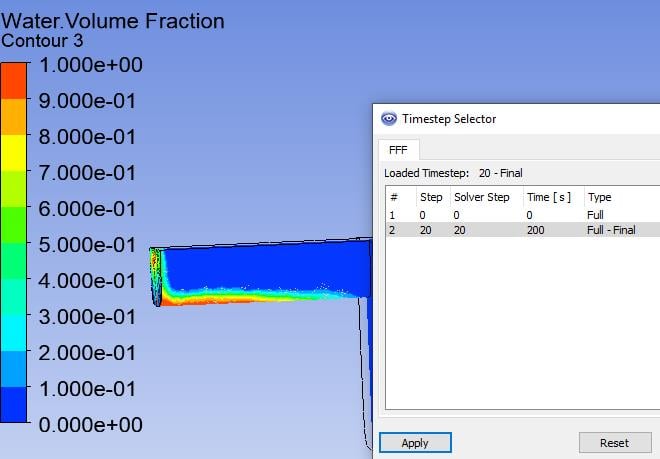
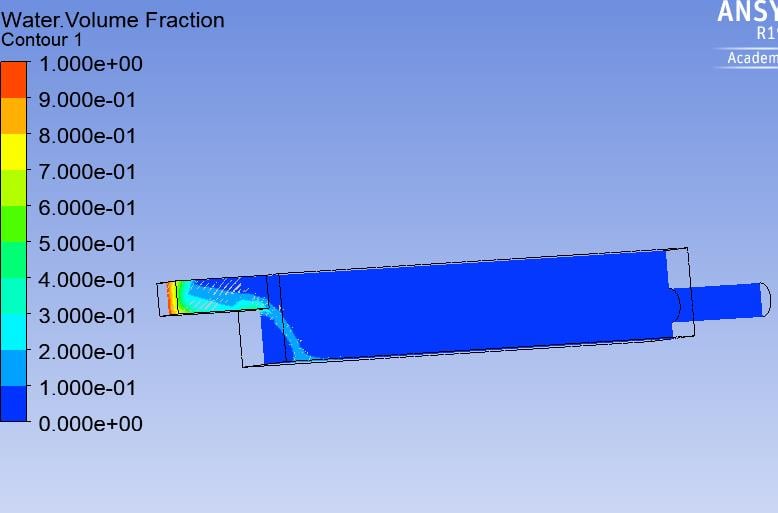
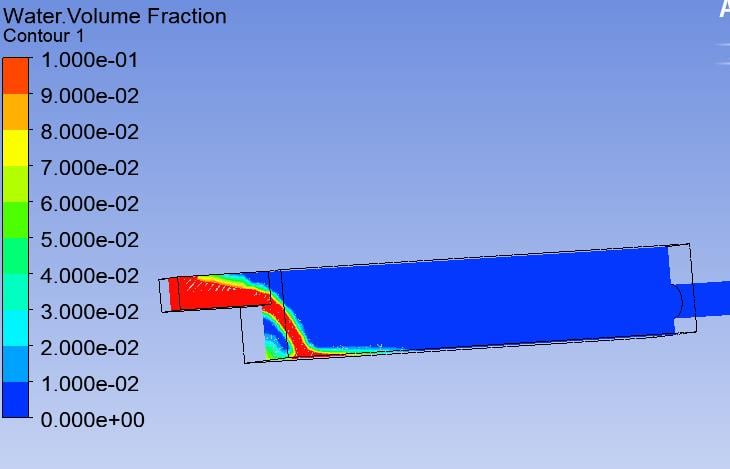
Then there's another thing I don't understand: If I have 12.5 kg/s of inflow and I did run the calculation for 200 s, how is it possible, that the water only reached the point in the graphics (the canal has a length of 1m, so 0.088 m3). With a inflow of 12.5 kg/s of water it should be 2500 kg (or liter) after 200s, which is way more than the volume of the canal. Might be, that I misunderstand the contour "volume fraction".Â
Thanks in advance,Â
best regards.Â
Daniela -
December 13, 2018 at 2:55 pm
Amine Ben Hadj Ali
Ansys EmployeeContour might be correct but as we do not have any idea about your model any comments will be only given by suspicion. We require some informations about your Case: Which boundaries are included and where?Â
Â
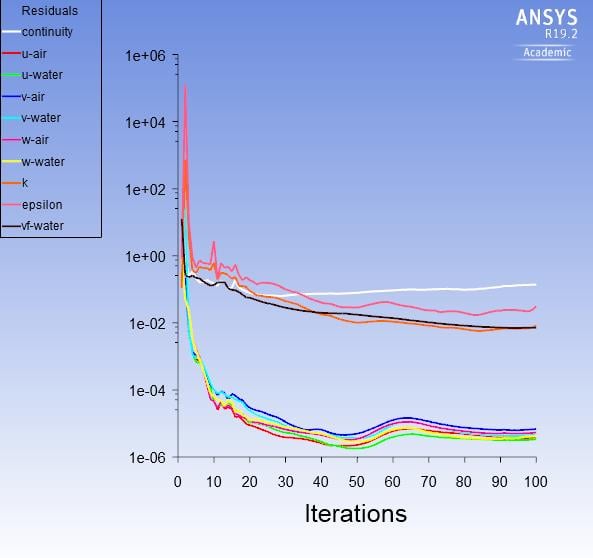
From the plot it looks after a sort of open channel flow (?) where the water flow is sub-critical and that is why the height is decreasing. Check if you have an outlet if water reached that outlet. Moreover post screenshot of Fluent Residuals.
Â
It might be that water reached a level far away but due to coarse resolution the whole vof field is smeared..
Â
-
December 13, 2018 at 4:47 pm
daniela
SubscriberBasically water is filled in an small open container and it should flow into another bigger container with open surface before getting into a pipeline. To model the open surface I've set atmospheric pressure at the top.Â
The big tank has a volume of 2.5 m3, that's why I'm only simulating 200s right now, because I just wanted to see how the water reaches the end of the big container.Â


Â
I have already decreased the maximum of the volume fraction contour, but it still doesnt reach the end of the container or the pipe.
Thanks.Â
Best regards,Â
Daniela Â
-
December 13, 2018 at 4:54 pm
Amine Ben Hadj Ali
Ansys Employee1/Ensure deep convergence every time step. From residual plot your run is not looking as it should. Share with us settings in FLUENT.
2/work with FLUENT post processing to avoid any issues. -
December 13, 2018 at 4:59 pm
Amine Ben Hadj Ali
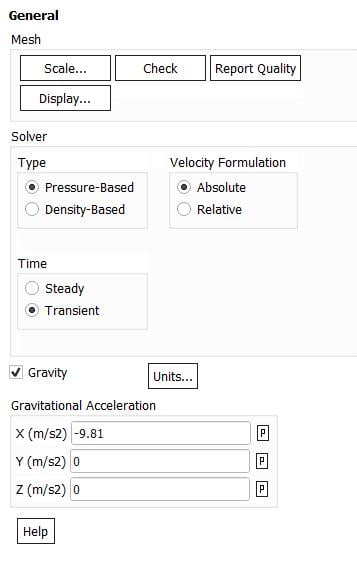
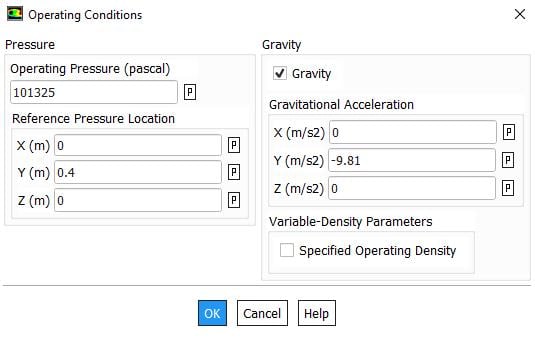
Ansys EmployeeEnsure gravity is set properly and free surface is set as symmetry or free slip wall. Include a air layer above water at inlet in case you want to use pressure boundary at top
-
December 13, 2018 at 5:04 pm
daniela
SubscriberThanks!Â
Is there a way to ensure convergence or do I just have to increase the number of iterations?Â
Best regards.Â
-
December 13, 2018 at 5:14 pm
Amine Ben Hadj Ali
Ansys EmployeeRather smaller time step size and not more than max. of 20 iterations per time step.
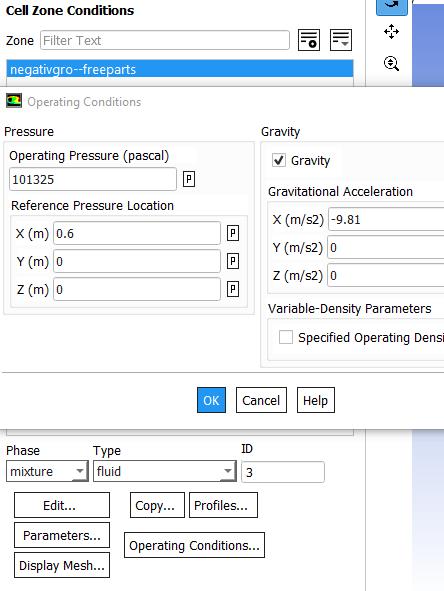
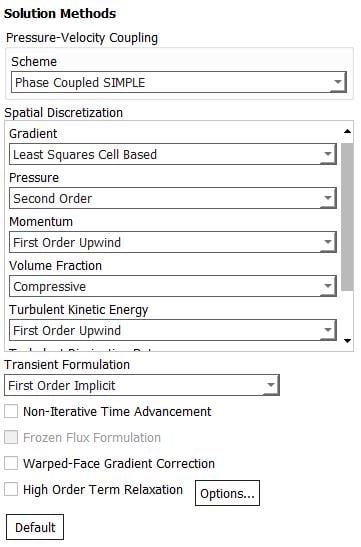
Post screenshot Of solution methods and operating conditions -
December 13, 2018 at 5:23 pm
-
December 13, 2018 at 6:28 pm
Amine Ben Hadj Ali
Ansys EmployeePlease use VOF model with implicit volume fraction and give thai density as operating density. Eulerian model for this case is too complicatedÂ
-
December 13, 2018 at 6:34 pm
daniela
SubscriberOkay.Â
Which density should I set as operating density? Water or air?Â
Best regards,Â
Daniela
-
December 13, 2018 at 7:07 pm
Amine Ben Hadj Ali
Ansys EmployeeGive air as first approximation -
December 13, 2018 at 7:18 pm
Amine Ben Hadj Ali
Ansys EmployeeCheck this
-
- The topic ‘Mass flow inlet in Eulerian VOF model’ is closed to new replies.
-
4803
-
1582
-
1386
-
1242
-
1021
© 2026 Copyright ANSYS, Inc. All rights reserved.