-
-
November 24, 2025 at 10:57 am
2582229122
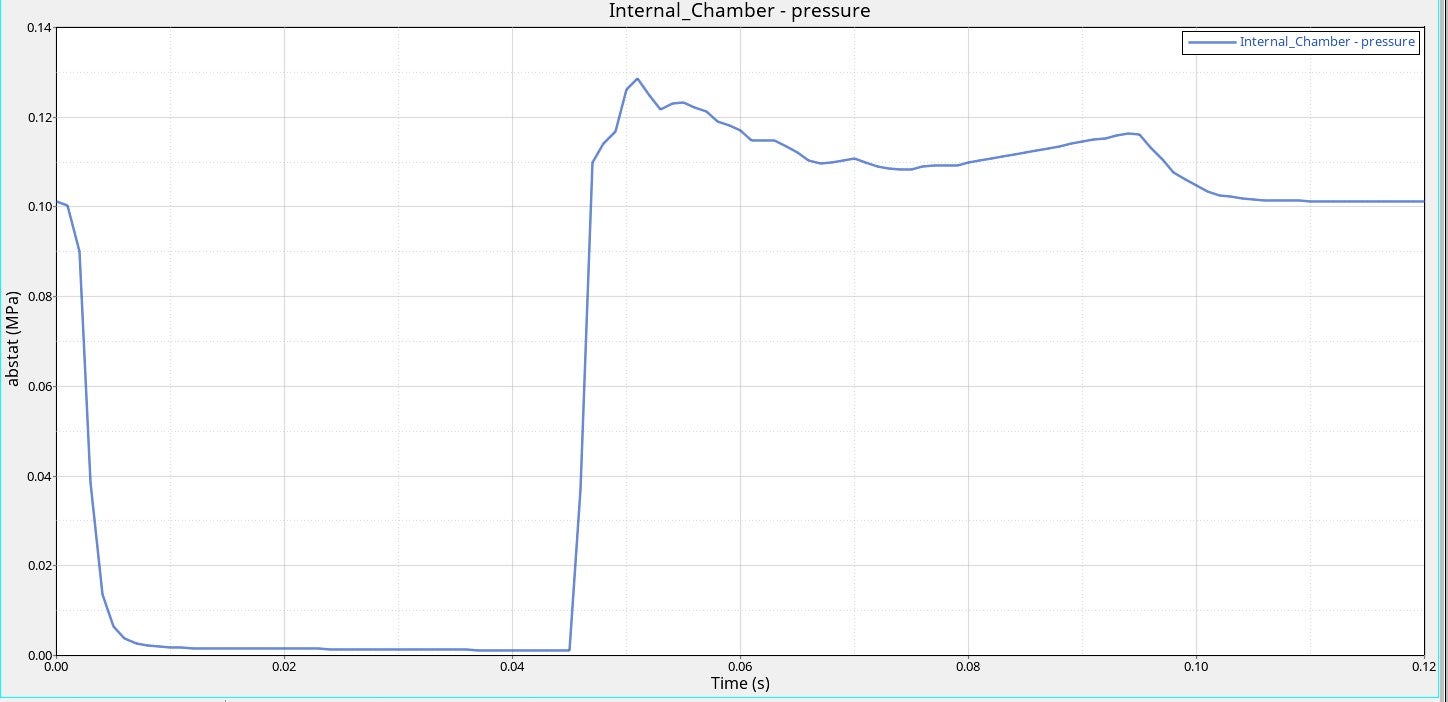
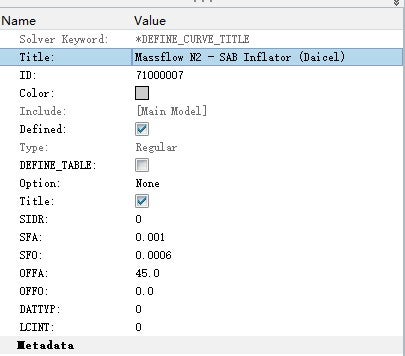
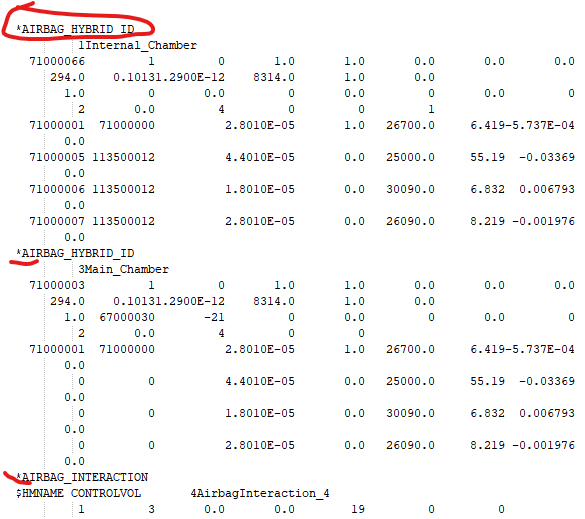
Subscriberi cant understand why my airbag pressure decline to zero in 20ms .The airbag was deployed at 45 ms , i implemented it by defining a delay ,as show in under figure , my airbag's keyword is *AIRBAG_HYBRID .I removed all the components except the airbag, and its pressure stopped dropping. I would greatly appreciate your help.


-
December 10, 2025 at 10:43 am
Vijay
Ansys EmployeeÂ
Â
Hello User,
Could you please share your *AIRBAG_HYBRID_ID card in text format? What do you mean by removing all the components Could you elaborate it more? Also please try to run the model with the latest R16 double precision solver and see If you observe any difference.
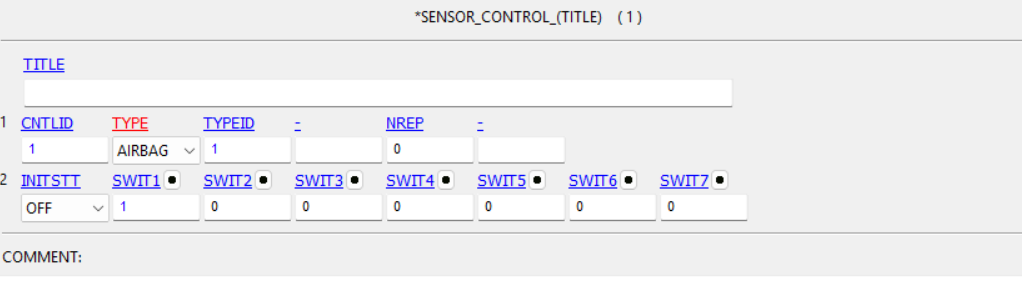
Instead of using Offset in *DEFINE CURVE, Could you use Sensor to delay the airbag deployment.You can acheive it by using *SENSOR_SWITCH and *SENSOR_CONTROL.
Let me know how it goes.Thanks,
Vijay
Introducing Ansys Assistant a 24/7 AI-powered virtual assistant for active Ansys academic customers.
Â
-
December 11, 2025 at 8:29 am
2582229122
SubscriberDear Vijay,
Thank you for your reply. I am currently using the R11 single-precision solver and have encountered some difficulty in setting up sensors for the airbag deployment within this version. I have attached my current model files for your reference, which include the K file and related keyword settings.
You can access the model files via this link:
https://drive.google.com/file/d/1Gn57tRfQHkbB_scGRg7xmRJSLzsMkEKR/view?usp=sharingCould you please review the attached materials and advise on how to correctly implement a sensor-based deployment delay in the R11 framework? Your guidance would be greatly appreciated.
Thank you for your time and support.
Best regards,
-
-
December 11, 2025 at 8:36 pm
Vijay
Ansys EmployeeHello User,
Unfortunately, Ansys employees are unable to download files from the forum, though other users may be able to assist. I recommend trying with a more recent solver, as R11 is quite outdated and we continuously fix bugs and introduce new enhancements in the latest versions.
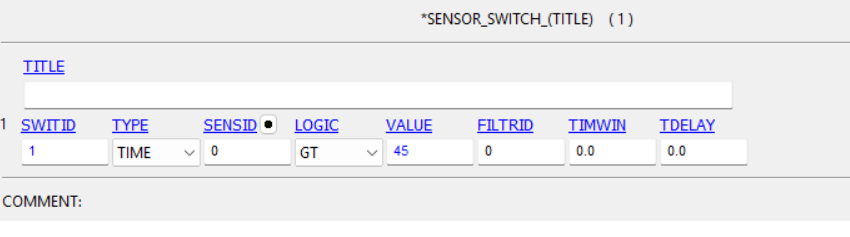
Implementing a sensor is straightforward,you only need to use two cards: SENSOR_SWITCH, which tracks time and creates a trigger, and SENSOR_CONTROL, which deploys the airbag at the specified trigger. Additional details can be found in Volume I of the LS-DYNA manual under Sensors. Please refer to the image below.
Try to implement this in simple model for validation.
I hope this helps.
Thanks,
Vijay
Introducing Ansys Assistant a 24/7 AI-powered virtual assistant for active Ansys academic customers.
-
December 16, 2025 at 12:14 pm
2582229122
SubscriberDear Vijay,
Thank you for your detailed explanation and guidance on implementing the sensor-based deployment delay. I will study the provided card examples and attempt to set it up accordingly.
I have another question regarding my airbag model: I am using the *AIRBAG_PARTICLE keyword in LS-DYNA to create the airbag. When running the same model under the R11 version, I noticed a significant difference in results between the SMP and MPP solvers. Could you advise on how to eliminate or reduce such discrepancies, and which type of solver result (SMP or MPP) is generally closer to real-world behavior?
Thank you again for your support.
Best regards
-
-
December 19, 2025 at 12:17 pm
Vijay
Ansys EmployeeHello User,
 Differences in predictions between the SMP and MPP solvers in LS-DYNA are expected due to the following reasons:
1- Solver-Specific Implementations: Certain LS-DYNA keywords have different subroutines in SMP and MPP, leading to variations in results. For instance, contacts in SMP are not handled as robustly as in MPP, especially for penalty-based ones where small numerical differences in stiffness calculations and force resolution can accumulate over time and lead to artifacts like the unusual deformations.
2- Parallelism and Domain Decomposition: SMP and MPP solvers use different parallel processing strategies. SMP uses shared memory, while MPP divides the model into multiple domains and distribute computations across multiple processors with separate memory. Communication between these domains can introduce slight differences compared to SMP due to the required interpolation and numerical rounding errors. Additionally, the number of cores used in MPP affects domain decomposition, leading to variations in results due to numerical round-off errors in summation order.
To ensure consistent predictions, it is always recommended to stick to a single solver (SMP or MPP) throughout the analysis. For SMP, make sure to set CONST=1 in *CONTROL_PARALLEL or use a negative ncpu value in the execution line, and for MPP, maintain a fixed core count and include *CONTROL_MPP_IO_LSTC_REDUCE in the input file to minimize variations (LS-DYNA Keyword User's Manual Vol. 1).
Please note that the developers usually suggest using MPP, but be aware that if you have old SMP models, not all features are seamlessly supported by MPP, so some modifications into input decks might be required.
You need to perform experimental validation to ensure correlation.I hope this information helps.
Thanks,
Vijay

ÂIntroducing Ansys Assistant a 24/7 AI-powered virtual assistant for active Ansys academic customers.
Have a look at our public help documentation website:Â Ansys Help
For more exciting courses and certifications, hit this link:Â Ansys Innovation Courses | ANSYS Innovation Space
Â
Â
-
- You must be logged in to reply to this topic.
-
5834
-
1906
-
1420
-
1305
-
1021
© 2026 Copyright ANSYS, Inc. All rights reserved.