TAGGED: altium, odb-design, siwave
-
-
March 28, 2022 at 4:42 am
minertom11551
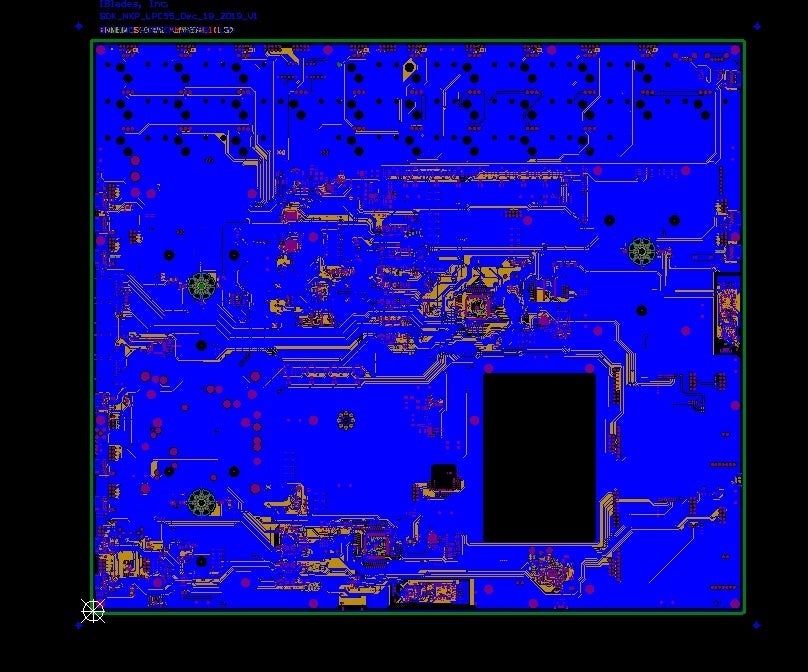
SubscriberI have attempted to import two different boards into Siwave, from two completely different sources and the error looks the same with either board. The best way to describe the problem is to show what the board looks like in Camtasia and then show what it looks like in Siwave. It has to do with how the components are imported.
I do not know what the issue is.
Thank You
Tom
March 29, 2022 at 8:38 amChinmay T
Forum Moderator
Please see the video link below and follow the same steps as shown in the video to import ODB++ file into SIwave.
Altium Designer to ANSYS SIwave via ODB++ - ECAD Part VIII - YouTube
Thanks Chinmay
March 29, 2022 at 2:56 pmDan Dvorscak
Ansys EmployeeAnother option here is to use the Altium EDB Exporter instead of ODB++ to get the geometry into SIwave. EDB is the Ansys internal layout file format and usually is has fewer issues than ODB++. Here is Altium's doc on how to enable that feature:
https://www.altium.com/documentation/altium-designer/interfacing-with-ansys-simulation-tools
March 31, 2022 at 4:27 pmSubscriberYour suggestion seems to have worked.
Thank You
Tom
Viewing 3 reply threads- The topic ‘Importing ODB++ from Altium. Components look like HUGE square shapes.’ is closed to new replies.
Innovation Space Trending discussions
 Top Contributors
-
peteroznewman
 6575
6575 -
scabo
 1906
1906 -
Dennis Chen
 1463
1463 -
javat33489
 1311
1311 -
Shyam Prasad V Atri
1022
Top Rated Tags
© 2026 Copyright ANSYS, Inc. All rights reserved.
Ansys does not support the usage of unauthorized Ansys software. Please visit www.ansys.com to obtain an official distribution.
-


The Ansys Learning Forum is a public forum. You are prohibited from providing (i) information that is confidential to You, your employer, or any third party, (ii) Personal Data or individually identifiable health information, (iii) any information that is U.S. Government Classified, Controlled Unclassified Information, International Traffic in Arms Regulators (ITAR) or Export Administration Regulators (EAR) controlled or otherwise have been determined by the United States Government or by a foreign government to require protection against unauthorized disclosure for reasons of national security, or (iv) topics or information restricted by the People's Republic of China data protection and privacy laws.

 You are navigating away from the AIS Discovery experience