Ansys Assistant will be unavailable on the Learning Forum starting January 30. An upgraded version is coming soon. We apologize for any inconvenience and appreciate your patience. Stay tuned for updates.
Electronics

Electronics

Topics related to HFSS, Maxwell, SIwave, Icepak, Electronics Enterprise and more.

How to extrude a surface to make a 3D object in ANSYS HFSS?

    • Kedi
      Subscriber

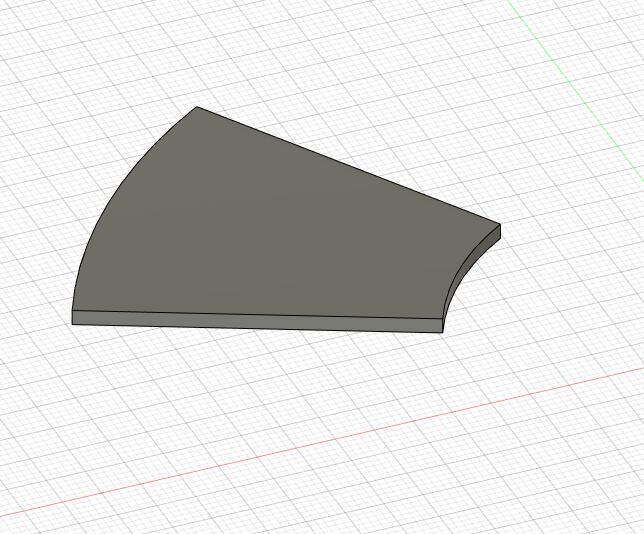
      As you can see from my screenshot below. I want to extrude the arc plane and generate a 3D object like the second screenshot. How do I do it in the ANSYS 2019b?


    • Kedi
      Subscriber

      I guess no one really wants to answer my question...

    • Khalid06
      Subscriber

      Hi,


      Have you solved your problem? Here is how I solved my problem which is quite similar to yours.


      Step 1: I have made a 2D closed polyline. Now this is actually a 2D surface


      Step 2: then I have selected that surface, and then right click it.


      Step 3: choose edit -> sweep -> Along vector


      Step 4: in the bottom, there will be three boxes for X, Y and Z to input your vector direction. If you want to extrude in the z-direction, input X = 0, Y = 0, Z = 1;


      Step 5: then it will ask for the dimension. If you want to make it 10 mm high, input dx = 0, dy = 0, dz = 10


      Step 6: Press enter. You might need to press the enter twice.


      Hope that should work.


      Thank you.


Viewing 2 reply threads
  • The topic ‘How to extrude a surface to make a 3D object in ANSYS HFSS?’ is closed to new replies.

[bingo_chatbox]