

TAGGED: symmetrical-mesh
-
-
October 8, 2021 at 10:11 am
LukBlaz
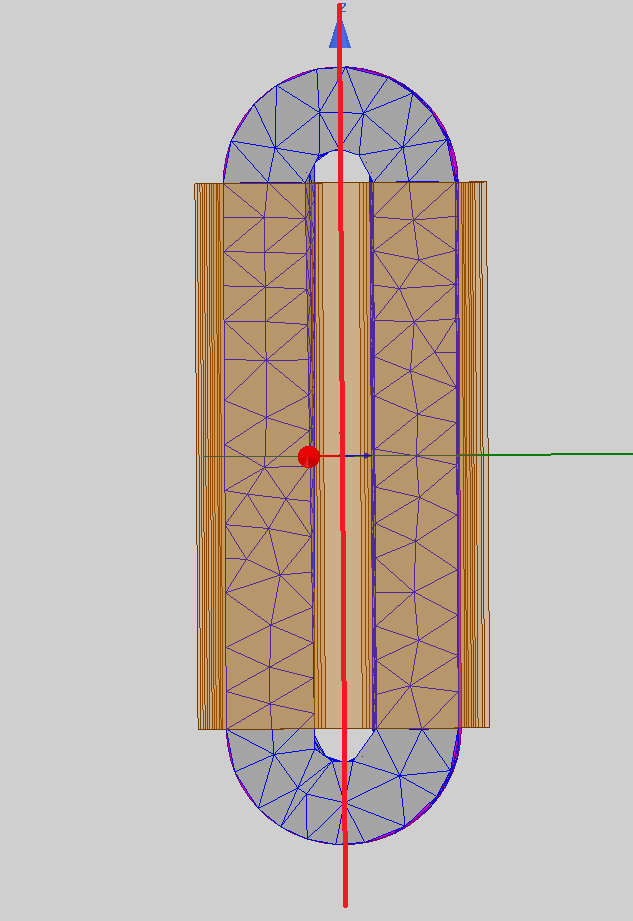
SubscriberI would like to create a mesh that is symmetrical on 2 sites of a plane.
I attached a picture below. This is a 3d model and i would like the mesh to be symmetrical to the red xz-plane that is shown in the picture as this red line (green line on the right is the y.axis).
As you can see the left and right side dont have the same mesh configuration, altough the model is perfectly mirrored around the red line/plane.
Can this be achieved somehow?
Thanks in advance
BR Lukas
October 8, 2021 at 1:07 pmGovindan Nagappan
Ansys EmployeeCut the model in half in Design Modeler. Then mirror one half to make the other half
Use same mesh controls for the original half and the mirror copy. If the program identified the bodies as copies/instances, the mesh is copied from the original to the instance
in mechanical, you can select one body and use "extend to instances" and see if it identifies the copies
Or
Make half model. Mesh half the model. Then send the mesh from one system to another. You can mirror the mesh when you send it to another system. Check model assembly in help section
Model Assembly Specification (ansys.com)
October 11, 2021 at 10:56 amSubscriberHi,
first of all thanks for the answer.
I tried that first approach and it didnt work out, the mirrored copy still gets its own mesh independend from the other half. It definitely gets a bit better and the mesh is closer to mirrored than before but its not 100% the same. Also im working in maxwell, so i guess the "extend to instances" doesnt exist or i couldnt find it.
I tried to second approach too, but couldnt find the option to mirror the mesh in the new system. The link you gave is not working without signing in with a business or institution account and i have neither so i cant open it sadly and i couldnt find the pdf with google too.
Do you have any other possibilities how to make this possible or a working link to the document?
BR Lukas
October 11, 2021 at 12:47 pmAnsys Employee
Options I provided are for Mechanical application and not for Maxwell
Hopefully someone familiar with Maxwell can provide a suggestion
I changed the title to specify Maxwell
October 13, 2021 at 4:56 pmNavya Chode
Forum ModeratorHi @LukBlaz With the full model, you can not get the symmetrical mesh on both sides.
But you can run a half symmetry model and then select all and plot mesh. select Full model on the popup window.
If you didn't see the full model mesh, select all again and plot mesh and select Full model on the popup window again.
This will give you symmetrical mesh visualization on both sides.
Note that this will not solve the other half of the model. It's just because it's symmetric.
See reference pictures below
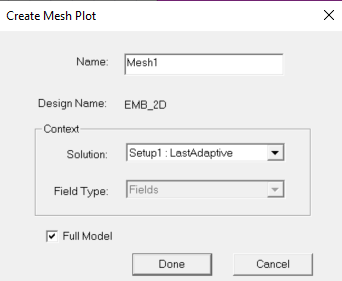
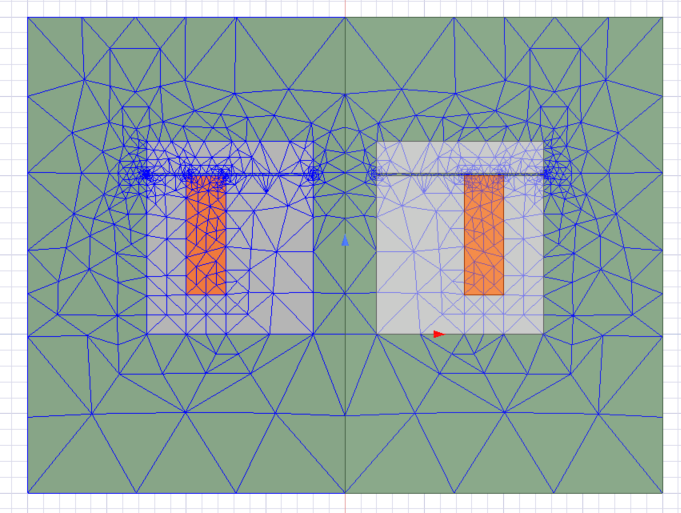
Regards Navya
Viewing 4 reply threads- The topic ‘How can i generate a symmetrical mesh in Maxwell?’ is closed to new replies.
Innovation Space Trending discussions
 Top Contributors
-
peteroznewman
 6660
6660 -
scabo
 1906
1906 -
Dennis Chen
 1469
1469 -
javat33489
 1313
1313 -
Shyam Prasad V Atri
1022
Top Rated Tags
© 2026 Copyright ANSYS, Inc. All rights reserved.
Ansys does not support the usage of unauthorized Ansys software. Please visit www.ansys.com to obtain an official distribution.
-


The Ansys Learning Forum is a public forum. You are prohibited from providing (i) information that is confidential to You, your employer, or any third party, (ii) Personal Data or individually identifiable health information, (iii) any information that is U.S. Government Classified, Controlled Unclassified Information, International Traffic in Arms Regulators (ITAR) or Export Administration Regulators (EAR) controlled or otherwise have been determined by the United States Government or by a foreign government to require protection against unauthorized disclosure for reasons of national security, or (iv) topics or information restricted by the People's Republic of China data protection and privacy laws.

 You are navigating away from the AIS Discovery experience