-
-
January 2, 2020 at 1:30 pm
Ansys_2020
SubscriberHello everyone and happy new year,
I'm doing a static analysis with Ansys Workbench of a train on a rail; I would need to have a mesh with very small elements in the wheel-rail contact area that gradually get bigger as you move away. I tried with the sphere of influence but I cannot make the increase in the size of the elements more gradual. Do you have any advice on how to do it kindly ?. I attach the photo of the model. Thanks in advance.
-
January 2, 2020 at 2:21 pm
peteroznewman
SubscriberYou can use two Spheres of Influence on the same coordinate system on the same body, but with two different Radius values.
-
January 2, 2020 at 4:15 pm
Ansys_2020
Subscriberfirst of all thanks. I tried to do this, the problem is that there is no gradualness between one sphere and another. I would need a method to be able to set for example the minimum size of the smallest element and the "speed" of increasing the size, taking the contact area as the epicenter.
-
January 2, 2020 at 7:57 pm
peteroznewman
SubscriberSasa2020,
Click on Mesh and in the Details window are several settings that control the speed the mesh will transition from small elements to larger elements. In the Sizing category is a setting called Growth Rate and is 1.2 by default. Set it to 1.05 to slow it down a lot. Then in the Quality category, Smoothing can be set to High and the Mesh Metric can be set to Element Quality and the Target Quality can be raised to help get a better mesh.
-
January 3, 2020 at 2:08 pm
Ansys_2020
SubscriberThank you very much!.
-
January 5, 2020 at 2:17 pm
Ansys_2020
SubscriberHello everyone,
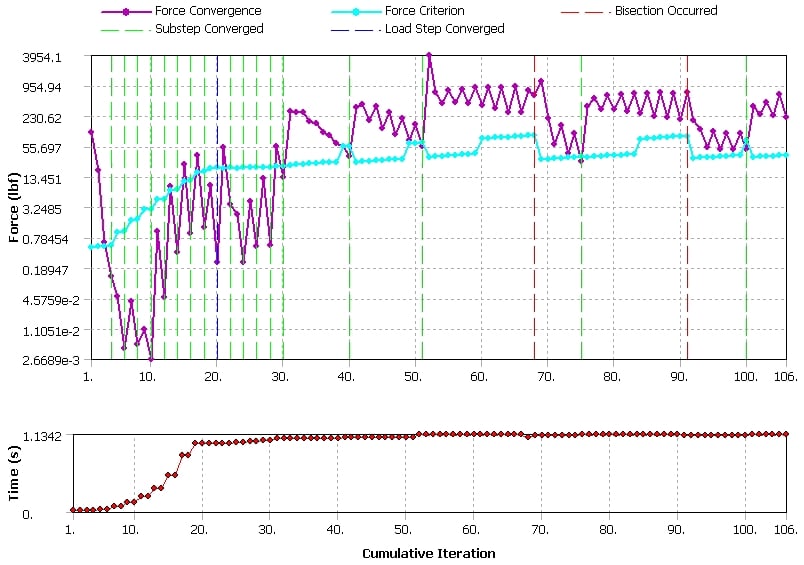
I managed to make this mesh (I attach photos and details). The problem is that for the moment the solver after a while gives me this error: "An unknown error occurred during solution. Check the Solver Output on the Solution Information object for possible causes". Could it be that the problem is related to the fact that my PC cannot elaborate such a simulation ?. My goal is to converge the tensions in the wheel-rail contact areas (I have to find the maximum normal stress ). Furthermore, as soon as I change the parameters, Ansys creates a diversified mesh between the tracks (on the one hand it uses quadratic elements, from the other triangular). Do you have any advice ? Thanks again.
-
January 6, 2020 at 12:48 am
peteroznewman
SubscriberI recommend you go back to CAD and slice the model down to 1/4 size so you are only studying one wheel/rail contact and use symmetry on the two cut planes to support the structure. That will make the solution go a lot faster and may resolve the error. You can find out details of the error by opening the Solution Output file under the Solution Information folder. Search for the word Error and reply with the text of that error.
-
January 7, 2020 at 1:50 pm
Ansys_2020
Subscriberthe error is certainly caused by the high calculation time. in fact with a single quarter of a model it will take many hours to complete the simulation. I had thought of using the symmetry constraint but in my case I don't think I can use it because it is the case of a train in curves. I'm looking for a compromise. Thanks again. -
January 10, 2020 at 11:30 am
Ansys_2020
SubscriberHello everyone,
I'm trying to resize the mesh in order to have fewer elements but every time I change parameters Ansys does it diversified between the 2 tracks or gives me an error. I would like to "copy" the mesh I want to the other track. I tried the mesh copy command but in my case I saw that I can't use it because the binaries are mirrored. Do you kindly have any advice on what I can do? thanks again.
-
January 19, 2020 at 3:02 pm
peteroznewman
SubscriberI can have a look at your model. Open it in Mechanical, and on the Mesh, Clear Generated Data, then File, Save the project, then File, Archive and save a .wbpz file. You can attach that file to your reply.
-
January 19, 2020 at 3:29 pm
Ansys_2020
Subscriberthank you so much for your availability Sir.
-
January 20, 2020 at 11:22 am
peteroznewman
SubscriberAttached is a model that has two steps. In step 1 gravity settles the wheels on the rail. That step converges. In step 2, the pressure on the pin is applied. I interrupted the solution because the progress was slow. Some improvements to the mesh should help that to converge faster and/or get to the full load.
I made a lot of changes, so take a look at the model and come back with questions.
Attached is an ANSYS 19.2 archive.
-
January 20, 2020 at 12:04 pm
Ansys_2020
Subscriberfirst of all thank you very much for your availability sir. I will let you know as soon as possible. -
January 21, 2020 at 8:58 am
Ansys_2020
SubscriberHello Sir,
unfortunately in my pc I can't start the simulation due to the lack of physical memory (I attach the error). I tried to resize the model but for now I can't finish the simulation. I kindly wanted to ask you if, in your opinion, is it possible to resize the model for my pc (maybe with the mesh, losing some information far from the contact area or changing the analysis settings) or should I start it in a more powerful pc? In the latter case, would it be possible to know first if the model works (i.e. to find the most stressed external wheels) ?. Looking forward to your reply, I greet you and thank you again.
-
January 21, 2020 at 11:49 am
peteroznewman
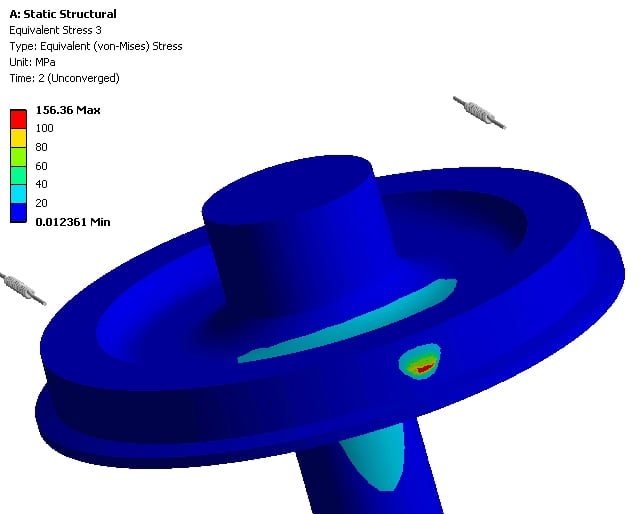
SubscriberHere is the stress on the highly stressed wheel with 12% of the pressure load applied.
Â
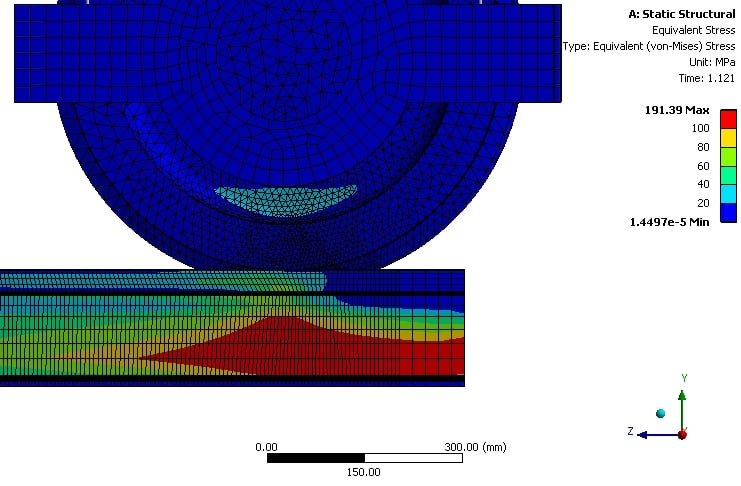
It looks like you should lengthen the rail as it has a significant stress from the lateral load.
The model used 65 GB of RAM to run on 15 cores. Below is the estimate of what it needed to solve on the Direct solver.
DISTRIBUTED SPARSE MATRIX DIRECT SOLVER.
 Number of equations =    2741893,   Maximum wavefront =   486
 Local memory allocated for solver             =  1860.268 MB
 Local memory required for in-core solution    =  1503.372 MB
 Local memory required for out-of-core solution =   511.975 MB
 Total memory allocated for solver             = 35643.631 MB
 Total memory required for in-core solution    = 28801.184 MB
 Total memory required for out-of-core solution =  9127.276 MB
If you can upgrade your RAM to at least 16 GB instead of the 8 GB you have now, it could solve out-of-core. If you can afford it, install the maximum RAM your motherboard supports. Â
This model could be cut in half and use symmetry through the center of the pin. That would reduce the memory requirements.
-
January 29, 2020 at 3:31 pm
Ansys_2020
SubscriberHi Sir,
if i am not rude, can i kindly ask you one last thing? i opened a new post:
/forum/forums/topic/archard-s-law-ansys-apdl-command/
I put the command under each contact. I have read the ansys guide, but I don't understand how to take and plot the results. thanks again.
Regards
-
January 30, 2020 at 12:31 pm
peteroznewman
SubscriberIÂ reply with what I know to be true, and sometimes build a model to be sure. In this case, I don't know, but since you asked nicely, I made a guess in the other discussion.
-
- The topic ‘gradual mesh sizing wheel-rail contact’ is closed to new replies.
-
5074
-
1813
-
1387
-
1248
-
1021
© 2026 Copyright ANSYS, Inc. All rights reserved.