Ansys Assistant will be unavailable on the Learning Forum starting January 30. An upgraded version is coming soon. We apologize for any inconvenience and appreciate your patience. Stay tuned for updates.
Electronics

Electronics

Topics related to HFSS, Maxwell, SIwave, Icepak, Electronics Enterprise and more.

Exporting fields from simulation

TAGGED: ,

    • sudrescu
      Subscriber

      Hello! I have a hfss simulation of a quarter wave resonator with some adjustments. I found the resonant frequency and I am able to plot the electric field inside the resonator at various points. But I want to export these values (basically the electric field at each point in space, (x,y,z,Ex,Ey,Ez)), for example as a CVS file. How can I do that (even in a given plane is ok, if doing it in 3D is not possible). Also, for a fixed frequency, how can I adjust the spatial resolution of the electric field? Thank you!


    • dushyant.marathe
      Ansys Employee

      Hi Sudrescu,

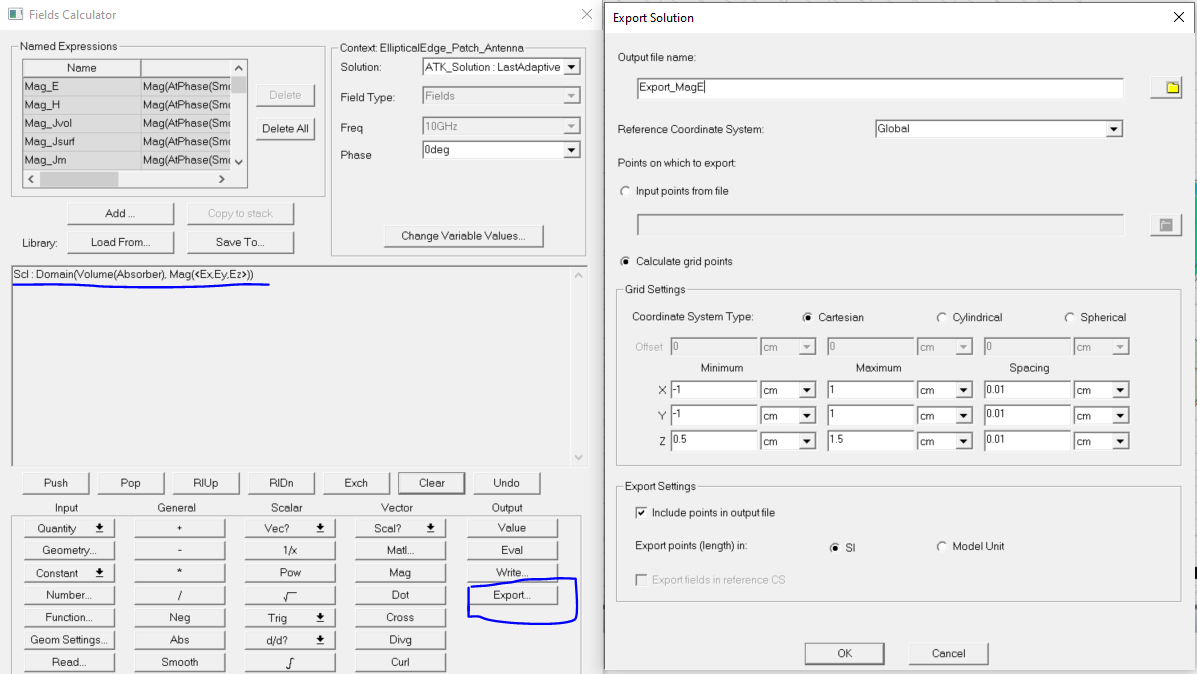
      You can use 'Field Calulator' available in HFSS. Click the ‘Export’ button in the ‘Fields Calculator’. This opens the ‘Export Solution’ dialog box. Select the suitable Co-ordinate system, check ‘Calculate grid points’, ‘Cartesian’. Enter suitable ‘Minimum’ and ‘Maximum’ data points for Geometry/Volume under consideration. These data points can be read from ‘Model’ tree for Geometry/Volume under consideration. Here I have exported MagE, you can give a try for Field Quantity as per need.


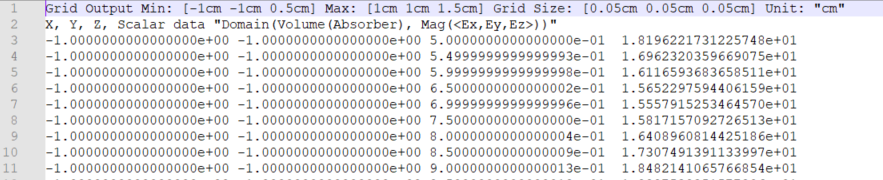
      Clicking 'Export' would give you .fld file with header looks like as shown below. You can change File extenstion to .csv manually.


       Hope this helps.

Viewing 1 reply thread
  • You must be logged in to reply to this topic.
[bingo_chatbox]