

TAGGED: ansys-simplorer, simplorer
-
-
August 20, 2020 at 1:50 pm
chandus127
SubscriberThe example models in simplorer are used to run finely but now I am seeing errors like this.
August 26 (C:/Users/cgoli/Desktop/)
....................
fbrc3 (C:/Program Files/AnsysEM/AnsysEM19.3/Win64/Examples/Twin Builder/Applications/PowerSystem/)
fbrc3_pwm38e
[info] Compilation... (9:24:59 AM Aug 20, 2020)
[info] Compiler completed successfully. (Time = 1 sec) (9:25:03 AM Aug 20, 2020)
[info] Analyzing... (9:25:03 AM Aug 20, 2020)
[error] [Sim2000App] Error - Failed to elaborate model DLL. Please recompile: File: Simplorer^Elements$Power^System^VHDLAMS$Power^System^VHDLAMS$fbrc3_mod.dll Model: fbrc3
>> Prepare (9:25:07 AM Aug 20, 2020) [error] [Sim2000App] Error - Failed to elaborate model DLL. Please recompile: >> Prepare (9:25:07 AM Aug 20, 2020)
[error] SimVHDL.dll [Start] Error 307 - Failed to add compiled model or its children: Simplorer^Elements$Power^System^VHDLAMS$Power^System^VHDLAMS$fbrc3_mod.dll >> Prepare (9:25:07 AM Aug 20, 2020)
[error] [Sim2000App] Error 10532 - Error encountered while PREPARE. >> Close (9:25:07 AM Aug 20, 2020)
[error] Simulation completed with execution error on server: Local Machine. (9:25:07 AM Aug 20, 2020)
.......................
The simulation model I have created used to run perfectly but it is showing the same errors. I tried to load examples just to cross check the simulations but none of them are working.
I have attached an image showing the errors tab.
September 8, 2020 at 12:36 pmrtk
Ansys EmployeeHello Chandra,nnThe reason for the error is that there is a mistake in the VHDL lib alias list that is stored in the project. After you load the project, go to Tools > Library Tools > Manage Twin Builder Aliases...nIn the dialog make the following change: n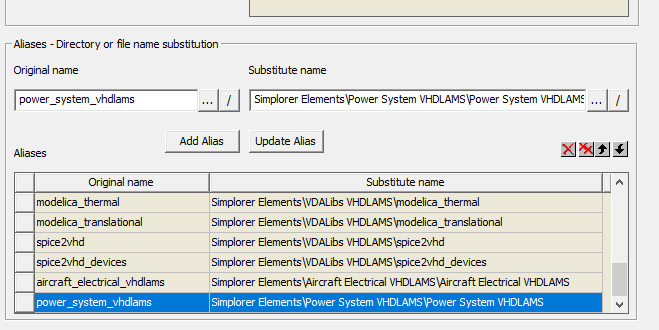 After that go to Tools > Project Tools > Update Definition... (turn on 'Show All Items') and update all definitions.nAfter that the em_converter model should appear in the model definition list in the project manager window and the simulation should run. There are some other examples of the Power Systems VHDLAMS library components that have the same issue. We will fix those examples for the upcoming release.nnRegards,
January 3, 2021 at 2:00 pm
After that go to Tools > Project Tools > Update Definition... (turn on 'Show All Items') and update all definitions.nAfter that the em_converter model should appear in the model definition list in the project manager window and the simulation should run. There are some other examples of the Power Systems VHDLAMS library components that have the same issue. We will fix those examples for the upcoming release.nnRegards,
January 3, 2021 at 2:00 pmMomo093
SubscriberHallo ,nnI have the same problem while running the twin builder:n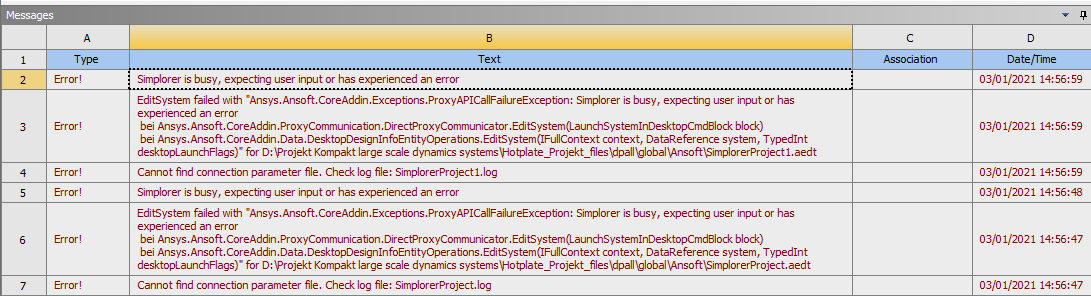 nCan you please more explain me how to fix this problem ?nThank you nBest regardsnMomon
Viewing 2 reply threads
nCan you please more explain me how to fix this problem ?nThank you nBest regardsnMomon
Viewing 2 reply threads- The topic ‘Error while running Simplorer (Twin Builder) examples’ is closed to new replies.
Innovation Space Trending discussions
 Top Contributors
-
peteroznewman
 6465
6465 -
scabo
 1906
1906 -
Dennis Chen
 1458
1458 -
javat33489
 1308
1308 -
Shyam Prasad V Atri
1022
Top Rated Tags
© 2026 Copyright ANSYS, Inc. All rights reserved.
Ansys does not support the usage of unauthorized Ansys software. Please visit www.ansys.com to obtain an official distribution.
-



 You are navigating away from the AIS Discovery experience