-
-
April 20, 2021 at 12:35 pm
EmilyJennings
SubscriberI am running Maxwell 3D and am new to Ansys. When I plot the J-Vector field, I get a few large red arrows that messes with the rest of my scale. I've attached a picture of the arrow. I've changed a few settings but that just moves the arrow to a new location. n -
April 21, 2021 at 11:47 am
Navya Chode
Forum Moderator.HiEmilyJennings ,
To change the appearance of a vector field plot's arrows:
1) Click Maxwell3D or Maxwell2D and selectFields>Modify Plot Attributes.
The Select Plot Folder window appears.
2. Select the plot folder you want to modify, and then click OK.
A dialog box with attribute settings for the selected folder appears.
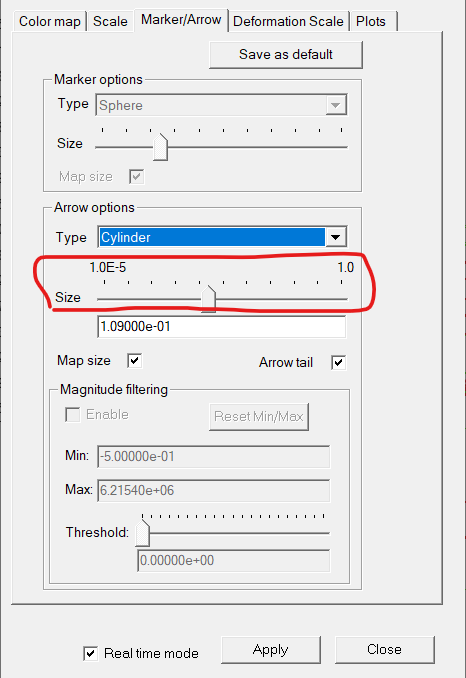
3. Click the Marker/Arrow tab.
You can change the size of the arrows or change other options as required.
Navya
. -
April 21, 2021 at 12:41 pm
EmilyJennings
SubscriberHey Array,
I have done that. My issue is there is something wrong with the simulation causing the red arrow that messes with the rest of my scale. The red arrows are about 90,000 A/m^2 and the rest of the arrows are about 6,000 A/m^2. I think there is a setting that is wrong that is causing a 15X outlier which is ruining my scale. I just need to remove those red arrows to fix the rest of the simulation.
Thanks!
-
April 28, 2021 at 2:44 pm
DELI
Ansys Employee.Hi EmilyJennings ,
For display, I have to suggestions:
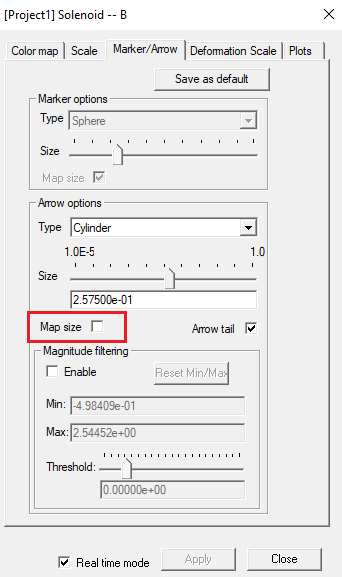
1 uncheck "map size" in Marker/Arrow tab, that usually will changing off scaled arrows for display.
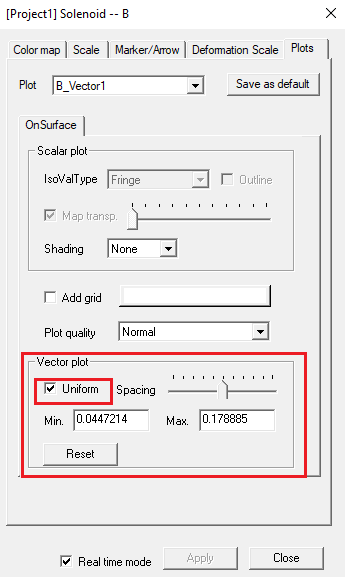
2 uncheck Uniform in Plot tab, that usually matches the arrow size to field amplitude.
For simulation accuracy, I will suggest refine mesh or heal geometry, an off scaled arrow could be caused by a non-sufficient mesh or geometry issue.
.
-
- The topic ‘Big Red Arrow’ is closed to new replies.
-
5849
-
1906
-
1420
-
1305
-
1021
© 2026 Copyright ANSYS, Inc. All rights reserved.