-
-
April 23, 2026 at 5:43 pm
Sébastien Labbé
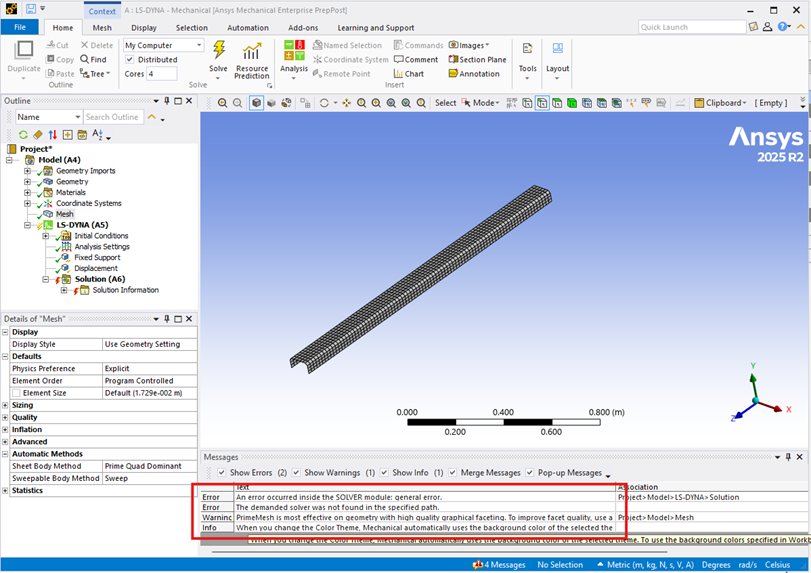
SubscriberI find a lot of posts about this error using the free student version, but here we have the academic/research licences and we still experience this error when trying to solve a dummy problem with LS-Dyna:
Our sales rep certifies that we are supposed to have access to that solver with our licences. Would you please tell us how to use this solver? -
April 23, 2026 at 8:55 pm
Nanda
Ansys EmployeeHello Sebastien,
Was this a new installation? Probably LS-DYNA was opted during installation process? A quick way to confirm this is to look for LS-DYNA default solvers in this path: C:\Program Files\ANSYS Inc\v252\ansys\bin\winx64 you should see below:
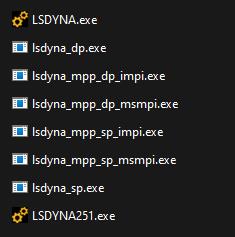
If you don't see the above default solvers, LS-DYNA was not selected during installation. Please uninstall everything, and while re-installing make sure you opt for LS-DYNA, when the installation wizard asks for "please select products to be installed"
Regards,
Nanda.
Have a look at our public help documentation website: Ansys Help
For more exciting courses and certifications, hit this link: Ansys Innovation Courses | ANSYS Innovation Space
Guidelines for Posting on Ansys Learning Forum

-
April 24, 2026 at 6:26 am
ErKo
Ansys EmployeeHi
Seems you are using Enterprise PrePost very strange (this is commercial licence).Anyway to check for LS-DYna install like Nanda said (alternative):
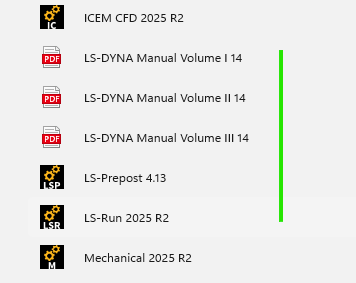
You can also check that you have installed LS-DYna, by seeing if these are installed and visible as shown below (in 2025R2 start menu folder):
All the best
Erko -
April 24, 2026 at 12:45 pm
Sébastien Labbé
SubscriberHello Nanda,
Yes, indeed, LS-Dyna was not installed, when I looked in the folder that you mention.
It does work now after I checked it in the installer.
The confusion comes from Workbench having the LS-Dyna blocks available anyway.
Thank you so much!
-
- You must be logged in to reply to this topic.
-
6219
-
1906
-
1457
-
1308
-
1022
© 2026 Copyright ANSYS, Inc. All rights reserved.