Ansys Assistant will be unavailable on the Learning Forum starting January 30. An upgraded version is coming soon. We apologize for any inconvenience and appreciate your patience. Stay tuned for updates.
LS Dyna

LS Dyna

Topics related to LS-DYNA, Autodyn, Explicit STR and more.

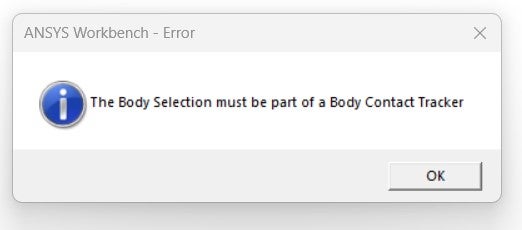
Error: The Body Selection must be a part of Body Contact Tracker

    • e217733
      Subscriber

      I am trying to extract contact force using contact force tracker (added by right clicking the 'Solution Information') scoped to a rigid body (tool) interacting with a flexible body (workpiece), when trying to simulate an orthogonal cutting process in ANSYS 2021R1 LS-DYNA. I only used 'body interaction' as a connection between these two bodies, with a frictional coffecient entered as 0.3, with no other contacts built betweeen these bodies (like bonded, etc). However, when I try to evaluate the results after solution has finished, the contact force tracker doesn't work, and generates me this error as I am sharing in the picture. I don't know how to add the body contact tracker, because I don't see any option to add it from anywhere (like it doesn't show up in the 'Solution Information'). Can you tell me how should I address this issue?

    • Nanda
      Ansys Employee

      Hello User,

      Please follow the below steps:

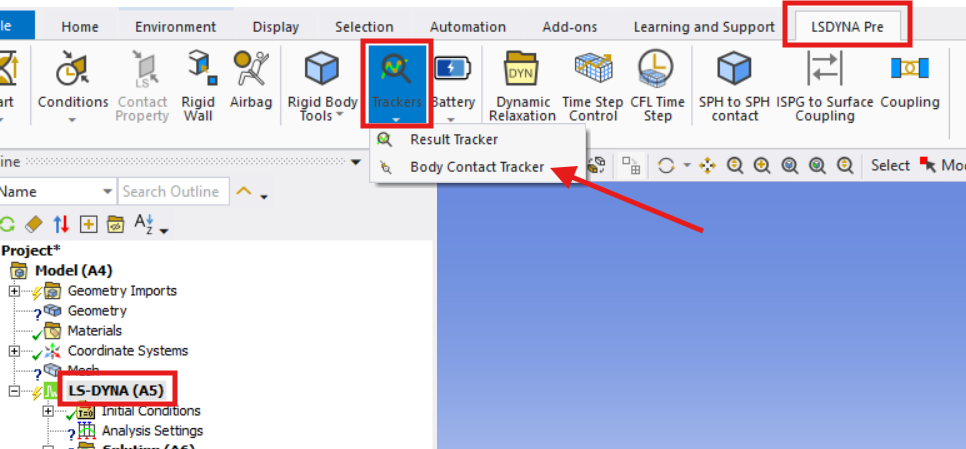
      • Open the LS-DYNA Pre toolbar before solving your model.
      • Insert a Body Contact Tracker and scope it to the rigid body (tool) or any relevant body for which you want to extract contact force.
      • Ensure the tracker is set up prior to running the solution. Post-processing contact forces is only possible if the tracker is present before solving.
      • After the solution, use the Body Contact Tracker to evaluate and plot the contact force results.

      Regards,

      Nanda.

      Have a look at our public help documentation website: Ansys Help

      For more exciting courses and certifications, hit this link: Ansys Innovation Courses | ANSYS Innovation Space

      Guidelines for Posting on Ansys Learning Forum

    • e217733
      Subscriber

      @Nanda, thank you for your timely response.

      Actually, I am trying to retrieve the tangential (F_c) and axial (F_t) forces acting on the tool (rigid body) to compare it against the experimental results recorded for this 3D orthogonal cutting setup. My initial understanding was that the contact forces on the tool body would directly relate to these F_c and F_t forces, however, upon extracting these contact forces, I realized that these were substantially smaller than the ones recorded during the experiments. The material properties, setup, etc is cross-checked beforehand to ensure that this issue doesn't stem from these determinants.

      I then tried using the reaction force probe to evaluate the reaction force on the rigid body. However, this is the error I encountered:
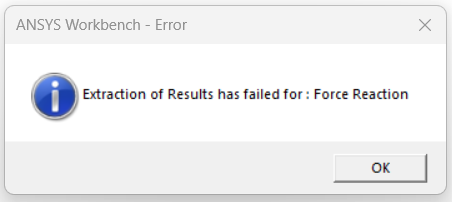

       I had to drag and drop the boundary condition scoped to the rigid body, onto the Solution Information because when I tried to directly insert a force reaction tracker, the 'Boundary Condition' box was yellow, which I believe signifies that the solver hasn't identified any valid boundary conditions whose force reactions can be calculated. I used only one Displacement BC on the rigid body, with z = free (velocity direction), x = y = 0. Can you please help me spotting where exactly I am making a mistake?  

Viewing 2 reply threads
  • You must be logged in to reply to this topic.
[bingo_chatbox]