Ansys Assistant will be unavailable on the Learning Forum starting January 30. An upgraded version is coming soon. We apologize for any inconvenience and appreciate your patience. Stay tuned for updates.
LS Dyna

LS Dyna

Topics related to LS-DYNA, Autodyn, Explicit STR and more.

LS-DYNA non-uniform time sampling issue

TAGGED: 

    • kanteti-vsr
      Subscriber

      Hi all, 

      I’m running an LS-DYNA analysis in Ansys (Explicit Dynamics) with a 2D plane strain model, and I’m having an issue with time sampling of results. 

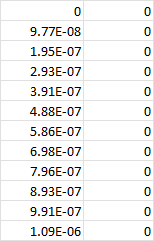
      I defined my output using a constant time interval (≈ 1e-7 s) expecting uniform time steps in the results. However, when I probe results in Ansys Mechanical (Velocity Probe → Tabular Data), the time values are not exact multiples of 1e-7. For example: 

      0 
      9.77E-08 
      1.95E-07 
      2.93E-07 
      3.91E-07 
      ... 

      So instead of getting exactly 1.00E-07, 2.00E-07, etc., I get slightly shifted values. Because of this, when I try to evaluate results at a specific time, Mechanical returns the nearest available value, not the exact time I want. 

      My understanding is that this may be related to LS-DYNA’s variable explicit time step, but I expected the output control to enforce exact time-based sampling. 

      Is there a way to force truly uniform time output (exact times)? 

    • Nanda
      Ansys Employee

      How do you want to control the timestep exactly? Can you elaborate this statement: "I defined my output using a constant time interval (≈ 1e-7 s) expecting uniform time steps in the results."

      Regards,

      Nanda.

      Have a look at our public help documentation website: Ansys Help

      For more exciting courses and certifications, hit this link: Ansys Innovation Courses | ANSYS Innovation Space

      Guidelines for Posting on Ansys Learning Forum


      • kanteti-vsr
        Subscriber

        Hi Nanda,

        Thanks for your follow-up. Let me clarify further and I’m attaching screenshots for reference.

        In my current setup, I’ve defined the output time interval in Output Controls as Δt = 1e-7 s (see attached). My expectation was that the solver would write results at exact, uniform time increments based on this value.

        However, when I check the results in Mechanical (Velocity Probe → Tabular Data), I see that the time values are not exact multiples of 1e-7. For example (also shown in the screenshot):

        0
        9.77E-08
        1.95E-07
        2.93E-07
        3.91E-07
        …

        So the spacing is approximately 1e-7, but not exact.

        What I’m trying to achieve is strictly uniform output time steps, i.e., I would like the results to be written exactly at:

        0, 1.00E-07, 2.00E-07, 3.00E-07, …

        and continue like this consistently until the end time is reached, without these small deviations.
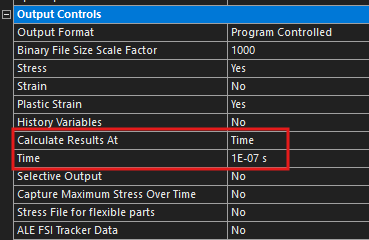
        Output Controls">              Velocity Probe">

    • Nanda
      Ansys Employee

      Does using the double precision solver help? This setting can be found under analysis settings named as "solver precision".


    • kanteti-vsr
      Subscriber


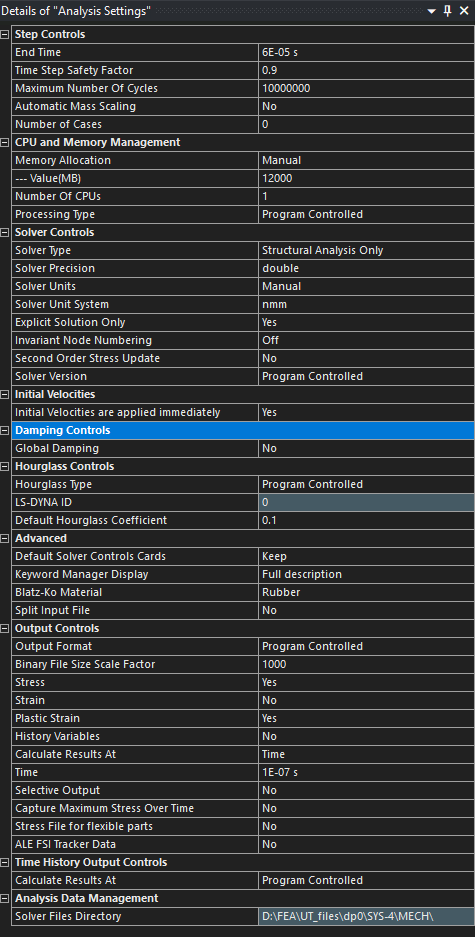
      Hi Nanda, I have already set the solver precision to double, and the solution I shared earlier is a result of this setting. Here is the full details of ''Analysis Settings'' Iam using for my model.


    • Dennis Chen
      Subscriber

      Can I just say?  Check the input deck and look at what was written out...forget about the GUI.   it is like putting a layer of flour skin over another dumpling while what you care about is the filling... it is ridiculous...

      it is very simple to check the right database card is writing out data at the right interval instead of looking at it under the cover of workbench.   

    • Nanda
      Ansys Employee

      I agree with Dennis chen, write the input file from WB and see what it has. I would also turn off the default control cards by WB and see if it changes anything in the output.

Viewing 5 reply threads
  • You must be logged in to reply to this topic.
[bingo_chatbox]