TAGGED: lumerical-license-error
-
-
November 3, 2025 at 4:51 pm
rsmkim
SubscriberHello,
My research group has one MODE and one FDTD license for Lumerical 2021 R2.5, but only the FDTD solver has been working. Our group uses a floating license on a seperate server to access the licenses. When I attempt to use the MODE solver, I am given the error "Insufficient Ansys Lumerical Prep/Post processing for MODE solvers licenses available. Licensed number of users reached".
On the license manager, it says that we are not using any mode licenses. We have tried turning off the MODE license of other research groups. We have also tried restarting the license manager and also restarting the computer we use Lumerical on.
If we could get support on how to resolve this issue, that would be super helpful.
Thank you. -
November 4, 2025 at 4:52 pm
Lito
Ansys EmployeeThe error message, you are running out of MODE licenses. Ensure that you are accessing the correct license server that has the MODE licenses. e.g. check the hostname of the machine that is running the Ansys LM with the MODE license and the port number used in the license file and this is configured for shared license access as shown in this KB >> Configuring the Ansys license manager for shared access – Ansys Optics
-
November 6, 2025 at 11:46 pm
rsmkim
SubscriberHello Lito,
We tried your suggestion, but unfortunatley the situation is still the same. The FDTD still works and the MODE license still gives "Insufficient Ansys Lumerical Prep/Post processing for MODE solvers licenses available. Licensed number of users reached".
Do you have any other suggestions?
Thank you. -
November 6, 2025 at 11:56 pm
-
November 7, 2025 at 12:04 am
Lito
Ansys Employee@rsmkim,
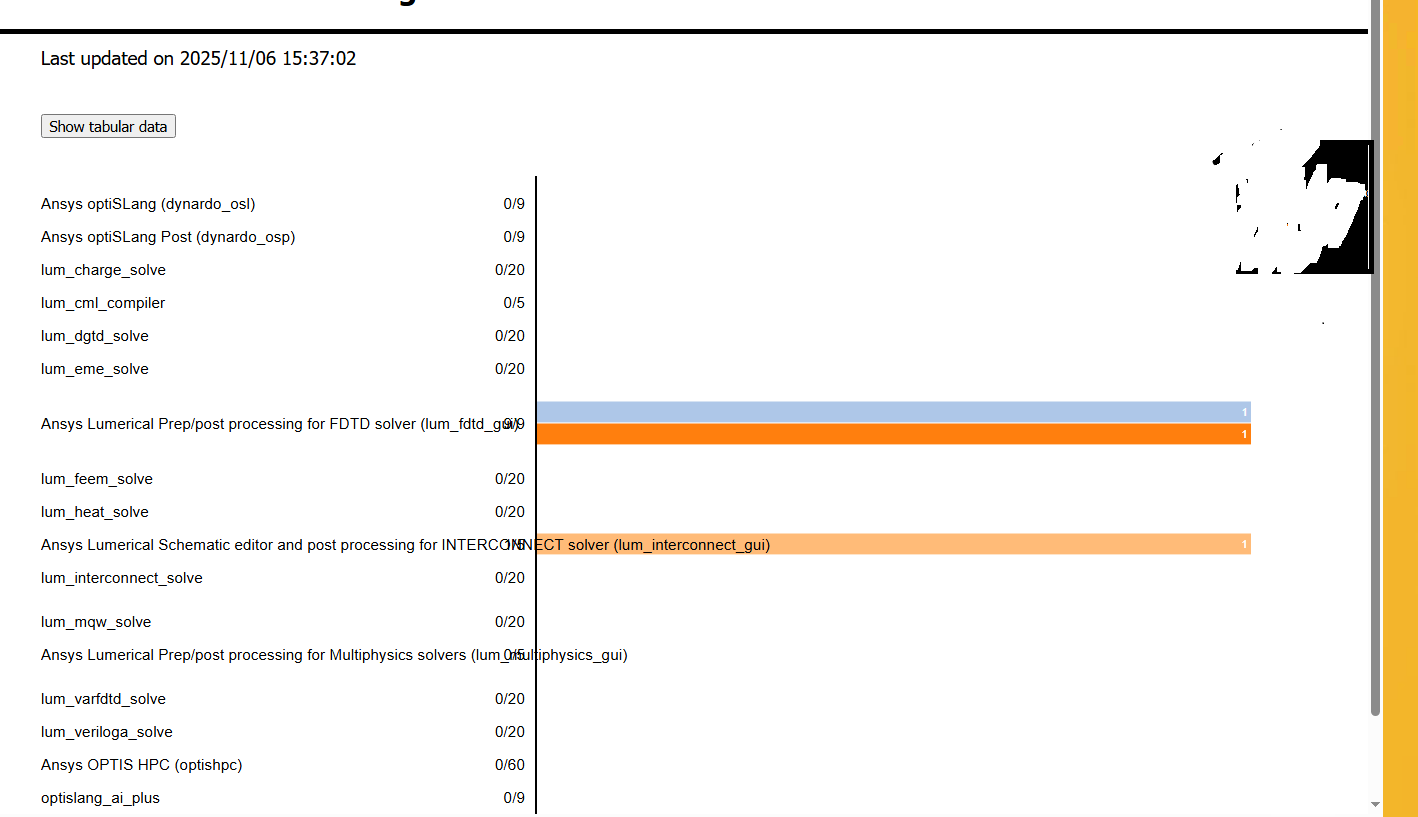
Based on the license usage report from the Ansys LM on your server, you have a few MODE entitlements
Can you check with the licensing admin if they are limiting access to the licenses on the server to specific groups and/or maybe the MODE licenses are stuck in “checkout” due to some glitch in the network. Or someone else is using the MODE license that was allocated to your group.We have the following KB guide for reference:
- What happens when you lose connection to the license server?
- Releasing a ‘stuck license’ (in check out state).
- Controlling access to the license using the options file – Ansys Optics
If you have admin access on the Ansys license manager on the server, you can check who is using the MODE licenses and if there access control on the Ansys License Manager. Ses KB #3 above on the location of the Options File on the Ansys LM install directory on the license server.
Otherwise, if you do not have admin access to the Ansys LM on your license server;
- Open a Windows command prompt on your local PC.
- Run the commands below and copy paste/post the outout here. note different command depending on the installer you used.
command for Lumerical stand alone installer installation directory for 2025 R2 release:
"C:\Program Files\Lumerical\v252\licensingclient\winx64\lmutil.exe" lmstat -c 1055@WIN-4OM4F99HPGO -f lum_mode_gui
"C:\Program Files\Lumerical\v252\licensingclient\winx64\lmutil.exe" lmstat -c 1055@WIN-4OM4F99HPGO -f lum_fdtd_guicommand for Ansys Automated installer installation directory for 2025 R2 release:
C:\Program Files\ANSYS Inc\v252\licensingclient\winx64\lmutil.exe" lmstat -c 1055@WIN-4OM4F99HPGO -f lum_mode_gui
C:\Program Files\ANSYS Inc\v252\licensingclient\winx64\lmutil.exe" lmstat -c 1055@WIN-4OM4F99HPGO -f lum_fdtd_gui -

November 7, 2025 at 12:48 am
rsmkim
SubscriberIt turns out it was a ghost license issue. The command for kicking off ghost license worked.
Thank you! -
November 7, 2025 at 12:57 am
Lito
Ansys EmployeeYou are welcome. Glad to hear that it's been resolved.
-
- You must be logged in to reply to this topic.
-
5824
-
1906
-
1420
-
1305
-
1021
© 2026 Copyright ANSYS, Inc. All rights reserved.