Ansys Assistant will be unavailable on the Learning Forum starting January 30. An upgraded version is coming soon. We apologize for any inconvenience and appreciate your patience. Stay tuned for updates.
Ansys Products

Ansys Products

Discuss installation & licensing of our Ansys Teaching and Research products.

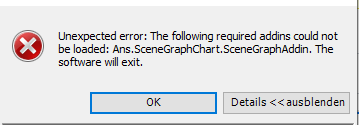
The following required addins could not be loaded: Ans.SceneGraphChart.SceneGrap

    • frederic.hurek
      Subscriber

      Hello,

      every time I try to open the Workbench, I get this error. I have already tried: reinstalling, updating the graphics card drivers, changing the Windows language, and running it as administrator.

      I would be really thankful if someone has a solution.


    • Mrunali Barde
      Ansys Employee

      Hello Frederic, 

      Can you please try this KM and let me know? 

      Link:

      https://customer.ansys.com/s/article/Workbench-error-Ans-SceneGraphChart-SceneGraphAddin

      https://customer.ansys.com/s/article/Addins-could-not-be-loaded-Ans-SceneGraphChart-SceneGraphAddin


      Can you also try to reconfigure/repair Visual C++ dependencies? 

      You can also reinstall it from 'C:\Program Files\ANSYS Inc\v2xx\prereq'


      I hope this helps. 

      Wishes, 

      Mrunali.

       

    • frederic.hurek
      Subscriber

      Hello Mrunali,

      I cannot access the links because I am required to create a Customer Support account, and I don't have an account number. I have also tried repairing the Visual C++ dependencies. I have the Ansys Student version, if that helps.

    • Mrunali Barde
      Ansys Employee

      Can you please try the below suggestion and let me know?

      Logs indicate that Qt5Core.dll is being loaded from C:/Windows/System32. The screenshot suggests that System32 contains a large portion of an older or incompatible Qt installation. Since System32 is searched before entries in the PATH, the application loads the incorrect Qt library, causing it to fail 


      1. Identify the conflicting files

        • Open C:/Windows/System32 and locate all files beginning with Qt5.

        • Note: There may also be some files starting with lowercase q (e.g., qsomething.dll)—review them carefully.

      2. Move or back up the files

        • Move these Qt5* files (and potentially conflicting q* files) to a backup directory outside System32.

        • Do not delete them immediately—keep them in case another application requires them.

      3. Restart and retest

        • Restart your system to ensure changes take effect.

        • Run the application again and confirm if the issue is resolved.


      Caution:
      Only remove Qt-related files. Deleting unrelated system files from System32 can cause serious OS problems.


    • prajyotpatil076
      Subscriber

      I am facing the same issue. there is any way to solve the issue permenantly ??

Viewing 4 reply threads
  • You must be logged in to reply to this topic.
[bingo_chatbox]