Ansys Assistant will be unavailable on the Learning Forum starting January 30. An upgraded version is coming soon. We apologize for any inconvenience and appreciate your patience. Stay tuned for updates.
Ansys Products

Ansys Products

Discuss installation & licensing of our Ansys Teaching and Research products.

Error in applying two remote forces to the same surface

    • esat38karakaya
      Subscriber

      Hi,

      I'm applying two remote forces to the same surface. Normally, I could apply them within a single load, but because my force expression is in the form of (sin(time)), ANSYS doesn't allow me to enter forces in multiple directions within the same force. So, I'm forced to apply two remote forces, but this time I get an MPC error.

      "Two or more moments or remote forces are referencing the same remote point. This will very likely cause duplicate specifications to be ignored. Please only specify one remote force or moment per remote point."

      Is there a way to solve this?

    • Gary_S
      Ansys Employee


      Apply a Remote Point to the single face.
      Then, Apply the Load1 and Load2 scoped to the Remote Point. 


      • esat38karakaya
        Subscriber

        Thanks, but i tried it yesterday and still get same warning. 

    • Gary_S
      Ansys Employee

      OK. Can you use two regular Forces (not Remote Force)? 


      • esat38karakaya
        Subscriber

        I can't because I use remote force because the force must affect the surface I mentioned from 1 meter away. Therefore, it would not be correct to apply direct force.

    • Gary_S
      Ansys Employee

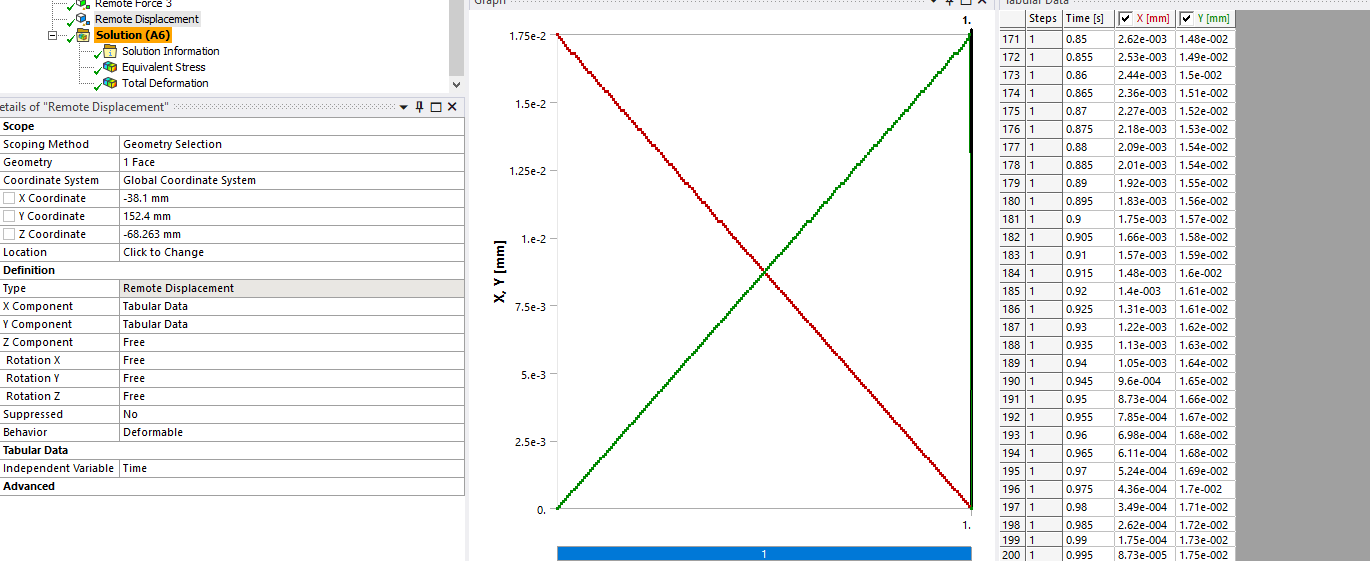
      OK. Maybe use a single Remote Force but use say Tabular Data for X and Tabular Data for Y?

      • esat38karakaya
        Subscriber

        I tried it also but it didn't work. When I retrieved tabular data from a 300-line XML file, only the first 10 were read by ANSYS.

    • Gary_S
      Ansys Employee


      OK. 

      I used a copy/paste 200 lines from Excel. Paste into the botttom cell and it will expand the table to fit the values. 
      The input ds.dat shows all 200 entries. 


      • esat38karakaya
        Subscriber

        Thanks, this actually worked. However, the stress results were the same. I got a result that was about 3% different from the analysis I received the MPC warning for. I don't know if it was specific to my project or if there was something else going on. Also, sorry for the late reply.

    • Gary_S
      Ansys Employee

      Any boundary condition that makes use of Constaint Equations / Multipoint Constraint Equations (CE/MPC) will cause overconstraint when layed on top of each other, or along a shared line. 
      There is no easy way around. It should be OK for small deformation analysis. 

      Beyond that the only other suggestion might be to split up the target face and apply as separate loads. 

      Glad to help!

Viewing 5 reply threads
  • You must be logged in to reply to this topic.
[bingo_chatbox]