-
-
January 1, 2020 at 4:32 pm
dolphinscream
Subscriber Hi,Â
I have just installed the 19R3 version of ANSYS. Previously, I had R2 version, and i wanted to compile my udf. I installed VS2017, and nmake errors kept popping up. It was not resolved, and now I am using R3 version with VS2019, and the same nmake problem is popping up again. Below is the message that kept coming up:
(chdir "libudf")(chdir "win642ddp_node")'nmake' is not recognized as an internal or external command, operable program or batch file.
Â
After selecting the source file, which i have placed in the dp0>fluent folder, I will click 'build' and then click 'load'. I hope this helps in identifying what is wrong. I am assuming that it is the compiler issue? I previously used VS2017, and still the nmake issue keeps coming up.
Â
Thank you in advance.
-
January 2, 2020 at 2:38 pm
Rob
Forum ModeratorSounds like the compiler wasn't installed correctly. Note, we only support Visual Studio 2017,  https://www.ansys.com/-/media/ansys/corporate/files/pdf/solutions/it-professionals/platform-support/ansys-platform-support-strategy-plans-august-2019.pdf?la=en&hash=B49F0829D0F8E375D38B4DCF837D94E10AE9244E Â
There are a few threads in the Installation section, one of those should solve the issue.Â
-
January 3, 2020 at 3:30 pm
dolphinscream
SubscriberThank you for the reply. I have installed the 2017 version, and the nmake problem still exists. Are there any specific individual components that i should select when installing VS2017? Maybe that is why it cant compile?
I have looked through various discussion topics and cant seem to find the right answer to solve my issue.
Previously I did download VS2017 and still did not work, so did 2015.Â
Thank you
-
January 3, 2020 at 4:52 pm
Rob
Forum ModeratorIt's the registry bit, I'll move this to installation as I suspect Win knows the answer: I just hassle IT....Â
-
January 3, 2020 at 8:55 pm
tsiriaks
Ansys EmployeeMSVS 2019 isn't officially supported yet (it will be supported in ANSYS version 2020) , as Rob mentioned, but you can try following Knowledge Material #Â 2059458
For MSVS 2017, see steps in Knowledge Material #Â 2049257
If you don't have access to ANSYS Customer Portal, please ask your ANSYS Support Coordinator, to access and download the pdf file instructions for you as well as the modified udf-batch_file if needed.
-
January 4, 2020 at 7:40 am
dolphinscream
SubscriberHi,
Â
Thank you for the replies. I have tried opening Fluent using the command prompt in VS2017, and tried compiling the udf again. I followed the following video to solve the issue, however to no avail. The nmake error still pops up. I am running out of ideas...
For reference, this message pops up:
udf_names.c and user_nt.udf files in 2ddp_node are upto date.
(system "copy "C:PROGRA~1ANSYS IncANSYS Studentv195fluent"fluent19.5.0srcudfmakefile_nt.udf "libudfwin642ddp_nodemakefile" ")
1 file(s) copied.
(chdir "libudf")(chdir "win642ddp_node")'nmake' is not recognized as an internal or external command,
operable program or batch file.
Â
Â
Done.
Â
May I ask what is this modified batch file?Â
Thank you
-
January 8, 2020 at 6:28 pm
tsiriaks
Ansys EmployeeYou don't have to use command prompt in VS if you are using ANSYS 19.5 (2019 R3) , please follow the instructions in the attached pdf in KM #2049257
The modified batch (udf-batch-file-2017, also attached in the KM) is only needed if you are using old version of ANSYS. You don't need this for your case.
Â
-
February 11, 2020 at 7:40 pm
Chaymae
Subscriber
Hi, I am facing problem loading my udf. I am using Ansys 18 and VS 2012 professional
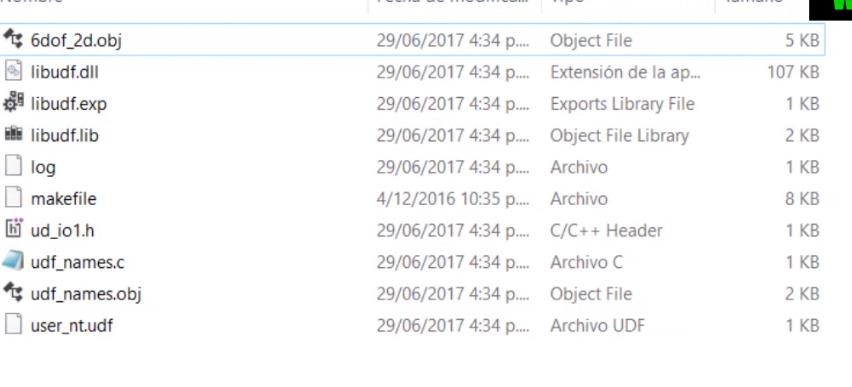
When I load my source I am supposed to get the files as on the picture, however I only find: Log/ makefile/ ud_io1/usr_nt.udf in my libudf folder
I do not know why I can not get all those files and I am really stuck on this step.
Can you please guide me?
Thank you
-
- The topic ‘nmake Error in Compiling of UDF’ is closed to new replies.
-
5874
-
1906
-
1420
-
1306
-
1021
© 2026 Copyright ANSYS, Inc. All rights reserved.