Ansys Assistant will be unavailable on the Learning Forum starting January 30. An upgraded version is coming soon. We apologize for any inconvenience and appreciate your patience. Stay tuned for updates.
Ansys Products

Ansys Products

Discuss installation & licensing of our Ansys Teaching and Research products.

Ansys Mechanical not starting, script error and grey, blank screen

    • jannik.bross
      Subscriber

      Hello,

      I have a problem with Ansys Mechanical 2024 R1.
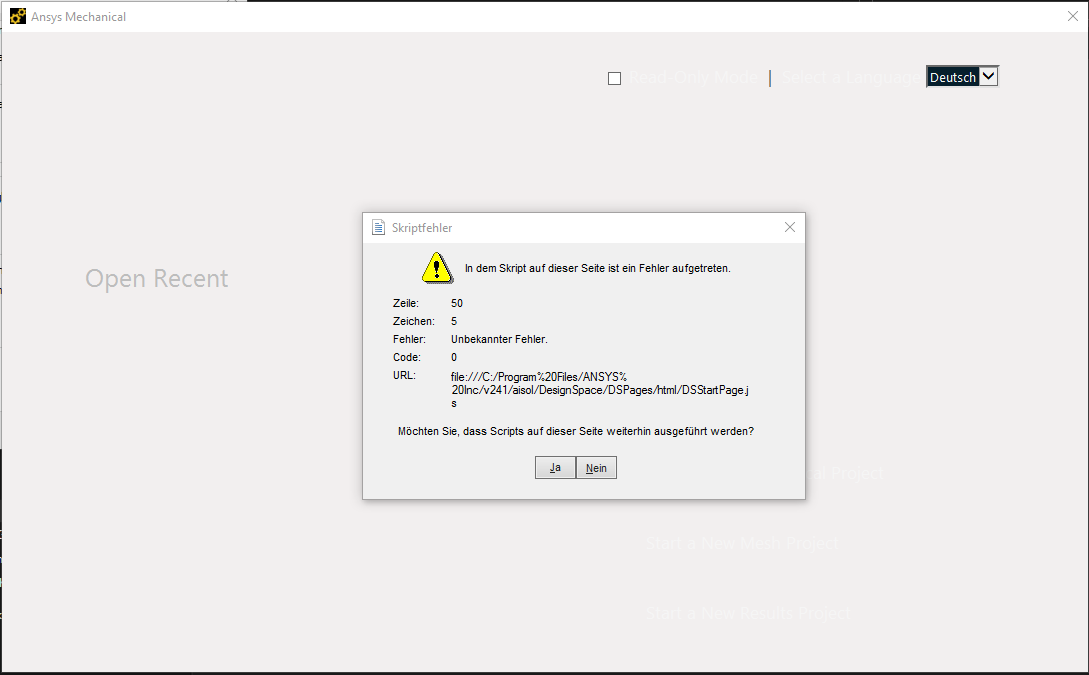
      Whenever I start Ansys Mechanical, I get the following window:


      regardless what I pick, mechanical will look like this:

      What can I do to fix this?
      What I have already tried:

      • reinstalling Ansys
      • rename all v241 folder in Appdata
      • reinstall Nvidia graphics driver
      • set PATH=C:WINDOWSsystem32;C:WINDOWS;C:WINDOWSSystem32Wbem
      • as admin, execute in CMD:

      %SYSTEMROOT%\system32\regsvr32.exe  %SYSTEMROOT%\system32\ole32.dll
      %SYSTEMROOT%\system32\regsvr32.exe  %SYSTEMROOT%\system32\atl.dll
      %SYSTEMROOT%\system32\regsvr32.exe  %SYSTEMROOT%\system32\oleaut32.dll
      %SYSTEMROOT%\system32\regsvr32.exe  %SYSTEMROOT%\system32\scrrun.dll
      %SYSTEMROOT%\system32\regsvr32.exe  %SYSTEMROOT%\system32\jscript.dll
      %SYSTEMROOT%\system32\regsvr32.exe  %SYSTEMROOT%\system32\vbscript.dll

      • and also as admin, execute in CMD:

      regsvr32.exe ole32.dll

      regsvr32.exe atl.dll

      regsvr32.exe oleaut32.dll

      regsvr32.exe scrrun.dll

      regsvr32.exe jscript.dll

      regsvr32.exe vbscript.dll

      • Configure Windows Firewall to allow everything from Ansys
      • I have no antivirus program, only the standard microsoft Defender

      These where the suggested sollutions from other threads here. Is there anything more I can do?

    • Rajeshwari Jadhav
      Forum Moderator

      Hi,

      Add this variable in environment variable under system variable,

      ANSYS_MECHANICAL_BROWSER=0                  //is used to avoid starting the newer Browser connection for ACT applications process called DSBrowserService.exe and uses an older exe called ANSYS.ACT.browser.exe

    • jannik.bross
      Subscriber

      sadly no change. I still get the same error when I open Mechanical through workbench.

      I just noticed, that when I open Mechanical on its own without Workbench, I get an other Error.

    • Rajeshwari Jadhav
      Forum Moderator

      Please edit the variable it should be like below

      variable name: ANSYS_MECHANICAL_BROWSER

      variable value: 0

    • jannik.bross
      Subscriber

      My Bad. I corrected it:

      But nothing changed. Still the same error.

    • jannik.bross
      Subscriber

      I installed V2024 R2 and got another error. Maybe this one is easier to fix? It appears, when I try to open Workbench. It won't open, instead I get the message below

Viewing 5 reply threads
  • You must be logged in to reply to this topic.
[bingo_chatbox]