-
-
July 16, 2019 at 6:33 am
vidhan28
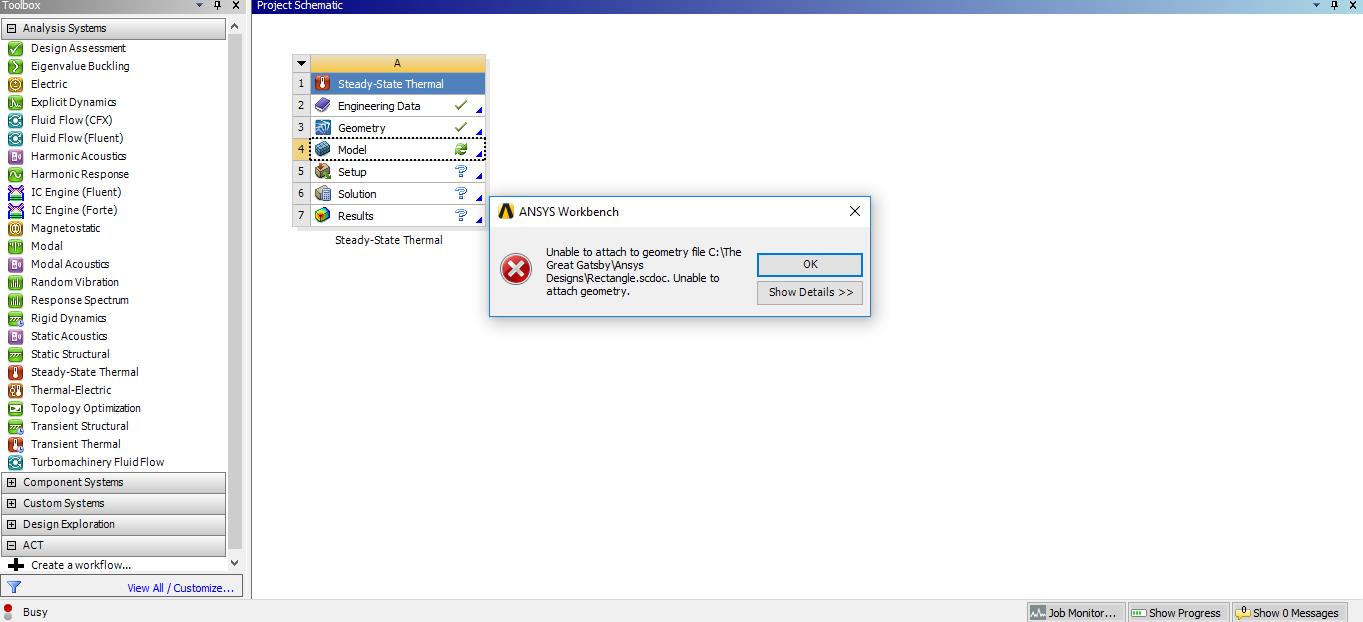
SubscriberI'm struggling with importing geometry while generating mesh in Ansys 19.2. Earlier I was facing a problem while making the geometry as the SC was abruptly getting closed. So, to fulfil the geometry criteria I imported it by first creating a geometry in the SCDM. Now, I'm facing another problem while generating mesh, where every time I try to get started with the Mechanical Model a "Plug-in" error message is popped up and geometry is not imported.


Kindly, help me with this situation.Â
-
July 16, 2019 at 11:00 am
Rob
Forum Moderator Does this work  /forum/forums/topic/fluent-error-the-geometry-editor-was-closed-abnormally ?
-
July 17, 2019 at 4:46 am
vidhan28
SubscriberHi again,
So I tried importing the geometry and generating mesh again, but this time by using the "pull tool" so that the rectangle is considered as a solid and not a curve.
Still, I'm getting a plug in error with "Specified argument out of range of valid values" message.Â
-
July 17, 2019 at 4:34 pm
tsiriaks
Ansys EmployeeYour latest issue is specific to your geometry. Let's eliminate any geometry specific issue. Can you import any scdoc file from (default location)
C:Program FilesANSYS Incv192scdmLibraryBeamProfilesStandard
then generate mesh
Â
-
July 18, 2019 at 4:16 pm
vidhan28
SubscriberHi,Â
Thanks for your reply. But I tried using another way i.e. I uninstalled ANSYS 19.2 and installed the ANSYS Student 2019 R2 version. After doing so I realized that all my errors and glitch were rectified automatically and SC as well as Mechanical Model is working error free.
-
July 19, 2019 at 6:07 pm
tsiriaks
Ansys EmployeeThat's great ! Thank you for the update.
Win
-
- The topic ‘Importing Geometry while Mesh generation in R19.2’ is closed to new replies.

-
6379
-
1906
-
1457
-
1308
-
1022
© 2026 Copyright ANSYS, Inc. All rights reserved.