-
-
December 20, 2023 at 10:17 am
Hamid R
SubscriberHello, everyone.
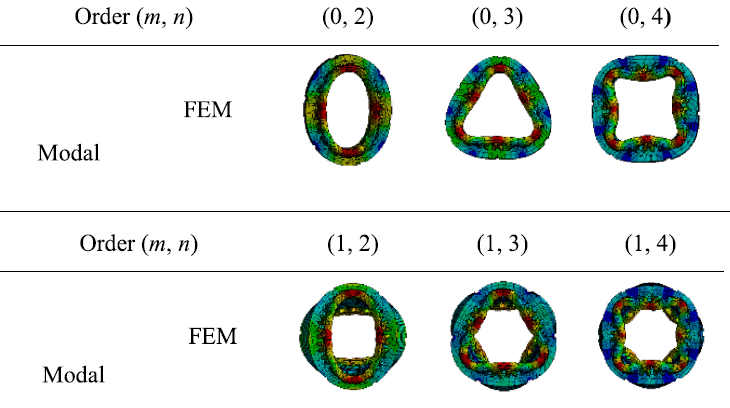
I have conducted a modal analysis using ANSYS Mechanical and I have filled the the maximum number of modes in the analysis setting section. Referring to the figure below, ‘n’ represents the circumferential modal order, and ‘m’ denotes the axial modal order. With regards to this, what does “maximum modes to find” refer to, which I have inputted during the modal analysis? Also, how can I modify the ‘m’ and ‘n’ modal orders in the modal analysis settings?
-
December 21, 2023 at 4:07 pm
dlooman
Ansys EmployeeWhen you use modal cyclic symmetry the modes are extracted one circumferential mode at a time. In a full model the program doesn't know what m and n are for a given mode. You just have to determine that by observation (as you have done.) "Maximum modes to find" is how many modes will be extracted. It's worded that way because sometimes the solver finds less than the requested number of modes.
-
December 21, 2023 at 9:40 pm
-
-
December 21, 2023 at 9:52 pm
dlooman
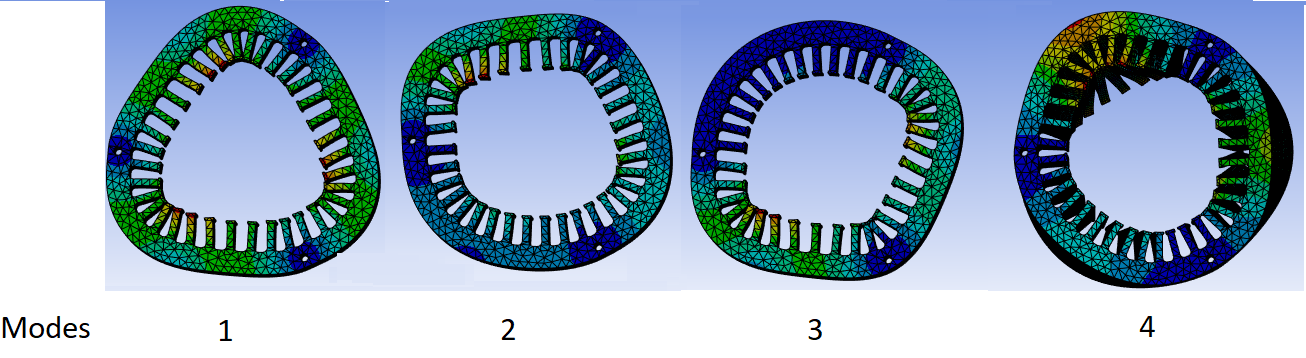
Ansys EmployeeThose modes don't look like harmonic index or nodal diameter 0. More like harmonic index 3.
-
December 21, 2023 at 11:05 pm
Hamid R
SubscriberYou can find a screenshot of the program detailing the material settings, definition of the cylindrical coordinate system, meshing, fixed support as the boundary condition, analysis settings, and a sample of the directional deformation for mode 1 through the link provided below. Do you think I made any mistakes during the analysis?
-
-
- The topic ‘Changing Circumferential and Axial Modal Orders’ is closed to new replies.

-
6485
-
1906
-
1458
-
1308
-
1022
© 2026 Copyright ANSYS, Inc. All rights reserved.