First click on the Physics block, then under Physics Solution click the Solver Options link, then select Launch Controls 1.
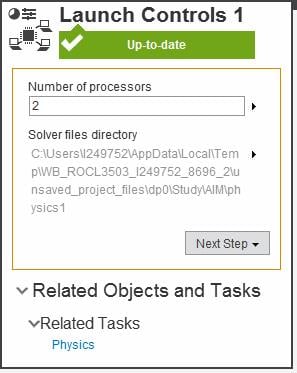
I have a 4-core laptop that is configured for hyperthreading which allows two threads per core, so the Task Manager Performance tab shows 8 CPUs. You should only type in 4 not 8 for the number of processors in this example. ANSYS will only reach about 50% utilization on the Task Manager Performance tab as it uses "real" cores, not threads.
The default is 2 processors, so if you have a 4-core computer with hyperthreading turned on, you would expect to see an average of 25% usage on the Task Manager while the solver is running on 2 cores.
I also have a 16-core desktop where I disabled hyperthreading (per ANSYS recommendations) and I can see 100% utilization on the Task Manager when ANSYS is running and I let it use all 16 cores.

When I am using ANSYS Mechanical rather than AIM, I can see if the solver is running in RAM only (incore) or needs to use the disk (out-of-core) because the solver estimated that it could not run in RAM only. When I see the solver is running out-of-core, I might choose to stop the solution and reduce the mesh density to try to get an incore solution, which will take less time to solve. I don't think AIM has that degree of visibility on how it is solving, but since it uses the same solver, I assume it tries to solve in RAM if possible.


















 You are navigating away from the AIS Discovery experience