TAGGED: #fluent-#cfd-#ansys, heattransfer, htc, reference-temperature
-
-
September 28, 2022 at 10:55 pm
lilly santana
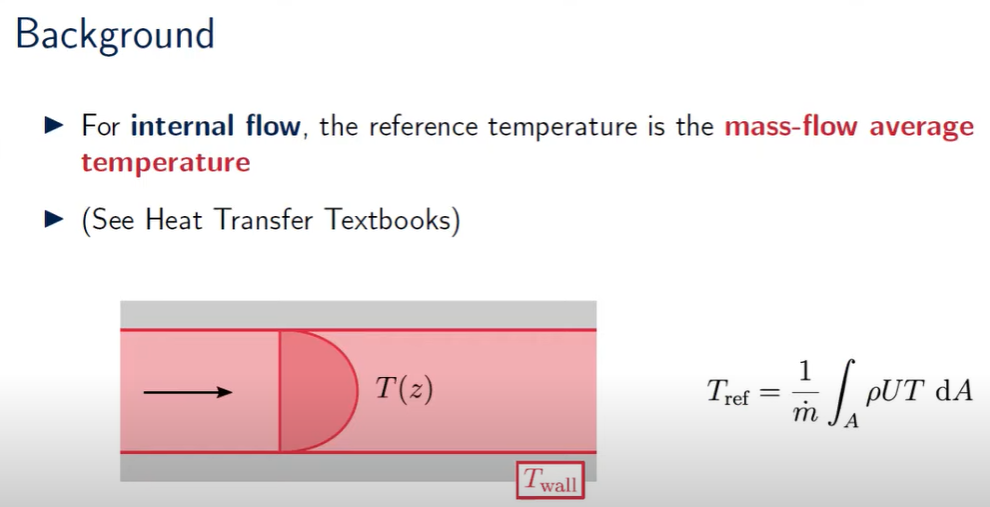
SubscriberHi,I have a 2D, steady state, laminar internal flow problem. I think the calculation for laminar flow HTC is: HTC = q / (T_wall - T_ref); where T_ref is the reference temperature. What I'm stuck on is how to define this reference temperature for my problem. This video says that for internal flow problems, the reference temperature is the mass weighted average (see attached image), but how can I calculate this integral?Thank you -
September 29, 2022 at 9:59 am
Rob
Forum ModeratorHave a look in the volume reports, but "mass flow average" implies a surface report. The best option is to read the User's Guide chapter which covers the HTC definitions as Fluent has 3-4, the one you want depending on what you're doing. There's a reason we generally report a heat flux!
-
October 3, 2022 at 8:41 am
lilly santana
SubscriberHi Rob,
Thank you for your response. Can you send me a link to the guide you're referring to cause I could only find ones detailing the HTC calculation from surface integrals? I inputted the heat flux in the wall BC 'thermal' tab & the reference temp in reference values myself, which I believe are both used to calculate the HTC?
-
October 3, 2022 at 10:09 am
Rob
Forum Moderatorhttps://ansyshelp.ansys.com/account/secured?returnurl=/Views/Secured/corp/v222/en/flu_ug/flu_ug_fvdefs.html You need to access Help via the solve and then paste the link into the same browser.
-
October 3, 2022 at 12:41 pm
-
October 3, 2022 at 12:42 pm
lilly santana
SubscriberSorry, I've had to cross the names out as per my mentor's request *sigh*
-
October 3, 2022 at 1:37 pm
Rob
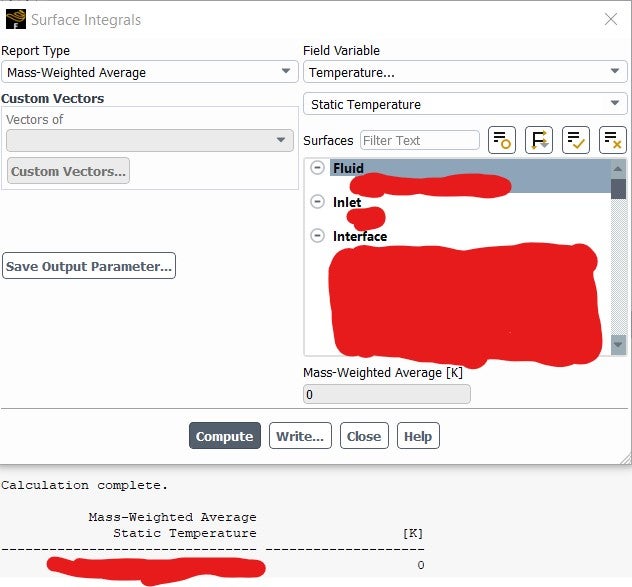
Forum ModeratorDon't report on the fluid surface, that's what the Volume reports are for. Zero Kelvin shouldn't be able to happen as the solver is limited to 1K. What happens if you plot temperature contours?
-
October 3, 2022 at 10:53 pm
lilly santana
SubscriberSo which surface should I report it on instead? I'm trying to get the mass flow average temp of the fluid. When I plot temperature contours, the fluid temp appears to be constant and the same as the initial temp I patched it to. I'm not sure why, since I have multiple battery cells which generate around 7W (or 700 W/m^2) of heat to the fluid.
Thanks in advance!
-
October 4, 2022 at 9:56 am
Rob
Forum ModeratorIf the temperature field is constant then generally you’re adding heat into the wrong place, the cell zones aren’t connected or the boundary conditions mean that the heat escapes very quickly.
Surface reports are for planes or “surface” entities, eg walls, inlet, outlet etc. The volume condition is reported for the fluid & solid zones. In 2d the two should return the same values for the fluid & solid regions.
Please post some images of the results so I can see what's going on.
-
December 23, 2022 at 10:15 am
lilly santana
SubscriberThank you for your reply! So I outputted both the surface and volume mass-weighted average temperatures and for some reason the former outputs 0 K and the latter around 400 K. Shouldn't they be the same value for a 2D simulation?
Furthermore, to output average HTC, do I first run the calculation with the reference values computed from inlet, and output the mass-weighted average temp in the console, then input this value into the 'reference temp' part under 'reference values' (without changing anything else), and then compute the average HTC using this reference temp? (baring in mind that I don't need to rerun the calculation when changing the reference temp value).
Thanks a million. I'm not really allowed to post any images online, sorry about this
-
January 3, 2023 at 2:58 pm
Rob
Forum ModeratorSort of, I'm not sure what will happen in solid zones with mass weighted for a surface report: technically a surface mass is the flow mass, so it gets a little weird.
HTC is based on the reference value, but the value you use will depend on what you're comparing to. You don't need to re-run or run the model on if you change these values. In some cases we use a reference value and the surface reports, in others we output the heat flux and compare that with the experiment: it comes down to what you need the data for.
No worries about images, but please remind your supervisor about the academic T&Cs. Tactfully!
-
January 5, 2023 at 12:18 pm
lilly santana
SubscriberIn both cases (surface and volume), I selected only the fluid region when getting the mass weighted average temperature, not the solid regions. I am not sure why the surface and volume temperatures are not the same for my 2D simulation.
When you say the HTC calculation depends on what I am comparing to, do you mean for validating my simulation?
So for internal flows, does it make sense to get the average HTC by: 1. outputting the mass weighted average temperature of the fluid 2. inputting this temperature value in the 'reference temperature' in 'reference values' and then outputting the fluid average HTC using this reference temp?
Thanks in advance
-
January 5, 2023 at 2:47 pm
Rob
Forum ModeratorIf you're using a current release they should be the same (user error permitting), in an older version of the code there was a glitch. I'd need to see images of what you have selected when reporting & the results.
I can't comment on the HTC reference. It's entirely dependent on how you want to report the value. My approach is to compare the heat flux per area (W/m2) if looking at experimental data.
-
January 11, 2023 at 3:56 pm
lilly santana
SubscriberI am using ANSYS R2021 R2. Can I also ask how I can find out how much heat each of the solid cubes are releasing? (I have a fluid domain which contains a bunch of solid cubes that generate 7W of heat. Initial temperature of solids > initial temperature of fluid)
I can only find the total heat transfer rate under 'fluxes', but don't know how to get the heat released by each solid cube
thank you in advance
-
January 11, 2023 at 5:30 pm
Rob
Forum ModeratorTotal over time? Or flux per cube during the steady simulation? For the latter you'd need a surface monitor and work out how much heat was released per time step & sum the result.
-
January 12, 2023 at 2:46 pm
lilly santana
SubscriberFlux per cube during a steady state simulation. So do I just click new report file --> surface report definition --> report type: integral --> field variable: wall fluxes and total surface heat flux and then select the solid cubes under 'surfaces'?
If I have already created a named selection which contains all of the 55 solid cubes together, do I have to create a separate cell register for each cube so I can see how much heat they are releasing individually, which I then select under 'surfaces'?
thank you very much again!
-
January 12, 2023 at 4:06 pm
Rob
Forum ModeratorIn the Domain tab you can separate faces by (I think) region. That'll split the 55 cubes to have 55 bc's: so it'll be cube_wall_label:001 etc Then use the flux reports.
-
- The topic ‘Reference temperature for HTC (internal flow)’ is closed to new replies.

-
5879
-
1906
-
1420
-
1306
-
1021
© 2026 Copyright ANSYS, Inc. All rights reserved.