TAGGED: 3d-geomertry, ansys-apdl, electromagnetics
-
-
June 29, 2022 at 1:46 pm
A.sanchai
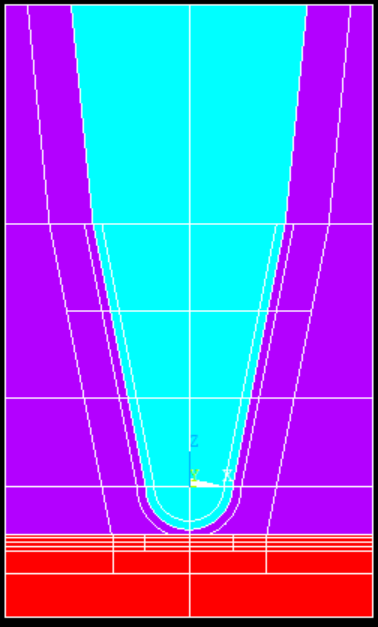
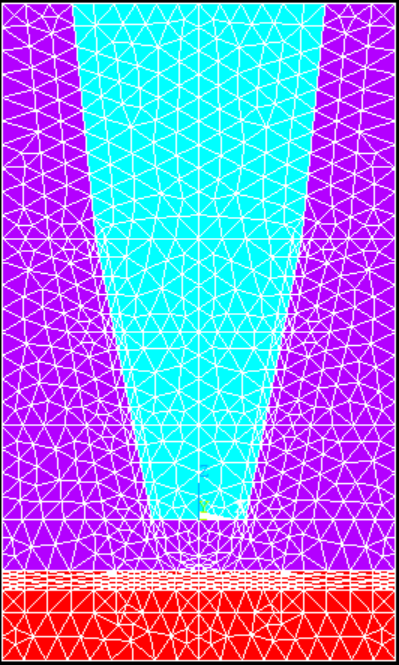
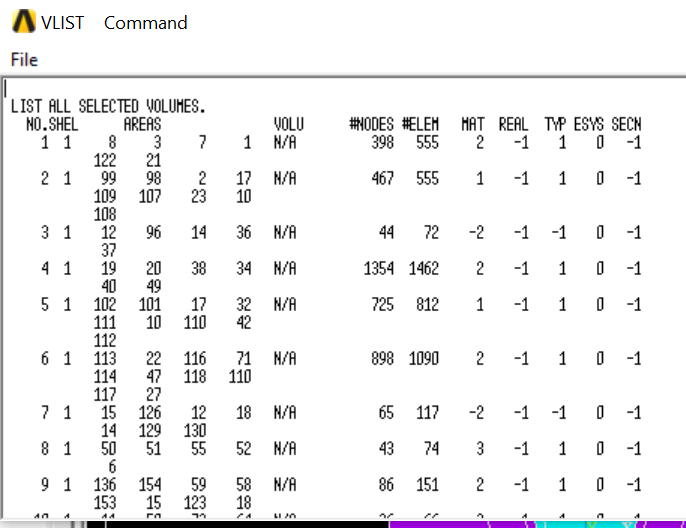
SubscriberI created a geometry and assign material for each of them.But after meshing end of the cone is gone/ the material change from mat 1 to mat 2 ? I check Vlist shows negative value (-2) in material of volume 3,7 (are the end of cone).But I assign mat 1 for those regions, why it is changed?ÂThis is how I meshMeshtool>Element attributes: GlobalMesh: volumesShape: tet, freepick allÂError says: Mid-nodes of some elements have been modified to lie on straight edges because of distortion with the original mid-nodes. This condition is sometimes eliminated by tetrahedron element improvement when enabled. Issue ESEL,,STRAIGHTENED to select such elements for listing or plotting.ÂThank you!Â
-
August 3, 2022 at 9:55 am
Ashish Khemka
Forum ModeratorHi,
Â
Try using the EMODIF command.
Â
20 APDL Commands Every ANSYS Mechanical User Should Know - PADT (padtinc.com)
Â
Regards,
Ashish Khemka
-
Viewing 1 reply thread
- The topic ‘After mesh, material is changed. How do I fix it?’ is closed to new replies.

Innovation Space
Trending discussions
Top Contributors
-
6535
-
1906
-
1463
-
1311
-
1022
Top Rated Tags
© 2026 Copyright ANSYS, Inc. All rights reserved.
Ansys does not support the usage of unauthorized Ansys software. Please visit www.ansys.com to obtain an official distribution.