Ansys Assistant will be unavailable on the Learning Forum starting January 30. An upgraded version is coming soon. We apologize for any inconvenience and appreciate your patience. Stay tuned for updates.
Electronics

Electronics

Topics related to HFSS, Maxwell, SIwave, Icepak, Electronics Enterprise and more.

How to run multiple design points in parallel using optiSlang DoE?

    • agarwa20
      Subscriber

      I am running an optimization using Ansys optiSlang in Workbench. For the sensitivity analysis step I am creating a design of experiments using a sampling scheme and a number of samples. I am unable to run multiple design points in parallel for the DoE. Below is the procedure I followed:

      Step 1: Select properties for the DoE.

       
      Step 2: Select simultaneous execution mode and choose number of design points to be sent parallely.


      Step 3: Change update option from Foreground to Remote Solve Manager


      Step 4: Checking the simulation, while running shows that the design points are being sent in parallel


      Step 5: All resulting designs obtained are failed designs even though the for single design point at a time all succeeded.


      Since optiSlang licenses have already been purchased with capability to run 200 concurrent simulations when driven through the optiSlang DoE, Optimizer, etc. this should not be a license issue. I request you to kindly help resolve this issue. 

      Thank you.

    • Markus
      Ansys Employee

      Hi agarwa20, first, you have well documented all steps.
      And making sure the Maxwell model is working fine with the single design point (mentioned in step 5) is a very good approach.
      I have 3 thoughts to share:
      1)    Setup of RSM
      In step 3 you have defined the RSM based on the “Project Schematic”. I would suggest keeping the “Component Execution Mode” as “Serial”.
      If you the click on the “Parameter Set” you can specify more clearly how the 4 Design (specified in step 2) should be executed (e.g. in 4 Jobs with 1 Task, as shown in the picture):
       
      More details on the settings are available in the Ansys help:
      https://ansyshelp.ansys.com/account/secured?returnurl=/Views/Secured/corp/v221/en/wb2_help/wb2h_usingrsmwb.html

      2)    Error and Log messages
      In the bottom righty you find the “Job Monitoring” and the Messages.
       
      In the Job Monitor you will get quite detailed information about the status of each job.
      This may give additional information why a Job fails.

       
      3)    Alternatives?
      If you still cannot resolve the issue, it might me a good Idea to reach out to your local Ansys support resource to discuss the issue in detail. Or you may also think about alternatives like running the optiSLang application and connecting to Workbench with the Workbench node etc.

      I hope this helps.

      Markus

    • agarwa20
      Subscriber

      Hello,

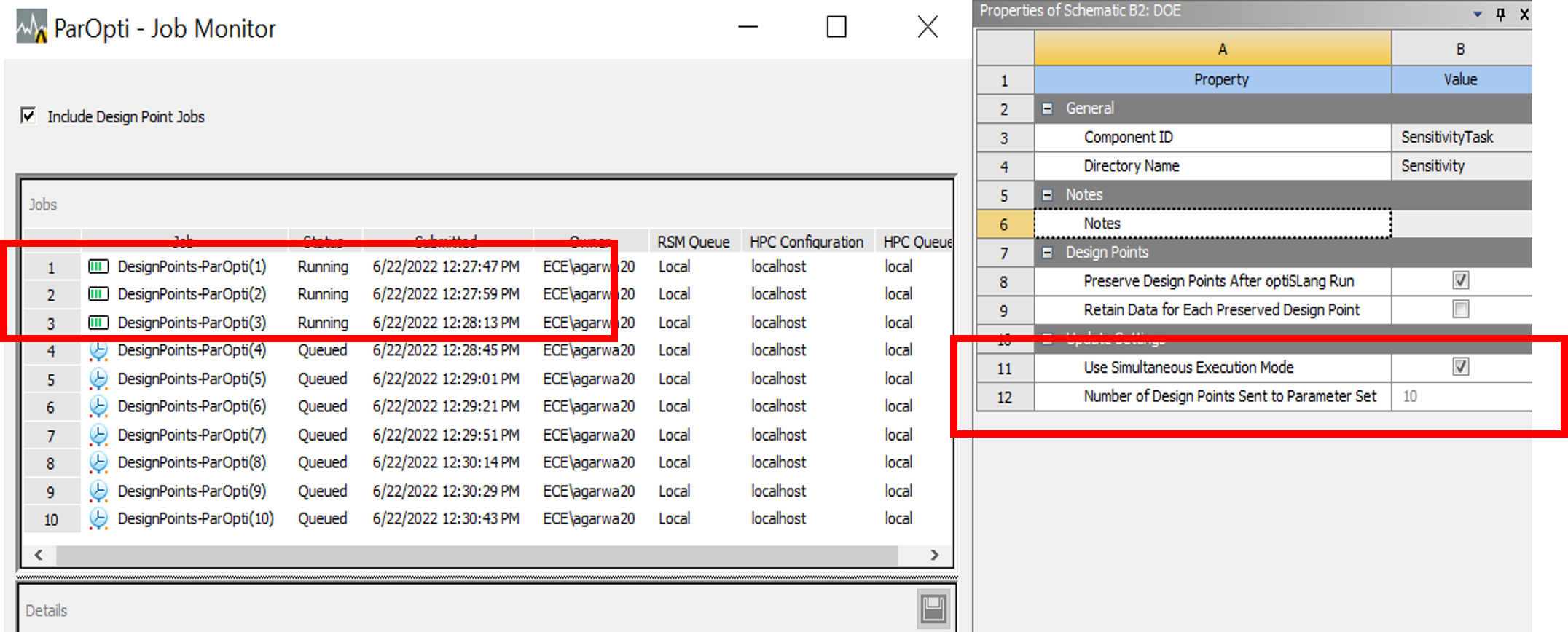
      Thank you for your detailed explanation. I am able to run multiple design points together now. However, since I selected the execution mode as serial, I am unable to get an improvement in time required to solve the design points. Here is an image depicting the problem:


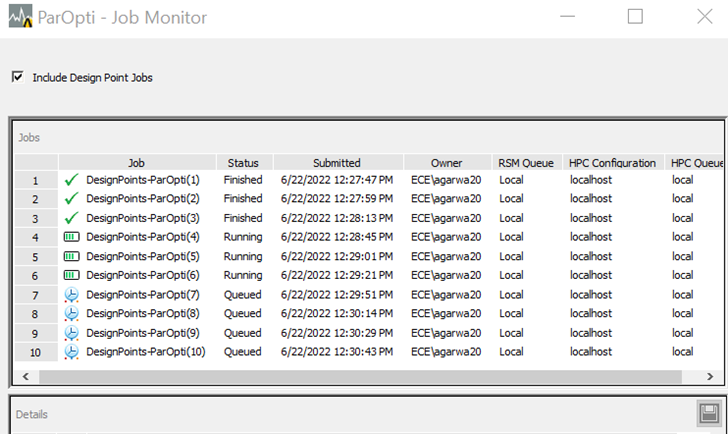
      Even after selecting 10 design points sent to parameter set, and execution mode serial, only 3 design points were seen to be running at a time. I sent 10 desings in the parameter set as well.  The time taken for completing execution of the three points was found to be approximately 3 times the time for single point update which does not solve my problem.


      In order to save time I want to run the multiple design points in parallel. What is limiting me here? Can it be related to number of cores or is there a problem in the simulation settings?

      Thank you very much for your help.


    • Markus
      Ansys Employee

      Hi agarwa20,

      here are my thoughts on your questions.

      Execution time:
      In general, longer time with RSM is somehow expected compared to running it in foreground. Using the RSM and design point update means that we .zip Workbench, execute it, etc. for each Job. There is some process overhead for that. If you use more Tasks per Job und less Jobs, you might reduce the overhead. So, this is a rather individual to configure.

      Parallel Execution:
      From the "Job Monitor” picture it seems you submit the jobs to the local queue on your own local system. And in general, the RSM and ARC has some mechanism to avoid an overlade of the machine. You can check e.g. in the ARC Configuration under “Execution Nodes” the max. number of cores that can be used on the node.

      Also you can calculate the number of cores needed e.g. for 10 Design, 1 Core for each Design:
      10 Designs X 1 Core per Design = 10 Cores

      In your situation your system may be not able to handle more than 3 designs in parallel.

      Best regards,
      Markus

Viewing 3 reply threads
  • The topic ‘How to run multiple design points in parallel using optiSlang DoE?’ is closed to new replies.
[bingo_chatbox]