

TAGGED: ansys-workbench, language, workbench
-
-
August 3, 2021 at 4:50 am
gihrs
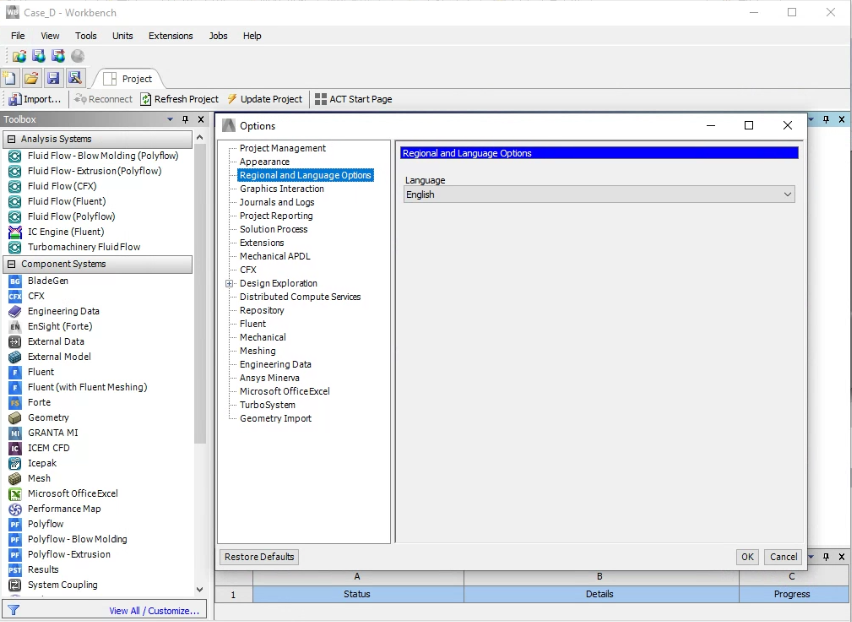
SubscriberHello everyone. I have an issue regarding the language settings in ANSYS. I am using ANSYS Workbench for Fluent simulation (Academic Research license). I already set the language into ‘English’ just like snapshot below.
August 16, 2021 at 2:41 pmGeorge Karnos
Ansys Employeecan you open a dos Command prompt and type in:
set
Paste the output to this post. Please do not attach files as we are not permitted to open them.
August 17, 2021 at 4:46 amSubscriberHi, this is the output
C:\Windows\system32>set
AGSDESKTOPJAVA=C:\Program Files (x86)\ArcGIS\Desktop10.7\
ALLUSERSPROFILE=C:\ProgramData
ANSYS212_DIR=C:\Program Files\ANSYS Inc\v212\ANSYS
ANSYSLIC_DIR=C:\Program Files\ANSYS Inc\Shared Files\Licensing
APPDATA=C:\Users\setya\AppData\Roaming
AWP_LOCALE212=en-us
AWP_ROOT212=C:\Program Files\ANSYS Inc\v212
CADOE_LIBDIR212=C:\Program Files\ANSYS Inc\v212\CommonFiles\Language\en-us
CommonProgramFiles=C:\Program Files\Common Files
CommonProgramFiles(x86)=C:\Program Files (x86)\Common Files
CommonProgramW6432=C:\Program Files\Common Files
COMPUTERNAME=DESKTOP-PAKMBD9
ComSpec=C:\Windows\system32\cmd.exe
configsetroot=C:\Windows\ConfigSetRoot
DriverData=C:\Windows\System32\Drivers\DriverData
HOMEDRIVE=C:
HOMEPATH=\Users\setya
ICEMCFD_SYSDIR=win64_amd
LOCALAPPDATA=C:\Users\setya\AppData\Local
LOGONSERVER=\\DESKTOP-PAKMBD9
LSTC_LICENSE=ANSYS
MOZ_PLUGIN_PATH=C:\Program Files (x86)\Foxit Software\Foxit PDF Reader\plugins\
NUMBER_OF_PROCESSORS=16
OneDrive=C:\Users\setya\OneDrive
OneDriveConsumer=C:\Users\setya\OneDrive
OS=Windows_NT
Path=C:\Windows\system32;C:\Windows;C:\Windows\System32\Wbem;C:\Windows\System32\WindowsPowerShell\v1.0\;C:\Windows\System32\OpenSSH\;C:\Program Files\dotnet\;C:\Users\setya\AppData\Local\Microsoft\WindowsApps;C:\Program Files\Bandizip\
PATHEXT=.COM;.EXE;.BAT;.CMD;.VBS;.VBE;.JS;.JSE;.WSF;.WSH;.MSC
PROCESSOR_ARCHITECTURE=AMD64
PROCESSOR_IDENTIFIER=Intel64 Family 6 Model 165 Stepping 5, GenuineIntel
PROCESSOR_LEVEL=6
PROCESSOR_REVISION=a505
ProgramData=C:\ProgramData
ProgramFiles=C:\Program Files
ProgramFiles(x86)=C:\Program Files (x86)
ProgramW6432=C:\Program Files
PROMPT=$P$G
PSModulePath=C:\Program Files\WindowsPowerShell\Modules;C:\Windows\system32\WindowsPowerShell\v1.0\Modules
PUBLIC=C:\Users\Public
P_SCHEMA=C:\Program Files\ANSYS Inc\v212\AISOL\CADIntegration\Parasolid\PSchema
SystemDrive=C:
SystemRoot=C:\Windows
TEMP=C:\Users\setya\AppData\Local\Temp
TMP=C:\Users\setya\AppData\Local\Temp
USERDOMAIN=DESKTOP-PAKMBD9
USERDOMAIN_ROAMINGPROFILE=DESKTOP-PAKMBD9
USERNAME=setya
USERPROFILE=C:\Users\setya
windir=C:\Windows
Viewing 2 reply threads- The topic ‘Issue with language settings’ is closed to new replies.
Innovation Space Trending discussions
 Top Contributors
-
peteroznewman
 6219
6219 -
scabo
 1906
1906 -
Dennis Chen
 1457
1457 -
javat33489
 1308
1308 -
Shyam Prasad V Atri
1022
Top Rated Tags
© 2026 Copyright ANSYS, Inc. All rights reserved.
Ansys does not support the usage of unauthorized Ansys software. Please visit www.ansys.com to obtain an official distribution.
-


The Ansys Learning Forum is a public forum. You are prohibited from providing (i) information that is confidential to You, your employer, or any third party, (ii) Personal Data or individually identifiable health information, (iii) any information that is U.S. Government Classified, Controlled Unclassified Information, International Traffic in Arms Regulators (ITAR) or Export Administration Regulators (EAR) controlled or otherwise have been determined by the United States Government or by a foreign government to require protection against unauthorized disclosure for reasons of national security, or (iv) topics or information restricted by the People's Republic of China data protection and privacy laws.

 You are navigating away from the AIS Discovery experience