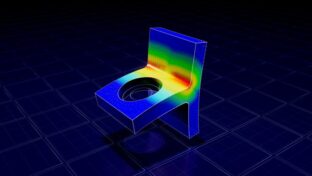

This course is the stepping-stone to understanding Ansys Mechanical™ structural finite element analysis software at its core and unleashing its full potential. It reveals the relationship between the Mechanical user interface and the core Ansys solver. A Mechanical model, as seen by the solver, is essentially a list of commands. With every new release of Ansys, advancements in element and solver technology become available as commands; however, these capabilities often do not appear in Mechanical until several releases later. Once you understand how the Ansys command language operates, you can fully access all the capabilities Ansys has to offer.
Learning Outcomes:
Following completion of this course, you will be able to:
- Understand the relationships among Ansys Workbench™ simulation integration platform, and Ansys Mechanical models, and their corresponding definitions in Ansys Parametric Design Language (APDL)™ finite element modeling tool.
- Use Ansys Parametric Design Language (APDL) commands within Ansys Mechanical to access advanced features.
- Learn how to use the Mechanical APDL graphical user interface to verify and postprocess models, gaining access to result quantities that may otherwise be unavailable within Mechanical.
- Gain an understanding of APDL command syntax, including scalar and array parameters, enabling the export of results data in any desired format.
Prerequisites:
- Completion of Ansys Mechanical: Beyond the Basics course is required.
Please note: These training materials were developed and tested in the 2024R1 release.
-
Cost: $450.00
- Course Duration: 6+ HOURS
- Skill Level: Expert
- Skills Gained: Understanding MAPDL, Writing MAPDL command snippets, Parametric scripting for advanced model setup
No reviews available for this learning resource.