Last Updated: April/2026
With Ansys FreeFlow™ smoothed-particle hydrodynamics (SPH) simulation software you can use one or more Graphic Processing Units (GPUs) to process your simulations. Before investing in new hardware, see the FAQs below to find guidelines and recommendations.
- FreeFlow GPU Performance Benchmark
- The benefits of GPU
- Performance Benchmark
- Benchmark results for Ansys FreeFlow 2026 R1
- Relevant conclusions on simulation performance
/ FreeFlow GPU FAQs
FreeFlow GPU FAQs
- Which license is required to run FreeFlow on GPUs?
- Which GPU cards are recommended for use with FreeFlow?
- What are the minimum requirements for GPU cards that will be used for running FreeFlow?
- Which cards are best for running SPH?
- Can you provide some examples for comparison?
- There are a lot of cards on that list! How do I choose the one that is right for me?
- I have only a mid-range budget. Can you recommend a card for me?
- If you had to recommend one, all-around best card for most situations, which would it be?
- Won’t the (non-recommended) card I already have work just as well as a recommended one?
- Assuming I use a recommended GPU card, how much faster can I expect my simulations to run?
/ FreeFlow GPU FAQs
/1. Which license is required to run FreeFlow on GPUs?
The Ansys FreeFlow follows the Ansys HPC pack, besides that one Ansys FreeFlow license allows the user to run a single job with up to 75 graphic cards SM’s (Streaming Multiprocessor)*. It is indifferent whether this is with a single or multiple GPU cards.
For example, you do need 3 Ansys HPC Pack licenses to run your FreeFlow simulation in one A100 card (108 SMs) or in four RTX 3060 (28 SM’s each). However, if you want to run one or two RTX 3060, you will not need to buy any Ansys HPC pack.
To sum up, if you want to run any FreeFlow simulation in more than 75 SMs, you will need to get a new Ansys HPC pack. In the table below, we listed the amount of Ansys HPC Pack Licenses that you will need, accordingly, with the SMs.
| SM’s |
Ansys HPC Pack License |
| 1 – 75 |
0 |
| 76 – 83 |
1 |
| 84 – 107 |
2 |
| 108 – 203 |
3 |
| 204 – 587 |
4 |
| 588 – 2123 |
5 |
Now consider another situation, in which you have one RTX 4090 card (128 SM’s) or five RTX 3060 cards (140 SM’s). In both cases you will need to invest in 3 Ansys HPC Pack Licenses (see the table below).
HPC features required according to the card(s) SM count
| RTX 3060 |
RTX 4090 |
| Cards |
SM Count |
Ansys HPC Pack License |
Cards |
SM Count |
Ansys HPC Pack License |
| 1 |
28 |
0 |
1 |
128 |
3 |
| 2 |
56 |
0 |
2 |
256 |
4 |
| 3 |
84 |
2 |
3 |
384 |
4 |
| 4 |
112 |
3 |
4 |
512 |
4 |
| 5 |
140 |
3 |
5 |
640 |
5 |
| 6 |
168 |
3 |
6 |
768 |
5 |
*For more information about SMs, refer to the APPENDIX section.
Notes:
- When using multiple GPU’s, licensing is based on the total number of SM’s across all GPU’s irrespective of the number of GPU’s.
- All available SM’s are used on a GPU card. It is not possible to restrict usage to a subset of SM’s.
- All GPU cards should reside on a single server, i.e., Ansys FreeFlow does not support distributed GPU computing.
/2. Which GPU cards are recommended for use with FreeFlow?
As an SPH-based tool, FreeFlow performs best on GPUs with high VRAM capacity and high memory bandwidth. These two characteristics improve the neighbor list allocation and provide higher efficiency for our memory-bound algorithm. We selected a few GPUs that might be interesting to run FreeFlow:
- Server: A30, A100, L40, H100, H100 NVL and H200.
- PROS: Essential for large-scale SPH simulations; highest memory bandwidth
- CONS: More expensive; must be installed on a server rack; no video output
- Workstation: Quadro RTX A6000, RTX A2000, RTX A4000 and RTX A5000
- PROS: Good VRAM; can be installed on individual workstations; has video output
- CONS: Cost is still high expensive
- Gaming: RTX 3060, RTX 3070, RTX 4060, RTX 4090 and RTX5060
- PROS: Good performance of SPH simulations; inexpensive; can be installed on individual workstations; has video output
- CONS: VRAM is not good, it limits the maximum resolution of the SPH domain
For better results, use the above recommended GPU cards during FreeFlow processing.
/3. What are the minimum requirements for GPU cards that will be used for running FreeFlow?
There are some minimum requirements for GPU or multi-GPU processing, and you must choose one or more NVIDIA GPU cards (computing or gaming), according to the following criteria:
At least 4 GB memory.
Fast single-precision processing capabilities.
At least 200 GB/s memory bandwidth.
A CUDA compute capability of 6.0 or higher.
A graphics driver version that supports the CUDA version 12.8 toolkit or higher.
(Access Nvidia website to see a CUDA driver table with a list of which driver version supports which toolkit version)
/4. Which cards are best for running SPH?
For simulation with only SPH elements, choose a GPU with high single-precision performance and higher memory bandwidth so you will speed up your simulations. GPUs with larger memory allow you to run bigger cases with millions of SPH elements, so keep it in mind when selecting the hardware. Regarding the memory bandwidth, one should choose that with highest value possible. This feature will provide better efficiency for the memory-bound algorithm.
/5. Can you provide some examples for comparison?
For SPH simulations, memory bandwidth is more important than single precision performance. Therefore, prefer the GPUs with the highest memory bandwidth and take the single precision as a secondary criterion. Considering the GPUs listed below, the best single precision performance are achieved with RTX 5090 and RTX 6000 Ada. The RTX 5090 is 15% faster than RTX 6000 Ada and has almost double the memory bandwidth. Moreover, the RTX 5090 is cheaper, making it a good choice for workstations.
An interesting option to look is the H100 NVL, despite being expensive compared with RTX 5090 and RTX 6000 Ada, its memory bandwidth combines with memory size can easily compensate its lower single precision. This combination of memory size and memory bandwidth enables simulations with millions of SPH elements.
Another interesting GPU to look at is the RTX 4090. This GPU has one of the highest single precision speeds listed below. Beside that, this card has over 1000 GB/s of memory bandwidth. As a consequence, its cost-benefit is one of the best among the GPUs presented here, recommended for workstations.
/6. There are a lot of cards on that list! How do I choose the one that is right for me?
Choosing the card that will work best for you depends upon the type of simulations you will be running, how fast you need those simulations to complete, and the budget available to spend on your hardware and HPC licenses.
The table below provides a quick comparison of the most common workstations, servers, and gaming cards.
*Last update March 2026. Prices are estimated and can vary from region to region, market demand, and other reasons.
|
Card Name |
Memory Size (GB) |
Memory Bandwidth (GB/s) |
SMs |
Single Precision (Tflops) |
Double Precision (Gflops) |
Estimated Purchase Price* (USD) |
| Workstation Cards |
RTX A6000 |
48 |
768 |
84 |
38.71 |
605 |
4,600 – 5,200 |
| RTX 6000 Ada |
48 |
960 |
142 |
91 |
1423 |
6,800 – 7,500 |
| RTX A2000 |
12 |
288 |
26 |
7.9 |
124.8 |
450 – 600 |
| RTX A4000 |
16 |
448 |
48 |
19.2 |
299.5 |
800 – 1,100 |
| RTX A5000 |
24 |
768 |
64 |
27.8 |
433.9 |
2,200 – 2,500 |
| RTX PRO 2000 |
16 |
288 |
34 |
17.03 |
266.2 |
800 – 840 |
| RTX PRO 4000 |
24 |
432 |
70 |
24.05 |
375.8 |
1700 – 2000 |
|
| Server Cards |
A30 |
24 |
930 |
56 |
10.3 |
5161 |
3,500 – 5,000 |
| A100 |
40 |
1555 |
108 |
19.5 |
9746 |
8,000 – 11,000 |
| A100 |
80 |
1935 |
108 |
19.5 |
9746 |
12,000 – 17,000 |
| H100 |
80 |
2039 |
114 |
51.22 |
25610 |
25,000 – 32,000 |
| H100 NVL |
94 |
3940 |
132 |
60.32 |
30160 |
30,000 – 38,000 |
| L40 |
48 |
864 |
142 |
90.52 |
1414 |
9,500 – 11,000 |
| H200 |
141 |
4800 |
132 |
60.32 |
30160 |
31,000 – 42,000 |
|
| Gaming Cards |
RTX 3060 Ti |
8 |
448 |
38 |
16.2 |
253.1 |
250 – 300 (Used) |
| RTX 3070 |
8 |
448 |
46 |
20.31 |
317.4 |
300 – 400 (Used) |
| RTX 3070 Ti |
8 |
608.3 |
48 |
21.75 |
339.8 |
300 – 400 (Used) |
| RTX 3080 |
10 |
760 |
68 |
29.77 |
465.1 |
450 – 600 (Used) |
| RTX 3080 Ti |
12 |
912.4 |
80 |
34.1 |
532.8 |
450 – 600 (Used) |
| RTX 3090 |
24 |
936.2 |
82 |
35.58 |
556 |
700 – 900 (Used) |
| RTX 3090 Ti |
24 |
1008 |
84 |
40 |
625 |
700 – 900 (Used) |
| RTX 4090 |
24 |
1008 |
128 |
82.58 |
1290 |
1,600 – 1,900 |
| RTX 5060 |
8 |
448 |
30 |
19.18 |
299.6 |
320 – 380 |
| RTX 5060 Ti |
16 |
448 |
36 |
23.7 |
370.4 |
450 – 550 |
| RTX 5090 |
32 |
1790 |
170 |
104.8 |
1637 |
3700 – 5000 |
/7. I have only a mid-range budget. Can you recommend a card for me?
For a mid-range budget, you can choose between RTX 5060, RTX 5060 Ti, RTX A4000 and RTX PRO 4000. They are similar GPUs in terms of memory bandwidth and single-precision performance. Then you can select based on each GPU’s VRAM and price. The RTX 5060 is the cheapest of those four GPUs but has the lowest memory. The cost-benefit of the RTX 5060 Ti is great, providing the same VRAM as an RTX A4000. Besides that, one RTX 5060 Ti can cost half of one RTX A4000.
/8. If you had to recommend one, all-around best card for most situations, which would it be?
All in all, the H100 NVL is the FreeFlow team’s preferred choice. It has one of the highest memory bandwidth among the GPUs and it delivers the most in terms of processing capacity given its cost.
And if it turns out your simulation does not fit onto a single GPU, you can always use FreeFlow’s support for multi-GPU to stack-up the GPU’s combined memory.
/9. Won’t the (non-recommended) card I already have work just as well as a recommended one?
Different GPU cards can have one order of magnitude difference in performance, which is why we have recommended only the cards that will have the best performance with FreeFlow. Just because FreeFlow appears to run fine on a non-recommended GPU card, does not mean that it is helping the processing performance. And if it is not helping the performance, then there is no point in running your simulations on GPUs.
To see for yourself the huge range of performance differences, visit the Nvidia and review the Processing Power / Single Precision / Memory Bandwidth of the GPUs cards.
/10. Assuming I use a recommended GPU card, how much faster can I expect my simulations to run?
Compared to a CPU with 48 cores, adding even one L40 has been shown to speed up the processing time 23 fold; add in one H100 NVL a 2-day simulation can be completed in hours. But it all depends upon what you are simulating, how large your case is, and how much budget you have.
Appendix: What are Streaming Multiprocessors (SMs)?
Streaming Multiprocessors (SMs) are key components of the NVIDIA GPU’s responsible for executing parallel computations, perform tasks related to rendering and other general-purpose computing. A SM consists of multiple CUDA cores and more powerful GPU cards typically contain more SM’s.
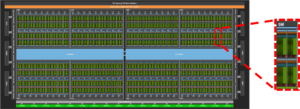
GH100 Full GPU architecture with 144 SMs
Ansys FreeFlow is a Smoothed Particle Hydrodynamics (SPH) solver, it is meshless, Lagrangian computational method used to simulate the dynamics of continuum media, such as liquids and gases. Unlike traditional Grid-Based (Eulerian) methods that look at fluid passing through a fixed point, SPH follows the individual “elements” of the fluid as they move through space.
It is well-suited to evaluate free surface flows, such as fluid sloshing, dam breaks, tire aquaplaning and other similar phenomena. Its Lagrangian nature allows tracking fluid interfaces without complex pre-processing tasks or other techniques, for example, mesh-deformation algorithms.
The benefits of GPU
In any SPH simulation, the fluid is discretized into millions of elements. On CPU hardware, the computations are processed via a limited number of high-performance concurrent cores compared to GPUs partition. In other words, one GPU computes thousands of mathematical operations when a CPU handles a few hundred. Consequently, the computation time tends to be significantly reduced, allowing Ansys Freeflow to scale more efficiently on GPU hardware due to the SPH algorithm’s inherently parallel nature.
Memory bandwidth plays an important role on SPH simulations. The SPH elements move and gather information of their neighbors at every time step. This leads to frequent, irregular memory access patterns. CPU can avoid waiting for memory using caches (L1, L2 or L3), but they lack memory bandwidth to handle millions of SPH elements efficiently. On the other hand, GPUs are designed for high workloads with a massive memory bandwidth. For example, comparing Intel Xeon Gold 6542Y and Nvidia H100 the ratio of memory between GPU/CPU is about 9 times for GPU, but this ratio can be even higher. Therefore, this superior data-transfer capability makes GPU the natural choice for large-scale SPH simulations.
Performance Benchmark
Criteria 1: SPH elements
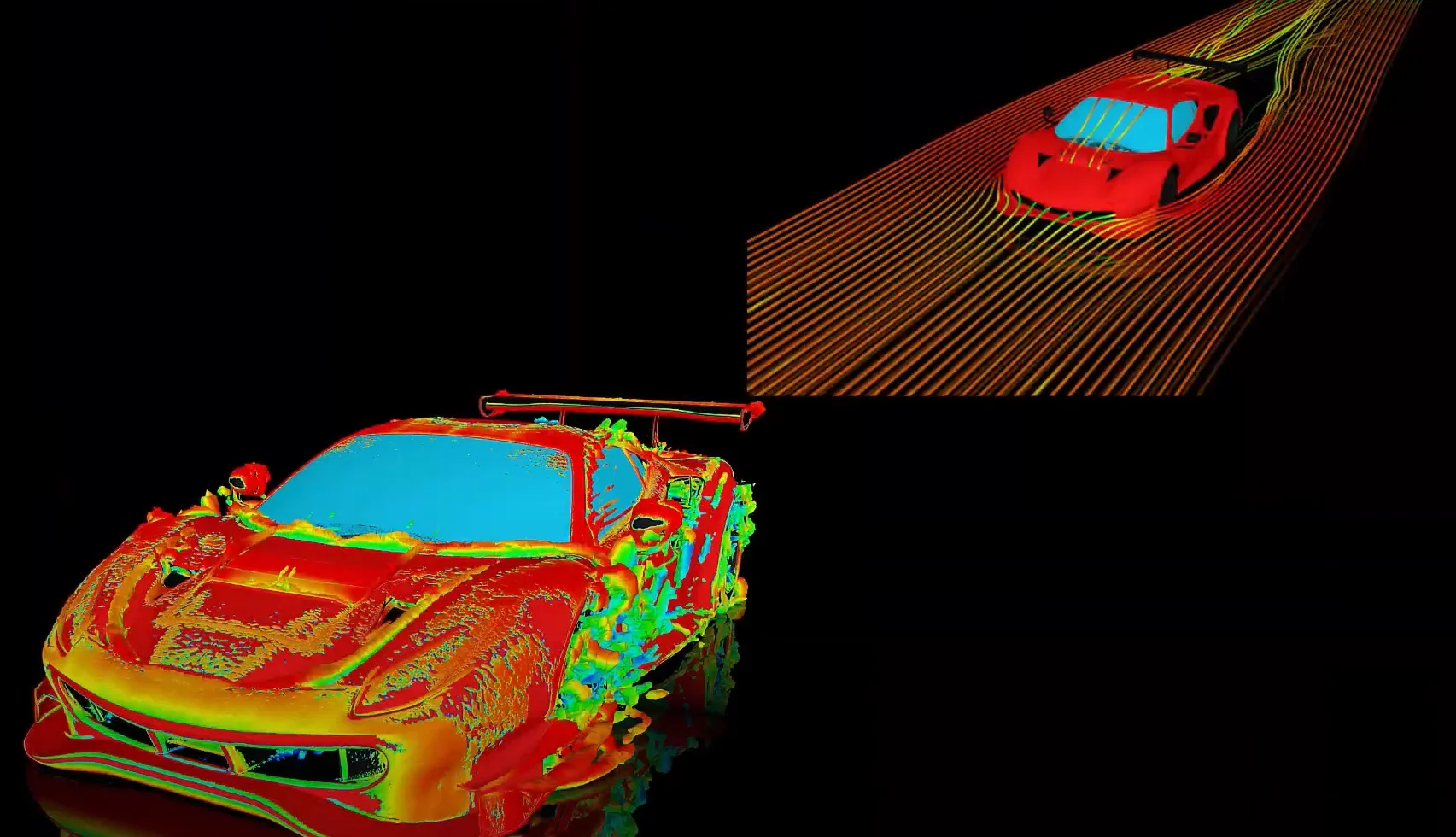
To assess the performance of a Ansys FreeFlow we use a vehicle driving through a water puddle (car wading). The fluid is model using 16 millions of SPH elements and all geometries have about a total of 32 million triangles.
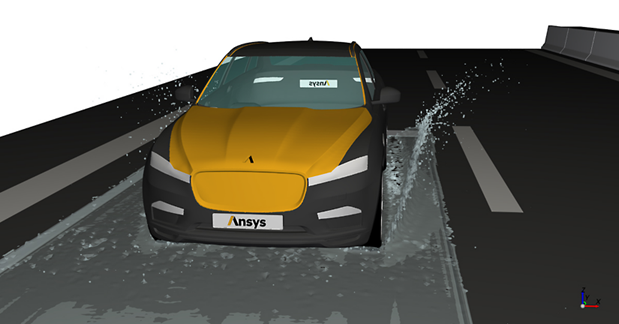
Figure 1 – Car wading simulation.
Criteria 2: Processing type
Four different processing combinations were evaluated:
- CPU: Intel(R) Xeon(R) Gold 6542Y CPU @ 2.90 GHz on 48 cores
- 1 GPU: NVIDIA H100, NVIDIA A100, NVIDIA L40
- 2 GPUs: NVIDIA H100, NVIDIA A100, NVIDIA L40
Criteria 3: Performance measurement
Two measurements were taken at steady state to evaluate performance:
- Simulation Pace (speed up), which is the amount of hardware processing time (duration) required to advance the simulation two seconds. The simulation speed up metric is used considering the CPU pace as reference.
- GPU Memory Usage, which is the amount of memory being used on the GPU while processing the simulation. In general, a lower memory usage allows for more SPH elements to be processed, and/or more calculations to be performed.
Benchmark results for Ansys FreeFlow 2026 R1
Relevant conclusions on simulation performance
Figure 2 shows the performance speed-up for the IISPH solver in Ansys FreeFlow. It is worth to mention that FreeFlow has another two other solvers WCSPH and DFSPH (Beta).
- The results show a huge performance gain of running a SPH simulation in a GPU. In the worst-case scenario, compared to a run in 48 CPU cores, you can reduce your simulation pace with one GPU in 23 times, approximately.
- The multi-GPU results also highlight the benefits of running SPH in a graphic card, with two GPUs you can achieve a time reduction about 65 times compared with a 48 CPU cores.
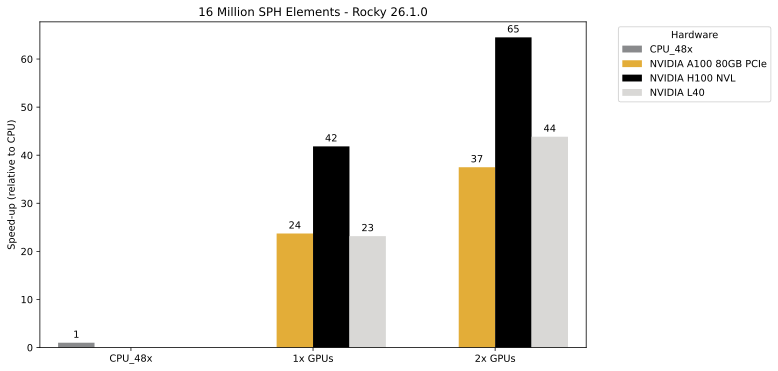
Figure 2 – GPU speed-up based upon Simulation Pace (compared with CPU 48x cores) achieved for the car wading.
Relevant conclusions on GPU memory consumption
Figure 3 shows the GPU memory usage for the SPH simulation within Ansys FreeFlow.
- A SPH simulation with 16 million SPH elements can be performed in just one GPU. Theoretically, it will be possible to run a case around 35 million SPH elements in 80 GB card, such as NVIDIA H100 NVL and NVIDIA A100 80GB PCIe.
- The maximum GPU memory consumption is about 27 GB in two GPUs. This result indicates Ansys Freeflow can be employed to analyze many complex problems.
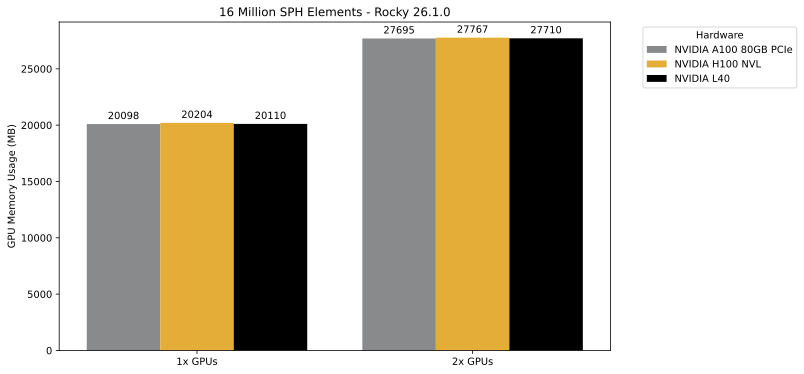
Figure 3 – Total GPU memory consumption for the SPH simulation.
Ansys FreeFlow™ smoothed-particle hydrodynamics (SPH) simulation software.








 You are navigating away from the AIS Discovery experience